# HyperPlay

A web3-native game store from the future.

## Welcome to HyperPlay

HyperPlay is the game store from the future where players discover great games, and developers find a censorship-resistant and developer-loyal distribution platform.&#x20;

HyperPlay solves the largest user experience and infrastructure problems facing both the players and developers of web3-enabled games. Through a rich in-game overlay with web3 features, HyperPlay improves the experience of playing games. Our in-game overlay features seamless wallet interactions powered by MetaMask and WalletConnect.&#x20;

HyperPlay’s developer solutions are the easiest to adopt in the industry, from simple and optional wallet APIs to rich quest builders and smart contract factories. Game developers can interact with our APIs directly from Unity, Unreal, proprietary games engines, or window\.ethereum for browser based games. Developers who prefer a no-code solution can leverage simple SDKs for both the Unreal and Unity game engines.

Unlike legacy game stores, HyperPlay aggregates other game stores like Epic Games, GOG, and Amazon Prime Gaming bringing the largest library and game discovery to players.&#x20;

Free from OS siloes, HyperPlay is available on Windows, Mac, and Linux and enables Windows games to be played on Mac and Linux. Browser-based games and dapps are supported too, and receive graphics card acceleration and our overlay when played through the HyperPlay app.<br>

## ETHDenver 2024 HyperPlay Presentation

Watch our founder's presentation from ETHDenver 2024 to learn more about the new kind of game launcher we've built.

Developers unlock new audiences and revenue streams. Players, say goodbye to fragmented platforms and embrace the universe of games at your fingertips.

{% embed url="<https://www.youtube.com/watch?v=VhS_oSikQQw>" %}

## Installing HyperPlay

HyperPlay is available as a native desktop application for Windows, SteamDeck, Linux, and MacOS.\
The early access alpha client is now publicly available for download on [hyperplay.xyz](https://hyperplay.xyz).&#x20;

{% content-ref url="/pages/4GFF2L3busHvLWW6FW6I" %}
[Install HyperPlay](/install-hyperplay)
{% endcontent-ref %}

## API Reference

Dive a little deeper and start exploring our API reference to connect wallet to game

{% content-ref url="/pages/9ZV4YfSNRl18V5l3eU7m" %}
[API for Native Games (EVM)](/developer-docs/api)
{% endcontent-ref %}


# Overview

A basic overview of HyperPlay

HyperPlay is the game store from the future where players discover great games, and developers find a censorship-resistant and developer-loyal distribution platform.&#x20;

HyperPlay solves the largest user experience and infrastructure problems facing both the players and developers of web3-enabled games. Through a rich in-game overlay with web3 features, HyperPlay improves the experience of playing games. Our in-game overlay features seamless wallet interactions powered by MetaMask and WalletConnect.&#x20;

HyperPlay’s developer solutions are the easiest to adopt in the industry, from simple and optional wallet APIs to rich quest builders and smart contract factories. Game developers can interact with our APIs directly from Unity, Unreal, proprietary games engines, or window\.ethereum for browser based games. Developers who prefer a no-code solution can leverage simple SDKs for both the Unreal and Unity game engines.

Unlike legacy game stores, HyperPlay aggregates other game stores like Epic Games, GOG, and Amazon Prime Gaming bringing the largest library and game discovery to players.&#x20;

Free from OS siloes, HyperPlay is available on Windows, Mac, and Linux and enables Windows games to be played on Mac and Linux. Browser-based games and dapps are supported too, and receive graphics card acceleration and our overlay when played through the HyperPlay app.

### Index

* Features available right now
* Supported Operating Systems
* Language Support

### Features available right now

* Discover games in HyperPlay's native store with 75+ web3-enabled games
* Sort games by popularity, most recent update, or alphabetical
* Access the Epic, GOG, or Amazon Prime Gaming stores
* Import your existing game library from Epic, GOG, or Amazon Prime Gaming
* Native games (Windows, Mac, Linux) or browser based games are both supported
* Install, uninstall, update, repair and move Games
* Connect a MetaMask extension, MetaMask Mobile, or WalletConnect mobile
* Overlay a MetaMask or WalletConnect wallet on top of native or browser based games
* Games can submit a transaction or signature request to the HyperPlay through an API call for native games or a window\.ethereum call for browser based games.
* Import an already installed game, or sideload a game from an installer file (easy testing for game developers)
* Play Epic games online \[some games are Windows only due to anti-cheat library compatibility issues]
* Play Windows games on Linux using Wine or Proton \[Linux, SteamDeck]
* Play Windows games on MacOS games using Crossover or GPTK \[macOS]
* Sync installed games with an existing Epic Games Store installation
* Sync saves with store cloud

### Supported Operating Systems

* Windows 8+ (might work on Win7 if you have the latest PowerShell but we do not give support for it)
* Linux:
  * Ubuntu 20.04LTS or newer
  * Fedora 33 or newer
  * Arch Linux (Manjaro and Garuda as well)
  * HyperPlay will still work on most distros but we do not give official support for them.
* SteamDeck (downloading using Discover only)
* macOS 10.15 or higher

### Language Support

Thanks to the community HyperPlay was partially translated to almost 40 different languages so far:

* English
* Azerbaijani
* Basque
* Belarussian
* Bosnian
* Bulgarian
* Catalan
* Czech
* Croatian
* Simplified Chinese
* Traditional Chinese
* Dutch
* Estonian
* Finnish
* French
* German
* Greek
* Japanese
* Korean
* Hungarian
* Italian
* Indonesian
* Malayalam
* Norwegian Bokmål
* Persian
* Polish
* Portuguese
* Portuguese (Brazil)
* Romanian
* Russian
* Spanish
* Slovak
* Swedish
* Tamil
* Turkish
* Ukrainian
* Vietnamese


# Install HyperPlay

## Install Desktop Client

{% embed url="<https://www.hyperplay.xyz/downloads>" %}

## Connect Wallet

{% hint style="info" %}
Prerequisites: MetaMask <https://metamask.io/download/>
{% endhint %}

Select MetaMask Mobile, MetaMask Extension, WalletConnect, or Create a new wallet.&#x20;

<figure><img src="/files/eXaSfRxfapTdvh2tChwP" alt=""><figcaption></figcaption></figure>

View fullscreen to verify your account is connected.

<figure><img src="/files/mHlnT5ZXwXpBzyIibZEm" alt=""><figcaption><p>Connecting to metamask browser</p></figcaption></figure>

Game assets from your mobile wallet will automatically sync with any game you launch. To understand how to sync games to the wallet, please refer to the HyperPlay API.


# FAQ

An overview of common questions about HyperPlay

#### **Q: What is HyperPlay?**

A: HyperPlay is a desktop application that provides both a web3-native game store and an aggregator of other game stores. HyperPlay allows players to install games from the Epic Store, GOG, Amazon Prime Gaming, or our own HyperPlay store. Players can connect their MetaMask or WalletConnect wallet to our native desktop application, and then use their wallet inside of every game launched from within HyperPlay, even in native desktop games. HyperPlay was developed in partnership with [**MetaMask**](https://metamask.io) and was incubated by [**Game7**](https://game7.io/), a DAO focused on accelerating the adoption of sustainable web3-native gaming. In June of 2023, we closed a capital raise and became an independent company.

#### **Q: What are HyperPlay Quests? What can I win by completing these quests?**

A: HyperPlay has built-in questing used by the games in the HyperPlay Store. Players can win tokens, NFTs, and off-chain points by completing the various quests created by the game developers who compose the HyperPlay community.&#x20;

Available Quests appear both in the Quest directory, the game's Store listing, and in the HyperPlay overlay while the player in in-game. You can browser the HyperPlay Store here, or open up the HyperPlay app and select "Quests" on the left sidebar. Once you've earned quest rewards, the quest rewards are claimed in-game, using the HyperPlay overlay.

#### **Q: Is HyperPlay related to MetaMask?**

We are built in close partnership with MetaMask, and our founder was previously Lead of Operations for MetaMask. MetaMask wrote a [case study](https://metamask.io/news/developers/how-hyperplay-is-building-a-web-3-game-store-with-the-metamask-developer/) about how we work together and you can see some of their[ tweet threads](https://twitter.com/MetaMask/status/1630995052402016256) about the collaboration as well.

#### **Q: Does HyperPlay have a token?**

A: Not yet. :smile:<br>

#### **Q: Is HyperPlay open source?**&#x20;

A: Yes. HyperPlay is open source, mainly under a GPL license. A small number of our products like the HyperPlay developer portal, game hosting, and the wallet overlay plugin are issued under a separate proprietary license, although we are working to progressively be more open source over time.<br>

#### **Q: How do games list in the HyperPlay Store?**

A: Developers seeking to list in the HyperPlay Store should get in contact with us through [**this form**](https://forms.gle/A3mQ8A7CTWrDo8LD6). Once your application is processed, we'll schedule an onboarding call and grant you access to the HyperPlay developer portal where you can manage your game builds.&#x20;

Since HyperPlay aggregates other game stores like the Epic Games Store, we also offer an option to create a "Forwarder Listing" inside the HyperPlay Store that will download the game from the Epic Games Store. Games looking to create a forwarder listing inside the HyperPlay Store should get in contact using the [same listing form](https://docs.google.com/forms/d/e/1FAIpQLSdR-nIKJp-ZeqiaoXKlXK8kWISPwkyk0Y898YAvUbcSbY4K9w/viewform) above. For listing in the Epic Games Store or GOG, we recommend reaching out to those stores directly.

#### **Q: As a game developer, how do I create quests for my game?**

A: You can build quests directly inside of the HyperPlay developer portal where you manage you game's listing. Most quest types require no engineering effort, and can even be built by a non-technical team member! The quests are all handled by HyperPlay and decentralized smart contracts end-to-end. HyperPlay's developer portal will deploy your game's quest smart contract, the HyperPlay overlay tracks player eligibility, and players claim the quest reward while in-game, through the HyperPlay overlay.

At launch, we support Play Streak quests, but other quest types are coming like Reputation Airdrops, Leaderboards, and In-game Achievements are all coming soon. Play Streak Quests and Reputation Airdrops can be created with no engineering effort from game teams, while the Leaderboards and In-game Achievement quests can be implemented by integrating with a simple API for tracking player progress.

#### **Q: What does HyperPlay charge developers to be included? Steam and Apple are charging 30% fees. Will HyperPlay charge similar fees?**

A: HyperPlay takes no listing fee or in-game transaction fees. HyperPlay is free for game developers. For developers releasing through Epic or GOG, the fees of those stores still apply, but we add no additional fees.&#x20;

#### **Q: Are both native games and browser games supported?**

A: Yes, both are supported! For browser games, we work some UX magic to give these a better user experience than playing a in traditional browser. We also provide graphics card acceleration of browser based games through WebGPU.

#### **Q: Which wallets are supported?**

A: Players can use MetaMask Mobile, the MetaMask browser extension, or any WalletConnect based wallet like Sequence, TrustWallet, or others. MetaMask Mobile and WalletConnect are connected by scanning a simple QR code, and the MetaMask browser extension can even be imported from your existing browser install.

#### **Q: How will HyperPlay keep players safe from scams, malware, and other attack vectors? Does HyperPlay have access to my secret recovery phrase?**

A: HyperPlay does not have access to your secret recovery phrase. To understand HyperPlay's security model, it is first important to understand how HyperPlay works. From a technical perspective, HyperPlay is actually a gaming-focused Electron-based web browser that includes built-in wallet implementations like MetaMask and WalletConnect.&#x20;

HyperPlay functions very similarly to the way Chrome does in relationship to the MetaMask browser extension. If you select the MetaMask browser extension as your wallet method, HyperPlay can import your extension MetaMask installation from your current web browser to the MetaMask installation included within HyperPlay. Your secret recovery phrase remains encrypted within the wallet vault file, and only you can access them by using your MetaMask password. For advanced users and developers, we also support importing a wallet with a 12 or 24 word secret recovery phrase. From a security perspective, this feature is essentially identical to setting up a new MetaMask install within Chrome.  If you lose your 12 or 24 word secret recovery phrase, there is nothing the HyperPlay team can do to help you recover it as we never had access to your keys or funds.

Overall, there are four critical components to HyperPlay’s security strategy.&#x20;

1. **Store review:** all stores included in our app (HyperPlay, Epic, GOG) do extensive malware testing and diligence on the development teams for any software submitted through our store, including both static analysis and dynamic analysis. We never allow any title to be published without security review.
2. **Game sandboxes:** Because it is impossible to ensure that no malware will ever slip through a store review process (see the many news stories about malware included in Steam), we’re introducing game sandboxes that prevent a malicious game that slipped through a store review process from acting outside of its own context. We aim to launch this feature soon.
3. **Key segregation:** HyperPlay never exposes a user’s keys to games. The wallet lives within our desktop application or on an external mobile device. Games can submit transaction requests to HyperPlay, which we show to the user. The game cannot access the user’s keys or sign on behalf of the user without user consent.
4. **External signer:** It isn’t a coincidence that we support MetaMask Mobile and WalletConnect. Keeping the keys off of one’s device, and having transactions pop up on an external mobile device is an inherently more secure pattern. For security conscious users, we strongly recommend the MetaMask Mobile integration as the most secure connection method. Even in the event that a user's computer becomes compromised, this pattern should keep the malware from being able to access the keys.

A word of warning here: other "web3 game launchers" have often marketed themselves as a safer solution to download games. At the time of writing, we are aware of extremely alarming poor security practices in some of these products. We urge those teams to look to our example and take user safety and protection of user funds more seriously.

<br>

#### **Q: What is the process of bringing an existing MetaMask wallet to HyperPlay?**

A: For MetaMask Mobile or WalletConnect users, players will scan a QR code within the HyperPlay app from MetaMask Mobile to link their wallet. For browser extension users, HyperPlay makes it super simple to import any MetaMask wallet (including custom networks, tokens, and settings) already found on the local device by importing the install from their browser extension folder. We only import your existing install with explicit user consent, however.

#### **Q: Which networks are supported?**

A: All EVM networks are supported, including Ethereum, zkSync, Polygon, Mantle, Linea, Avalanche, Arbitrum, Optimism, BSC, and Harmony. Non-EVM networks like Sui, Starkware, Solana and Cosmos are supported through MetaMask’s Snaps plugin system, but will require the user to use a MetaMask browser extension wallet for compatibility.<br>

#### **Q: What operating systems are supported?**

A: HyperPlay supports Windows, SteamDeck, MacOS, and Linux. We are also integrated with GPTK and Wine-Crossover, providing game compatibility on Mac. For SteamDeck and Linux players, HyperPlay integrates with the [Proton compatibility library](https://www.protondb.com/), allowing Windows games to run natively. We can't promise that Windows game will run perfectly on Mac or Linux through these compatibility libraries, but we do our best to provide this kind of support.

#### **Q: What kinds of interactions between games and the integrated wallets are possible?**

A: All major web3 APIs can be passed through to the game, and back to the wallet. This is accomplished using a combination of the MetaMask Mobile SDK, the MetaMask browser extension, and the HyperPlay client-side API. This includes transaction requests, signature requests, propose custom networks, and propose custom tokens.&#x20;

#### **Q: Is HyperPlay related to the Heroic Games Launcher?**

A: Yes! HyperPlay's co-founder Flavio Lima is also the founder of the Heroic Games Launcher. Heroic was created to allow people to play Epic Games Store games on Steam Deck and Linux, but isn’t necessarily a web3 product. We are developing both products, and share a great deal of the same tech.

#### **Q: What are some of the benefits for developers launching their games through this platform?**

A: HyperPlay is the most-developer loyal game distribution platform. We solve many developer experience problems (ie. the wallet-to-game interaction problem) to make it easier to build great web3 game experiences. Additionally, our model of aggregating many stores provides a safe haven for web3 game developers who have been constantly de-platformed and exploited by monopolistic web2 companies. We are a developer loyal platform that aims to promote freedom and permissionless innovation. Many user acquisition features are coming for our developer community as well.<br>

#### **Q: How does HyperPlay make money?**

A: We are not monetized at this time. We plan to introduce optional monetized features to our users at a later date.

#### Q: What is HyperPlay's CDN coverage?

A: HyperPlay's CDN coverage is global. We block the following countries to comply with US laws:

* **CU**: Cuba
* **IR**: Iran
* **KP**: North Korea
* **SY**: Syria

#### Q: How long does it take my project release to go live?

A: For the first release for a project, it typically takes 1-3 days for the full testing process. If your game passes all tests, it will go live, and you will receive a notification email.&#x20;

For subsequent releases, it typically takes 30 to 60 minutes for a release to go live if no issues are found with your submitted build.

#### Q: What is the difference between the admin and release manager roles?

A: An admin role can perform all sensitive actions regarding a project. A release manager can only create new releases for channels.<br>


# Publish / List a Game

This guide is designed to provide you with all the information you need to list your game with HyperPlay, a web3-native game store.&#x20;


# Building with HyperPlay

**Install HyperPlay**

The first step to testing your game with HyperPlay is to install the HyperPlay app.&#x20;

{% content-ref url="/pages/4GFF2L3busHvLWW6FW6I" %}
[Install HyperPlay](/install-hyperplay)
{% endcontent-ref %}

**Test Your Game**

In order to test your game from within HyperPlay, you can start by side-loading your game into HyperPlay locally to test its performance. To side-load your game in the HyperPlay client, follow these steps:

1. Launch the HyperPlay client and navigate to the "Library" section.
2. Click on the "Add Game" button located at the top of the client window.
3. Fill out the relevant information, such as the game title, in the "Add Game" window.
4. Click on the folder icon under "Select Executable" and locate the .EXE file you wish to import.
5. If your game uses our wallet APIs, select the checkbox "This game was web3 features."
6. Click on "Finish" to begin the import process.
7. Once the game has been imported, it will appear in your library, and you can launch it by clicking on the "Play" button.

For developers looking to test amongst a larger group, it is also possible to create an access code-gated branch in the HyperPlay developer portal. For more information on this, review the [Developer Portal](/developer-docs/publish-list-a-game/developer-portal) documentation.

**Example Projects**

{% embed url="<https://github.com/HyperPlay-Gaming/unity-demo/releases>" %}

{% embed url="<https://youtu.be/0CNwa7xiBo0>" %}

{% embed url="<https://github.com/G7DAO/web3.unreal>" %}

{% embed url="<https://youtu.be/ClUW_GUQthw>" %}


# Publishing Your Game

1. To get started with publishing your game on the HyperPlay Library, fill out the application form below with the required information. Our team will then carefully review your application and contact you directly to schedule a meeting to discuss the publishing process. Rest assured that we strive to make the process as straightforward as possible for you and are here to help every step of the way.  [**List a Game in HyperPlay**](https://docs.google.com/forms/d/e/1FAIpQLSdR-nIKJp-ZeqiaoXKlXK8kWISPwkyk0Y898YAvUbcSbY4K9w/viewform)
2. Attend your developer onboarding call. We recommend bringing both technical and marketing related team members to the onboarding call since we'll review all aspects of building with HyperPlay on the call.
3. After completing the onboarding call, you'll be granted access to the [**HyperPlay Developer Portal**](https://developers.hyperplay.xyz). Please note that game builds submitted through the HyperPlay developer portal by game studios that haven't completed onboarding will be rejected.
4. On the HyperPlay developer portal, you'll create an account for your game studio, a listing for your game, and submit your game build. A detailed review of using the Developer Portal is available [**here**](/developer-docs/publish-list-a-game/developer-portal).
5. After submitting your game, you'll need to add a Download on HyperPlay or Play on HyperPlay badge to your game's website in order to be eligible to be in the platform. To make this easier, HyperPlay provides a [**badge creator**](https://www.hyperplay.xyz/badges) that you can use to generate a badge for your site.
6. After completing all the necessary steps, our security team will review your submitted build to ensure there is no malicious content and that the game is safe for our players. The review process typically takes up to three business days on first submission and 1 business day on subsequent submission. Upon completion, we will publish your game on the HyperPlay Store for players to download and enjoy.


# CI/CD Automation

Automate publishing your project to HyperPlay

Publishing a project can be automated in your existing CI/CD flows with `@hyperplay/cli`&#x20;

Extensive documentation can be found at <https://www.npmjs.com/package/@hyperplay/cli>.&#x20;

Hyperplay CLI's code is publicly available at <https://github.com/HyperPlay-Gaming/cli>. Feel free to open an issue or PR if you would like changes made to the package.


# Developer Portal

During your onboarding session with our team, we will provide you with a direct link to our Developer Portal where you can publish your game.

{% tabs %}
{% tab title="Creating an Account" %}
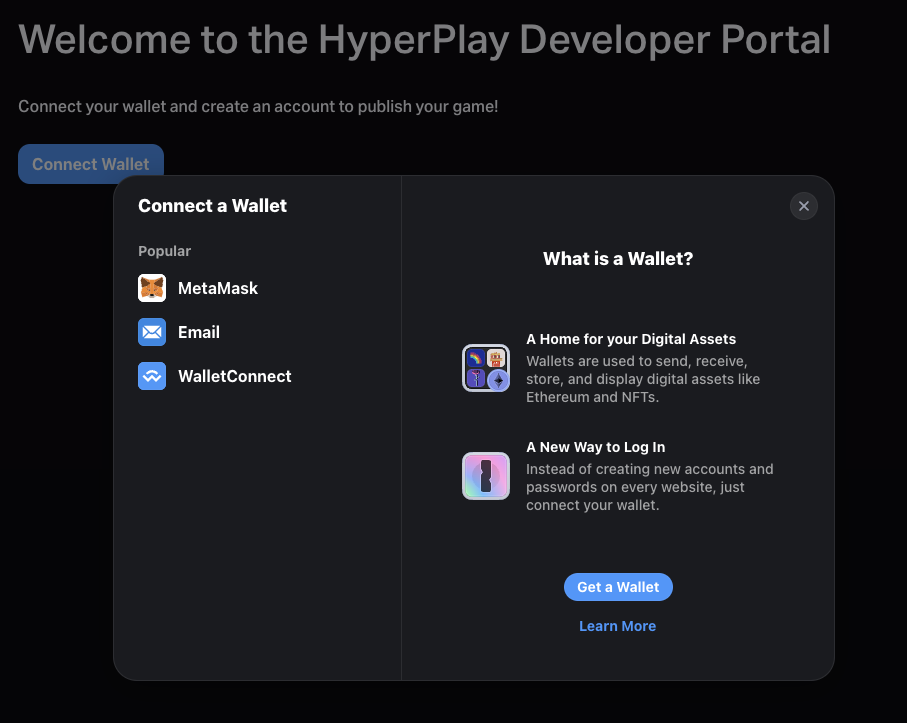
Upon navigating to our Developer Portal, you will be greeted by the following Welcome Screen.

<figure><img src="/files/t7lXGAelZQ8ww1GZQegb" alt=""><figcaption></figcaption></figure>

Follow the on-screen instructions to connect your wallet and create a Developer account.

1. Click on “Connect Wallet”&#x20;
2. Select your desired wallet
   1. MetaMask Browser Extension
   2. E-Mail via Magic Link
   3. WalletConnect
3. If you do not currently have a wallet, you can click on “Get a Wallet” to set one up

<figure><img src="/files/xKdHF2xFcCbIBjP8qLU1" alt=""><figcaption></figcaption></figure>

You will be prompted with a request to allow the site to add a network (polygon)

<figure><img src="/files/s3rfyYhTJ1XRiIhQgJGc" alt=""><figcaption></figcaption></figure>

You must select **“Approve”** to continue to the next step

After selecting “Approve,” you will receive a request to change the network from Ethereum to Polygon. Select **“Switch network”**

<figure><img src="/files/FDsz5idCp6ohd0oih09K" alt=""><figcaption></figcaption></figure>

You will then be prompted with a message requesting you to verify ownership of the wallet. Click on **“Send message”** to sign the message.

<figure><img src="/files/Z0dBkhLMUZRaZDoeGC5v" alt=""><figcaption></figcaption></figure>

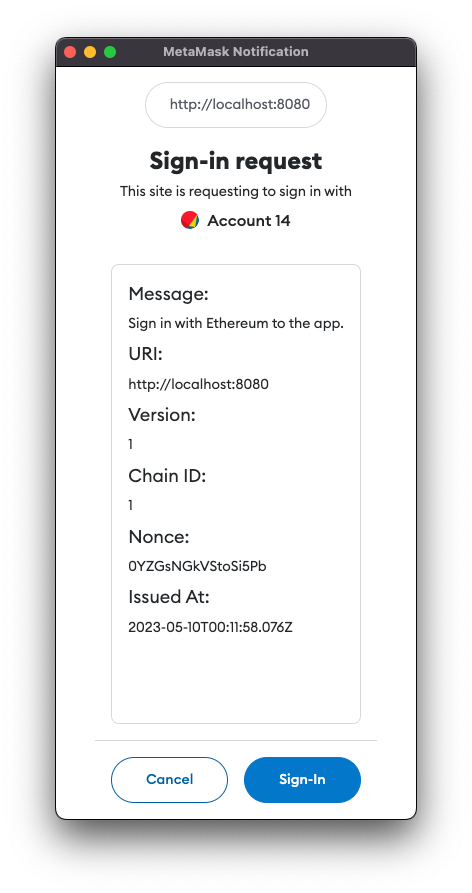
Next, you'll encounter a message asking you to sign in and complete the verification process to confirm ownership of your wallet.

<figure><img src="/files/xc5dyekyyND06kpyMuHA" alt=""><figcaption></figcaption></figure>

{% hint style="warning" %}
It's essential to note that for security reasons, you ensure that the URI below the **"Sign in with Ethereum to HyperPlay"** prompt shows the Developer Portal URL.
{% endhint %}

#### Setting up your Account

Fill in your account information and add an image.

<figure><img src="/files/AHSuOkf1hXsflQsXAgef" alt=""><figcaption></figcaption></figure>

{% hint style="info" %}
Please note the **“Display Name”** will be converted to an immutable username that will be saved in the registry smart contract. You can change the Display Name at any time, along with any other metadata.
{% endhint %}

<figure><img src="/files/dGl3QK8xQydlDIahW500" alt=""><figcaption></figcaption></figure>

After completing the previous step, select **"Proceed to Add Members"**. This page will allow you to designate administrators who will have complete control over the account and all its games. Administrators have full privileges, such as modifying settings and uploading new releases.

You may use any wallet address or ENS name for adding admins. Your currently connected wallet will be automatically added as an account admin.

<figure><img src="/files/K9Yc60KBo6Xwk8V3NXhk" alt=""><figcaption></figcaption></figure>

When you have finished, click **"Complete Create Account"**. You will then receive a prompt to sign a meta-transaction (with no gas fees) to register the account:

<figure><img src="/files/kVj63xOlWHAnDqpiYrkC" alt=""><figcaption></figcaption></figure>

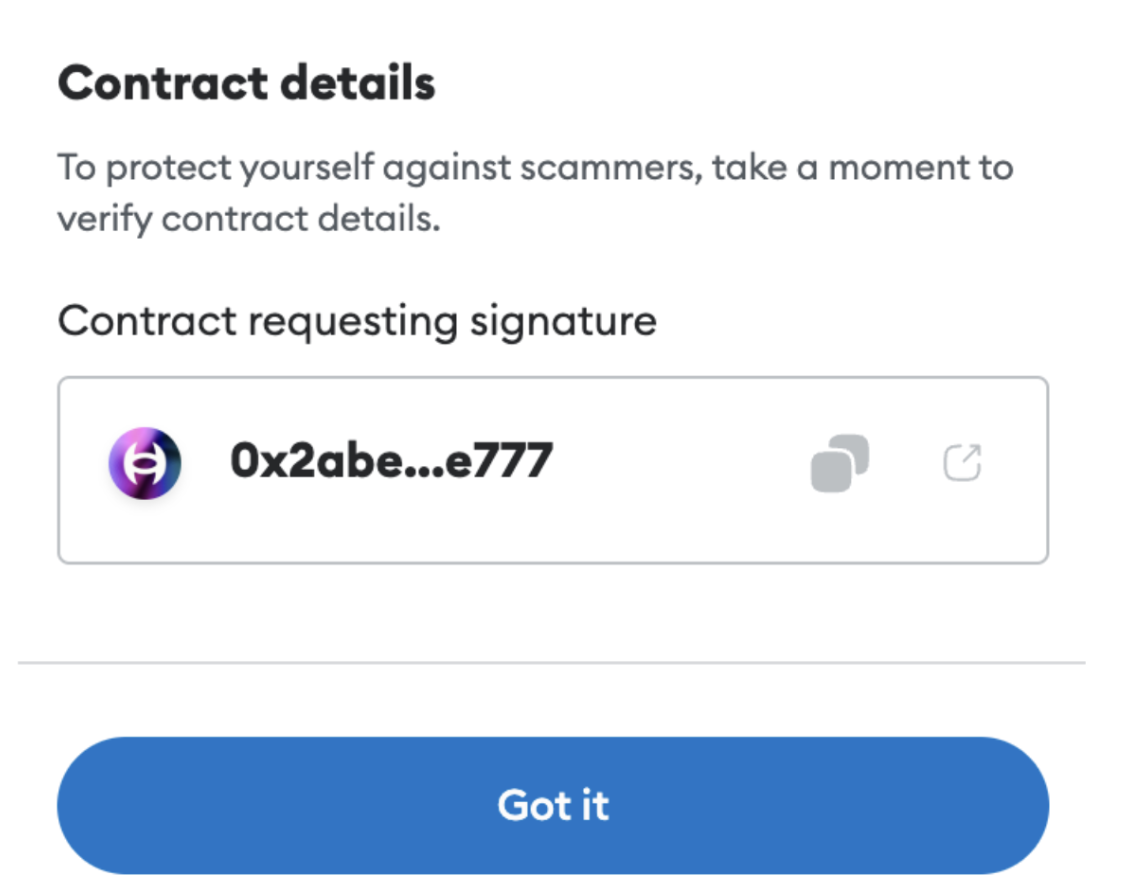
If you wish to confirm the forwarder contract responsible for processing the meta-transaction, you may click **"Verify contract details"**. This will reveal the contract's address and a link to its block explorer.<br>

<figure><img src="/files/ivGh8R6hEk0zxsRtfeMA" alt=""><figcaption></figcaption></figure>

**The correct address is:**

[0x2abee2e2294556ebe0b15b8eb0ed4891b27ae777](https://polygonscan.com/address/0x2abee2e2294556ebe0b15b8eb0ed4891b27ae777)

{% hint style="success" %}
Navigate to the **"Create a Game"** Tab at the top of this page to continue.&#x20;
{% endhint %}
{% endtab %}

{% tab title="Creating a new Game" %}
Here, you can provide more information about your game by filling out the following metadata fields:

* Game Cover (**16:9 ratio or 1920x1080px**)
* Display Name
* Website
* Type
  * Options include: Browser or Native Desktop
* Define whether the game is eligible for HyperPlay rewards
  * HyperPlay provides algorithmic bonuses and partnership rewards to games that adopt the platform more fully. Full details of each rewards program is available in the developer portal.
* Genres
* Supported Blockchain Networks
* (Optional) Use the Epic Games Store for hosting

The **"Supported Blockchain Networks"** field is optional, but it helps us to categorize your game accurately and verify the contracts that users will be interacting with.

<figure><img src="/files/hwwldks0FX6qOHiGZIXM" alt=""><figcaption></figcaption></figure>

{% hint style="info" %}
The **“Display Name”** will be converted into an immutable username in the same way the account username was created. The “Display Name” and all other metadata can be changed at any time in the future.
{% endhint %}

After filling out your game's metadata, proceed by clicking on the **"Continue"** button.

Now it's time to configure your game's system requirements. Provide the minimum requirements your game needs, such as CPU, GPU, Memory, and Disk.&#x20;

You can also check the Compatibility Library Support if your game is playable on Linux and/or macOS using the Proton compatibility support built into the HyperPlay Launcher. If you have tested your game on these systems, select the relevant operating system checkboxes.

<figure><img src="/files/KWwOEFHyoqxjUZ5rmVdH" alt=""><figcaption></figcaption></figure>

Click **"Continue"** after you have filled out your game's requirements.

In the **"Media & Descriptions"** tab, provide the following details:

* A link to your YouTube video
* Header image (**recommended size is 1824x816px**)
* Gallery images (**screenshots of gameplay**) - you can upload any number of images
* Short description
* Full/long description<br>

<figure><img src="/files/eOFPAgqBHBh4GxOXOFVP" alt=""><figcaption></figcaption></figure>

Don't forget to click **"Continue"** once you have filled out these details.

After configuring your game's metadata, you have the option to add game publishers who will have the ability to publish new releases exclusively.

<figure><img src="/files/IHxWrN4umjdCuyus4tcC" alt=""><figcaption></figcaption></figure>

{% hint style="info" %}
Please note that Account Admins have the ability to publish under any game within the account, so if your wallet is already an admin, you do not need to add the address to the Game Publishers list.
{% endhint %}

After adding any desired Game Publishers, click **“Create”**. This will trigger another meta-transaction signature request.

<figure><img src="/files/koslgBzAPhomUNg3nUsE" alt=""><figcaption></figcaption></figure>

{% hint style="info" %}
To verify the authenticity of the contract, you can use the same method as in the previous tab.
{% endhint %}

Once you have completed all the necessary steps, you can proceed to upload your game. You will be directed to your developer portal dashboard where you can manage your game's metadata and upload new releases.&#x20;

{% hint style="success" %}
Navigate to the **"Uploading a Release"** Tab at the top of this page to continue.&#x20;
{% endhint %}
{% endtab %}

{% tab title="Uploading a Release" %}
To begin the upload process, simply click the "Submit Release" button located on your game's card.

<figure><img src="/files/ipWeCDKJbvgJX7cayfwl" alt=""><figcaption></figcaption></figure>

After selecting **"Submit Release"** you will be taken to a landing page where you will need to specify a release version for your game. Please use the SemVer (semantic version) format when entering the version number.

You also have the option to add a release image and release notes, although these are not mandatory.

{% hint style="info" %}
It is worth noting that releases are entirely immutable for security reasons. If you need to make changes to a release, you must create a new release with a different tag and release name.
{% endhint %}

<figure><img src="/files/akUwtn2Ljl0Amx8muH4S" alt=""><figcaption></figcaption></figure>

Moving on to the next tab, you can upload the files for your release.

**Supported platforms for game releases include:**

* Browser games & WebGL builds
* Windows 10 and up
* macOS Catalina and up
* Linux & SteamOS
* AMD64 and ARM64 architectures for each platform

**For Windows builds:**

1. Upload a compressed ZIP file of your game folder with the .exe in the root folder.&#x20;

**Example:**&#x20;

* Zipped game folder
  * game.exe

**Wrong Example:**

* Zipped game folder
  * Another game folder
    * game.exe&#x20;

{% hint style="info" %}
Uploading your build incorrectly will make it difficult for users to import your game later on if needed.
{% endhint %}

2. Set the executable path from the build root, including the .exe extension.
3. Add an optional pre-install script for any dependencies.

If there are any external dependencies, include them in a folder named **"redist**" or add a pre-install script.

**For macOS builds:**

1. Upload a compressed ZIP file of your .app or .pkg file.
2. Set either the .app or .pkg name as the executable path, including the .app/.pkg file extension.

<figure><img src="/files/HzHcn6zNB7UN16DK8lUF" alt=""><figcaption></figcaption></figure>

**You have two options to upload your browser/web builds:**

1. Upload your web build folder.
2. Set an external URL to an already deployed website.

<figure><img src="/files/RmfgZ61EJjYmij6TY8Lt" alt=""><figcaption></figcaption></figure>

{% hint style="info" %}
You will be prompted to sign one final meta-transaction to complete the release.
{% endhint %}

Upon successful upload and submission of your release, you will receive the following confirmation message.

<figure><img src="/files/sFC2ad6fe0sYlPw5N1Q8" alt=""><figcaption></figcaption></figure>

Once your release is submitted, it will be received by the HyperPlay team for review and verification. The process generally takes less than **five business days**.

Congratulations on successfully submitting your release to the HyperPlay Store! We are thrilled to work with you in building the next generation of gaming.
{% endtab %}
{% endtabs %}


# HyperPlay Store Badges

While HyperPlay doesn't charge anything to developers, adding a badge to your game's website is a requirement to be included in the HyperPlay Store. These badges help HyperPlay grow and are a great way to let your audience know your game is available on our platform.&#x20;

To ensure the proper use of our badges, please follow these guidelines:

* Use the badges from our [badge creator](https://www.hyperplay.xyz/badges) or create your own!
* The badge must be large enough that all of the text is legible.
* The badge must be present wherever users download or launch the game. Linking to HyperPlay in a Partners section is appreciated, but is not sufficient to be included in the HyperPlay Store.
* There must be clear space surrounding the badge equal to one-quarter the height of the badge.
* The HyperPlay badge should be the same size or larger from other app store badges.

You can find our badges in the link below. We encourage you to use them on your website, social media, and other promotional materials. Using our badges, you can show your audience that your game is a part of the growing community of amazing games on the HyperPlay Store.

Thank you for choosing HyperPlay as your game distribution platform. We are committed to helping you reach a wider audience and providing players with the best gaming experience possible.

{% embed url="<https://www.hyperplay.xyz/badges>" %}


# HyperPlay Hex Codes

This PDF document contains the Hex codes for the color scheme used in the HyperPlay ecosystem. While not mandatory for developers, this resource provides you with easy access to the specific colors used in our application. Whether you are a developer, designer, or simply interested in replicating the visual aesthetics of HyperPlay, this PDF will assist you in incorporating the color scheme into your projects.

**Usage**: To utilize the Hex codes in your projects, follow these steps:

1. Download the PDF file containing the Hex codes.
2. Open the PDF using a PDF reader or viewer of your choice.
3. Locate the desired color in the document.
4. Copy the Hex code associated with the color you want to use.
5. Paste the Hex code into your preferred development tool, design software, or any other relevant application.

By providing this PDF resource, we aim to make it convenient for developers, designers, and enthusiasts to access and utilize the Hex codes associated with the HyperPlay Game Launcher color scheme. Incorporating these colors into your projects can help maintain visual consistency and align with the aesthetics of the application.

{% file src="/files/3JupmeNQWiZg2Mg4iICm" %}


# Feedback & Developer Support

If you have any questions, require assistance, or would like to provide us with your feedback, please don't hesitate to reach out to us via our [Discord](https://discord.gg/hyperplay) server or through the official communication channel we've set up with your team (Discord, Telegram, or Slack).&#x20;

When using our Discord server, we recommend that you connect with our Community Lead to ensure that you have the official **"HyperPlay Developer"** role, which will provide you with access to all the resources and support you need.

We're excited to see what you'll bring to the platform and look forward to supporting you on your journey.


# \[Beta] Patching

## What is patching?

HyperPlay supports differential updates where users only have to download new content when a game is updated.

## How do I join the beta test?

As a developer, you can request to join in the beta test of this feature by reaching out to the team directly.

For developers participating in the program, you can continue to publish your builds the same way you have already been publishing them, and HyperPlay will handle the rest.&#x20;

## Best Practices

There are some general guidelines you can follow to optimize your patch size.

In particular for Unreal Engine games:&#x20;

* Avoid switching the build you submit back and forth between build targets (i.e. Production, Testing, Debug, etc.)
* Group assets into separate PAK files&#x20;
  * Here is the official guide: <https://dev.epicgames.com/documentation/de-de/unreal-engine/cooking-content-and-creating-chunks-in-unreal-engine>
  * An effective strategy can be to group assets by level or area into their own pak files. New content can be added to new pak files instead of modifying existing ones as well.

## Estimating Patch Size

To get an estimate of the patch size, you will need to first get the `project_meta_id` for two separate releases.&#x20;

1. Go to <https://developers.hyperplay.xyz/api/v1/listings> in your browser and find your game
2. Find the channel you are releasing on.
3. Copy `channels[i].release_meta.release_id` to your records as `oldReleaseMetaId`
4. Perform a new release on the channel
5. Copy `channels[i].release_meta.release_id` to your records as `newReleaseMetaId`
6. Make a note of the platform id from `channels[i].release_meta.platforms` to pass in the following url
7. Go to `https://developers.hyperplay.xyz/api/v1/patches/compare?old_release_id=<paste_oldReleasemetaId_here>&platform_name=<platform_name_here>&new_release_id=<paste_newReleasemetaId_here>`&#x20;

Here is a sample response:

```
{"differentBlockPercentage":85.08110505639335,"estimatedPatchSizeInKB":13749760}
```

The value for `differentBlockPercentage` is the amount of new data that was downloaded for the patch divided by the size of the new release on disk.

As a developer, you can use this tool to experiment with your build pipeline on private (i.e. gated) channels to optimize for patch size.


# Design Considerations

This page covers important design considerations for game devs looking to integrate HyperPlay

## Security

### Requesting a Transaction from the Player

We highly recommend making it clear to the player that the game will be requesting a transaction from them prior to requesting it. HyperPlay also helps with this by overlaying notifications if a transaction is pending on mobile.

All requests must be made from client side code in your game.

### Reading Blockchain State

If your game is multiplayer, we highly recommend reading blockchain state from your server side code. Otherwise the player might be able to fake a transaction to obtain an in-game item.

## Game Engine Integrations

There are several methods of integrating HyperPlay into your game depending on which engine you using.

{% content-ref url="/pages/jfoqDZZMweYbSndyK3TA" %}
[Unreal Engine Integration](/developer-docs/design-considerations/unreal-engine-integration)
{% endcontent-ref %}

{% content-ref url="/pages/BvfiSfW4cQUYQSobkGys" %}
[Unity Integration](/developer-docs/design-considerations/unity-integration)
{% endcontent-ref %}


# Unreal Engine Integration

Suggestions for how to integrate HyperPlay with your Unreal Engine Project

## HTTP Requests

There are several options in Unreal Engine for making HTTP requests depending on your needs.

### [web3.unreal](https://github.com/G7DAO/web3.unreal) (Recommended)

We have built a free and open source plugin specifically for Unreal devs that wraps the UE HTTP runtime.&#x20;

This plugin exposes async nodes globally that parse input and output parameters into HyperPlay calls. This way you can work in an Unreal context without having to worry about formatting or syntax errors.&#x20;

See our API docs for examples you can easily copy and paste into your Blueprint graphs.

### C++&#x20;

You can use the [Unreal Engine HTTP runtime](https://docs.unrealengine.com/4.27/en-US/API/Runtime/HTTP/) directly. See our API docs for examples.

### Fetch Plugin

This plugin makes generic HTTP calls at the blueprint level easy.

A license can be [purchased in the Unreal Marketplace](https://www.unrealengine.com/marketplace/en-US/product/fetch-a-simple-http-client?sessionInvalidated=true) for commercial projects.

Or [downloaded from the Github repo ](https://github.com/GDi4K/unreal-fetch)for non-commercial projects.&#x20;

## Architecture

### Blueprint Library

If you intend on using the UE HTTP runtime directly, it is recommended that you expose these functions in a Blueprint Function Library.

### Game instance

Common HyperPlay API calls can be defined in your Game Instance class. This is a good place since it is available globally, only exists on the client side, and persists despite level changes and other changes to game state.


# Unity Integration

Suggestions for how to integrate HyperPlay with your Unity Project

## Integration pathes

Unity games seeking to leverage HyperPlay's wallet features may do so through direct HTTP API calls, or through no-code SDKs provided through HyperPlay's partners.

## SDKs

Our recommended SDK for Unity developers is [ThirdWeb](https://thirdweb.com/), which has a [deep integration](https://portal.thirdweb.com/unity/wallets/actions/connect) with HyperPlay's wallet features out of the box.

Developers using other SDKs can still integrate directly using our [Wallet API](/developer-docs/api).

## C\#

You can use our Unity API examples to write your own transaction requests with the `UnityEngine.Networking` module.


# API for Native Games (EVM)

## Overview

HyperPlay is a web3-native game launcher with wallet integration. The launcher acts as a proxy between the desktop game and wallet. Any game on HyperPlay can trigger a wallet interaction with a simple HTTP request.

* Game triggers a HTTP request
* HyperPlay launcher receives the request and forwards it to the player's wallet
* If the player connected via MetaMask Mobile or WalletConnect, there will be a mobile popup
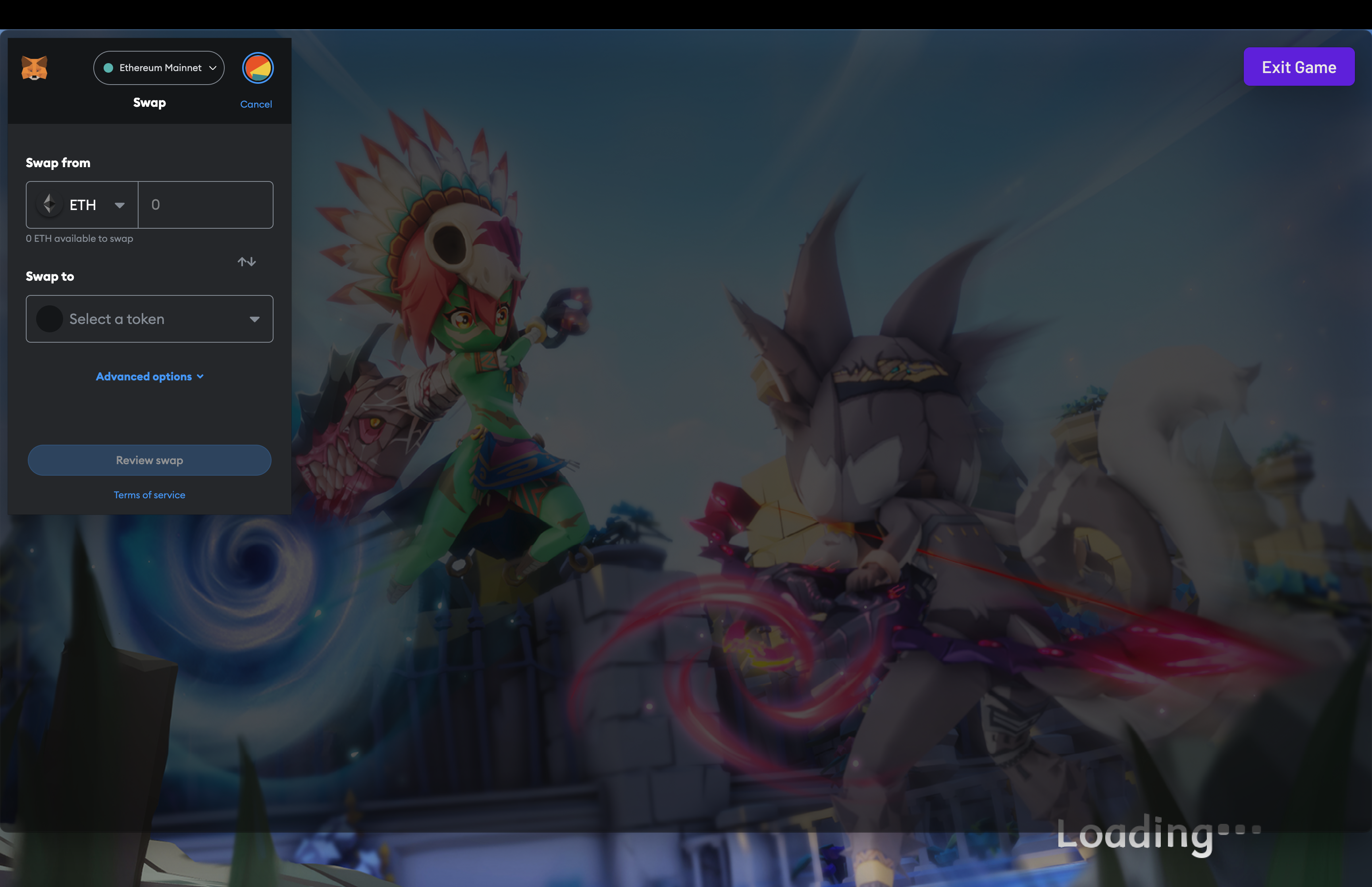
* If the player connected via MetaMask Extension, there will be an in game overlay
* The player can decide to approve or reject the transaction

<figure><img src="/files/ikpbDyjBnRivXn2LaTYE" alt=""><figcaption></figcaption></figure>

## All JSON RPC Endpoints

The HyperPlay API references many of the calls found in MetaMask's and geth's JSON RPC endpoints. The next sections will provide some examples.

{% embed url="<https://metamask.github.io/api-playground/api-documentation>" %}

{% embed url="<https://ethereumbuilders.gitbooks.io/guide/content/en/ethereum_json_rpc.html>" %}

## Quick Start

{% embed url="<https://youtu.be/EpdoYwEm8qE>" %}


# Get Accounts

## Request

Get the user's currently selected address

Note that HyperPlay currently supports a single globally selected account during its connection flow. In the future, multiple account addresses will be supported.

{% tabs %}
{% tab title="curl" %}

```bash
curl --location --request POST 'localhost:9680/rpc' \
--header 'Content-Type: application/json' \
--data-raw '{
   "request":{
      "method":"eth_accounts"
   },
   "chain":{
      "chainId":"1"
   }
}'
```

{% endtab %}

{% tab title="Unity" %}

```csharp
using System.Collections;
using UnityEngine;
using UnityEngine.Networking;

public class GetAccounts: MonoBehaviour
{
    void Start()
    {
        StartCoroutine(Accounts());
    }

    private IEnumerator Accounts()
    {
        string jsonString = "{\"request\":{\"method\":\"eth_accounts\"},\"chain\":{\"chainId\":\"5\"}}";
        byte[] jsonBytes = System.Text.Encoding.UTF8.GetBytes(jsonString);

        UnityWebRequest request = new UnityWebRequest("localhost:9680/rpc", "POST");
        request.uploadHandler = new UploadHandlerRaw(jsonBytes);
        request.downloadHandler = new DownloadHandlerBuffer();
        request.SetRequestHeader("Content-Type", "application/json");

        yield return request.SendWebRequest();
        Debug.Log(request.error);
        Debug.Log(request.downloadHandler.text);
    }
}

```

{% endtab %}

{% tab title="Unreal Blueprints" %}
If you have the HyperPlay plugin installed, copy and paste the following into a Blueprint Graph.

```
Begin Object Class=/Script/BlueprintGraph.K2Node_AsyncAction Name="K2Node_AsyncAction_3"
   ProxyFactoryFunctionName="GetAccounts"
   ProxyFactoryClass=Class'"/Script/web3Unreal.GetAccounts"'
   ProxyClass=Class'"/Script/web3Unreal.GetAccounts"'
   NodePosX=368
   NodePosY=1264
   ErrorType=1
   NodeGuid=A68F54FE46311FC6C1EDD6B935DB9E00
   CustomProperties Pin (PinId=47B93F1E418AA43A3D49B99FBF5B9F5C,PinName="execute",PinToolTip="\nExec",PinType.PinCategory="exec",PinType.PinSubCategory="",PinType.PinSubCategoryObject=None,PinType.PinSubCategoryMemberReference=(),PinType.PinValueType=(),PinType.ContainerType=None,PinType.bIsReference=False,PinType.bIsConst=False,PinType.bIsWeakPointer=False,PinType.bIsUObjectWrapper=False,LinkedTo=(K2Node_InputAction_0 904296DF4CA20B81D7E394B69DAFB05F,),PersistentGuid=00000000000000000000000000000000,bHidden=False,bNotConnectable=False,bDefaultValueIsReadOnly=False,bDefaultValueIsIgnored=False,bAdvancedView=False,bOrphanedPin=False,)
   CustomProperties Pin (PinId=9D0B0C694BF6FCA99B3C5EA298583CA6,PinName="then",Direction="EGPD_Output",PinType.PinCategory="exec",PinType.PinSubCategory="",PinType.PinSubCategoryObject=None,PinType.PinSubCategoryMemberReference=(),PinType.PinValueType=(),PinType.ContainerType=None,PinType.bIsReference=False,PinType.bIsConst=False,PinType.bIsWeakPointer=False,PinType.bIsUObjectWrapper=False,LinkedTo=(K2Node_CallFunction_11 A43DC78948D3E5BC559EAFA820913229,),PersistentGuid=00000000000000000000000000000000,bHidden=False,bNotConnectable=False,bDefaultValueIsReadOnly=False,bDefaultValueIsIgnored=False,bAdvancedView=False,bOrphanedPin=False,)
   CustomProperties Pin (PinId=4190722C4FC4A0FD0358A9862D84FF46,PinName="OnResponseOutput",PinFriendlyName=NSLOCTEXT("", "611327CF4C4FA8A082EAD58315C83F8A", "On Response Output"),PinToolTip="On Response Output",Direction="EGPD_Output",PinType.PinCategory="exec",PinType.PinSubCategory="",PinType.PinSubCategoryObject=None,PinType.PinSubCategoryMemberReference=(),PinType.PinValueType=(),PinType.ContainerType=None,PinType.bIsReference=False,PinType.bIsConst=False,PinType.bIsWeakPointer=False,PinType.bIsUObjectWrapper=False,LinkedTo=(K2Node_CallFunction_12 C6B76BD3405EB33B8FFED1B11E4375F8,),PersistentGuid=00000000000000000000000000000000,bHidden=False,bNotConnectable=False,bDefaultValueIsReadOnly=False,bDefaultValueIsIgnored=False,bAdvancedView=False,bOrphanedPin=False,)
   CustomProperties Pin (PinId=144510B04CCC3CE5B0520680134728C9,PinName="SelectedAccount",PinToolTip="Selected Account",Direction="EGPD_Output",PinType.PinCategory="string",PinType.PinSubCategory="",PinType.PinSubCategoryObject=None,PinType.PinSubCategoryMemberReference=(),PinType.PinValueType=(),PinType.ContainerType=None,PinType.bIsReference=False,PinType.bIsConst=False,PinType.bIsWeakPointer=False,PinType.bIsUObjectWrapper=False,LinkedTo=(K2Node_CommutativeAssociativeBinaryOperator_1 8A7A7DA4457EB0A9AF0EC4813D868185,),PersistentGuid=00000000000000000000000000000000,bHidden=False,bNotConnectable=False,bDefaultValueIsReadOnly=False,bDefaultValueIsIgnored=False,bAdvancedView=False,bOrphanedPin=False,)
   CustomProperties Pin (PinId=F7B94F664F81B897BCECA1AA958F49DB,PinName="StatusCode",PinToolTip="Status Code",Direction="EGPD_Output",PinType.PinCategory="int",PinType.PinSubCategory="",PinType.PinSubCategoryObject=None,PinType.PinSubCategoryMemberReference=(),PinType.PinValueType=(),PinType.ContainerType=None,PinType.bIsReference=False,PinType.bIsConst=False,PinType.bIsWeakPointer=False,PinType.bIsUObjectWrapper=False,LinkedTo=(K2Node_CallFunction_10 BDD56EFF4EBFC2F721716CB749B253CD,),PersistentGuid=00000000000000000000000000000000,bHidden=False,bNotConnectable=False,bDefaultValueIsReadOnly=False,bDefaultValueIsIgnored=False,bAdvancedView=False,bOrphanedPin=False,)
   CustomProperties Pin (PinId=1E3FC27C43AF33DEA0B890BE8C26AFC6,PinName="WorldContextObject",PinToolTip="World Context Object\nObject Reference",PinType.PinCategory="object",PinType.PinSubCategory="",PinType.PinSubCategoryObject=Class'"/Script/CoreUObject.Object"',PinType.PinSubCategoryMemberReference=(),PinType.PinValueType=(),PinType.ContainerType=None,PinType.bIsReference=False,PinType.bIsConst=True,PinType.bIsWeakPointer=False,PinType.bIsUObjectWrapper=False,PersistentGuid=00000000000000000000000000000000,bHidden=True,bNotConnectable=False,bDefaultValueIsReadOnly=False,bDefaultValueIsIgnored=False,bAdvancedView=False,bOrphanedPin=False,)
   CustomProperties Pin (PinId=ED3BF55E43AF6863E23D3D90868DE83B,PinName="chainId",PinToolTip="Chain Id\nInteger",PinType.PinCategory="int",PinType.PinSubCategory="",PinType.PinSubCategoryObject=None,PinType.PinSubCategoryMemberReference=(),PinType.PinValueType=(),PinType.ContainerType=None,PinType.bIsReference=False,PinType.bIsConst=False,PinType.bIsWeakPointer=False,PinType.bIsUObjectWrapper=False,DefaultValue="5",AutogeneratedDefaultValue="1",PersistentGuid=00000000000000000000000000000000,bHidden=False,bNotConnectable=False,bDefaultValueIsReadOnly=False,bDefaultValueIsIgnored=False,bAdvancedView=False,bOrphanedPin=False,)
End Object

```

{% endtab %}

{% tab title="Unreal Engine C++" %}

```cpp
#include "Endpoints/GetAccounts.h"
#include "HyperPlayUtils.h"

void OnResponse(FString Response, int32 StatusCode)
{
	const bool bWasSuccessful = HyperPlayUtils::StatusCodeIsSuccess(StatusCode);

	UE_LOG(LogTemp, Display, TEXT("GetAccounts Success: %s"), bWasSuccessful ? "true" : "false");
	UE_LOG(LogTemp, Display, TEXT("GetAccounts Response: %s"), *Response);
}

int main(){
    UGetAccounts* GetAccountsInstance = UGetAccounts::GetAccounts(nullptr, 1, "");
    GetAccountsInstance->GetOnCompletedDelegate().AddRaw(this, &OnResponse);
    GetAccountsInstance->Activate();
}
```

{% endtab %}
{% endtabs %}

## Response

{% tabs %}
{% tab title="Response" %}

```json
["0x638105aa1b69406560f6428aeface3db9da83c64"]
```

{% endtab %}

{% tab title="Response Unreal Engine C++" %}

```json
FString("0x638105aa1b69406560f6428aeface3db9da83c64")
```

{% endtab %}

{% tab title="Error" %}
Errors will have an HTTP response status 500-599

```json
{
  "message": "error description here"
}
```

{% endtab %}
{% endtabs %}


# Sign-in With Ethereum

### Examples

{% tabs %}
{% tab title="curl" %}

```cpp
curl --location --request POST "localhost:9680/rpc" \
--header 'Content-Type: application/json' \
--data-raw '{
    "request": {
        "method": "personal_sign",
        "params": [
          "localhost:8080 wants you to sign in with your Ethereum account:\n0x638105AA1B69406560f6428aEFACe3DB9da83c64\n\nSign in with Ethereum to the app.\n\nURI: http://localhost:8080\nVersion: 1\nChain ID: 1\nNonce: BIiotOrXWUldCD6Z5\nIssued At: 2023-05-09T22:09:03.350Z", 
          "0x638105AA1B69406560f6428aEFACe3DB9da83c64"
        ]
    },
    "chain": {
        "chainId": "1"
    }
}'
```

{% endtab %}

{% tab title="Unity" %}

```cpp
using System.Collections;
using UnityEngine;
using UnityEngine.Networking;

public class PersonalSign : MonoBehaviour
{
    void Start()
    {
        StartCoroutine(Sign());
    }

    private IEnumerator Sign()
    {
        string jsonString = "{ \"request\": { \"method\": \"personal_sign\", \"params\": [\"localhost:8080 wants you to sign in with your Ethereum account:\n0x638105AA1B69406560f6428aEFACe3DB9da83c64\n\nSign in with Ethereum to the app.\n\nURI: http://localhost:8080\nVersion: 1\nChain ID: 1\nNonce: BIiotOrXWUldCD6Z5\nIssued At: 2023-05-09T22:09:03.350Z\", \"0x638105AA1B69406560f6428aEFACe3DB9da83c64\"] }, \"chain\": { \"chainId\": \"1\" } }";
        byte[] jsonBytes = System.Text.Encoding.UTF8.GetBytes(jsonString);

        UnityWebRequest request = new UnityWebRequest("localhost:9680/rpc", "POST");
        request.uploadHandler = new UploadHandlerRaw(jsonBytes);
        request.downloadHandler = new DownloadHandlerBuffer();
        request.SetRequestHeader("Content-Type", "application/json");

        yield return request.SendWebRequest();
        Debug.Log(request.error);
        Debug.Log(request.downloadHandler.text);
    }
}
```

{% endtab %}

{% tab title="Unreal C++" %}

```cpp
#include "HyperPlayUtils.h"
#include "Endpoints/RpcCall.h"

void OnRpcResponse(FString Response, int32 StatusCode)
{
    const bool bWasSuccessful = HyperPlayUtils::StatusCodeIsSuccess(StatusCode);

    UE_LOG(LogTemp, Display, TEXT("Rpc Get Balance Success: %s"), bWasSuccessful ? "true" : "false");
    UE_LOG(LogTemp, Display, TEXT("Rpc Get Balance Response: %s"), *Response);
}

int main(){
   const FString request("{ \"request\":{ \"method\": \"personal_sign\", \"params\": [\"localhost:8080 wants you to sign in with your Ethereum account:\n0x638105AA1B69406560f6428aEFACe3DB9da83c64\n\nSign in with Ethereum to the app.\n\nURI: http://localhost:8080\nVersion: 1\nChain ID: 1\nNonce: BIiotOrXWUldCD6Z5\nIssued At: 2023-05-09T22:09:03.350Z\", \"0x638105AA1B69406560f6428aEFACe3DB9da83c64\"] }, \"chain\":{ \"chainId\":\"1\" } }");

    URpcCall* RpcCallInstance = URpcCall::RpcCall(nullptr,
        request,
        5);
    RpcCallInstance->GetOnCompletedDelegate().AddRaw(this, &OnRpcResponse);
    RpcCallInstance->Activate();
}
```

{% endtab %}
{% endtabs %}

### Sample Response

The following signature will be returned:

```
0x85583ed06e09efd25f0f5b9f948e092f70753182ccd36cfcaa5aa6f7dde6916d7a8fbc367180573f32a6f75410ee99ef202300d991cecac53a6a86baa1c2f1251b
```

### Overview

Sign-in with Ethereum (**SIWE**) is a form of authentication that enables users to control their digital identity without relying on a traditional intermediary. Here's how it generally works:

1. **Ethereum Account**: To use "Sign in with Ethereum," you need an Ethereum account. This typically involves creating a digital wallet that generates a unique address and cryptographic keys. The wallet stores your private key securely and allows you to interact with the Ethereum network.
2. **Application Integration**: Applications or services that support "Sign in with Ethereum" integrate with the Ethereum blockchain by utilizing the Ethereum Name Service (ENS) or other similar systems. ENS provides human-readable names for Ethereum addresses, making it easier for users to identify and connect their Ethereum accounts.
3. **User Authentication**: When you choose to sign in with Ethereum on a supported application, it initiates a request to your Ethereum wallet to authenticate your identity. The application generates a unique cryptographic challenge or request message.
4. **Wallet Interaction**: Your Ethereum wallet receives the authentication request message and prompts you to confirm the action. You typically need to approve the message by providing your wallet's digital signature using your private key to sign in. This signature serves as proof of your ownership of the Ethereum account.
5. **Verification and Access**: Once you provide the signed message, the application validates the signature using the corresponding public key associated with your Ethereum account. If the verification is successful, the application grants you access to its services, treating your Ethereum account as a form of authentication. It's important to note that while "Sign in with Ethereum" provides benefits in terms of decentralization and security; it's still essential to exercise caution and protect your private key to prevent unauthorized access to your Ethereum account.

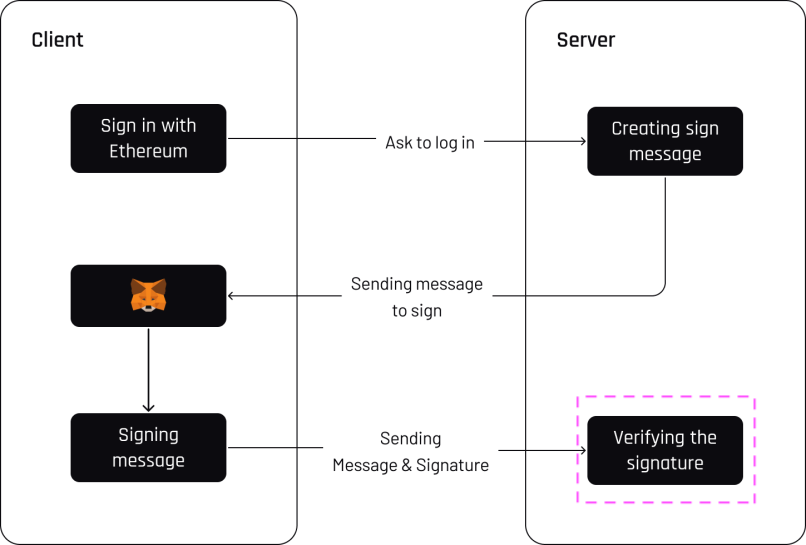
### Let's review the process within HyperPlay

<figure><img src="/files/hZcYZcPcSQgRjxjfWK5z" alt=""><figcaption></figcaption></figure>

#### This will be split into three parts

* Creating the message
* Signing the message
* Verifying the signature

{% tabs %}
{% tab title="Creating the message" %}
The server will create a message for the client to sign.

<figure><img src="/files/z89IndzgmBdR7WXEnUzV" alt=""><figcaption></figcaption></figure>

```cpp
const siwe = require("siwe");

const message = new siwe.SiweMessage({
  domain: "localhost:8080",
  address: "0x6Ee9894c677EFa1c56392e5E7533DE76004C8D94", // address of signer
  statement: "This is a test statement",
  uri: "http://localhost:8080",
  version: "1",
  chainId: "1",
});

const siweMessage = message.prepareMessage();

console.log(siweMessage);    
```

**The&#x20;*****siweMessage*****&#x20;will look something like this:**

```cpp
localhost:8080 wants you to sign in with your Ethereum account:
0x6Ee9894c677EFa1c56392e5E7533DE76004C8D94

This is a test statement

URI: http://localhost:8080
Version: 1
Chain ID: 1
Nonce: BIiotOrXWUldCD6Z5
Issued At: 2023-05-09T22:09:03.350Z
```

**Or**

```cpp
localhost:8080 wants you to sign in with your Ethereum account:\n0x638105AA1B69406560f6428aEFACe3DB9da83c64\n\nSign in with Ethereum to the app.\n\nURI: http://localhost:8080\nVersion: 1\nChain ID: 1\nNonce: BIiotOrXWUldCD6Z5\nIssued At: 2023-05-09T22:09:03.350Z
```

{% endtab %}

{% tab title="Signing the message" %}
The client will use their wallet to sign the message.

<figure><img src="/files/ZsiafRgK2ZUJ2benug9f" alt=""><figcaption></figcaption></figure>

#### Browser

```cpp
<script src="https://cdnjs.cloudflare.com/ajax/libs/ethers/6.3.0/ethers.umd.min.js"></script>

<script>
  (async () => {
    const siweMessage = "localhost:8080 wants you to sign in with your Ethereum account:\n0x638105AA1B69406560f6428aEFACe3DB9da83c64\n\nSign in with Ethereum to the app.\n\nURI: http://localhost:8080\nVersion: 1\nChain ID: 1\nNonce: BIiotOrXWUldCD6Z5\nIssued At: 2023-05-09T22:09:03.350Z";

    const provider = new ethers.BrowserProvider(window.ethereum);
    await provider.send("eth_requestAccounts", []);
    
    const signer = await provider.getSigner();
    signature = await signer.signMessage(siweMessage);
    console.log({ signature });
  })();
</script>
```

**There should be a popup to sign**

<figure><img src="/files/J2qNtRszpct4nPGWc5Az" alt=""><figcaption></figcaption></figure>

**cURL with HyperPlay**

```cpp
curl --location --request POST "localhost:9680/rpc" \
--header 'Content-Type: application/json' \
--data-raw '{
    "request": {
        "method": "personal_sign",
        "params": [
          "localhost:8080 wants you to sign in with your Ethereum account:\n0x638105AA1B69406560f6428aEFACe3DB9da83c64\n\nSign in with Ethereum to the app.\n\nURI: http://localhost:8080\nVersion: 1\nChain ID: 1\nNonce: BIiotOrXWUldCD6Z5\nIssued At: 2023-05-09T22:09:03.350Z", 
          "0x638105AA1B69406560f6428aEFACe3DB9da83c64"
        ]
    },
    "chain": {
        "chainId": "1"
    }
}'
```

**If connected to MetaMask SDK, there should be a popup on mobile to sign.**

<figure><img src="/files/4PaOhPn3gZh5sbbQ0WxI" alt=""><figcaption></figcaption></figure>

#### Using Unity with HyperPlay

```cpp
using System.Collections;
using UnityEngine;
using UnityEngine.Networking;

public class PersonalSign : MonoBehaviour
{
    void Start()
    {
        StartCoroutine(Sign());
    }

    private IEnumerator Sign()
    {
        string jsonString = "{ \"request\": { \"method\": \"personal_sign\", \"params\": [\"localhost:8080 wants you to sign in with your Ethereum account:\n0x638105AA1B69406560f6428aEFACe3DB9da83c64\n\nSign in with Ethereum to the app.\n\nURI: http://localhost:8080\nVersion: 1\nChain ID: 1\nNonce: BIiotOrXWUldCD6Z5\nIssued At: 2023-05-09T22:09:03.350Z\", \"0x638105AA1B69406560f6428aEFACe3DB9da83c64\"] }, \"chain\": { \"chainId\": \"1\" } }";
        byte[] jsonBytes = System.Text.Encoding.UTF8.GetBytes(jsonString);

        UnityWebRequest request = new UnityWebRequest("localhost:9680/rpc", "POST");
        request.uploadHandler = new UploadHandlerRaw(jsonBytes);
        request.downloadHandler = new DownloadHandlerBuffer();
        request.SetRequestHeader("Content-Type", "application/json");

        yield return request.SendWebRequest();
        Debug.Log(request.error);
        Debug.Log(request.downloadHandler.text);
    }
}
```

#### Using Unreal C++ with HyperPlay

```cpp
#include "HyperPlayUtils.h"
#include "Endpoints/RpcCall.h"

void OnRpcResponse(FString Response, int32 StatusCode)
{
    const bool bWasSuccessful = HyperPlayUtils::StatusCodeIsSuccess(StatusCode);

    UE_LOG(LogTemp, Display, TEXT("Rpc Get Balance Success: %s"), bWasSuccessful ? "true" : "false");
    UE_LOG(LogTemp, Display, TEXT("Rpc Get Balance Response: %s"), *Response);
}

int main(){
   const FString request("{ \"request\":{ \"method\": \"personal_sign\", \"params\": [\"localhost:8080 wants you to sign in with your Ethereum account:\n0x638105AA1B69406560f6428aEFACe3DB9da83c64\n\nSign in with Ethereum to the app.\n\nURI: http://localhost:8080\nVersion: 1\nChain ID: 1\nNonce: BIiotOrXWUldCD6Z5\nIssued At: 2023-05-09T22:09:03.350Z\", \"0x638105AA1B69406560f6428aEFACe3DB9da83c64\"] }, \"chain\":{ \"chainId\":\"1\" } }");

    URpcCall* RpcCallInstance = URpcCall::RpcCall(nullptr,
        request,
        5);
    RpcCallInstance->GetOnCompletedDelegate().AddRaw(this, &OnRpcResponse);
    RpcCallInstance->Activate();
}
```

{% endtab %}

{% tab title="Verifying the signature" %}

<figure><img src="/files/ZqOlstCspXlh3wNjdBzy" alt=""><figcaption></figcaption></figure>

**The signature will look something like this:**

```cpp
0x85583ed06e09efd25f0f5b9f948e092f70753182ccd36cfcaa5aa6f7dde6916d7a8fbc367180573f32a6f75410ee99ef202300d991cecac53a6a86baa1c2f1251b
```

\
**The message and signature will be sent back to the server to verify.**

```cpp
const siwe = require("siwe");

(async () => {
  const message = "localhost:8080 wants you to sign in with your Ethereum account:\n0x638105AA1B69406560f6428aEFACe3DB9da83c64\n\nSign in with Ethereum to the app.\n\nURI: http://localhost:8080\nVersion: 1\nChain ID: 1\nNonce: BIiotOrXWUldCD6Z5\nIssued At: 2023-05-09T22:09:03.350Z";
  const signature = "0x85583ed06e09efd25f0f5b9f948e092f70753182ccd36cfcaa5aa6f7dde6916d7a8fbc367180573f32a6f75410ee99ef202300d991cecac53a6a86baa1c2f1251b";

  const siweMessage = new siwe.SiweMessage(message);
  const verify = await siweMessage.verify({ signature });
  console.log({ verify });
})();
```

**Is verified**

```cpp
{
  verify: {
    success: true,
    data: SiweMessage {
      domain: 'localhost:8080',
      address: '0x638105AA1B69406560f6428aEFACe3DB9da83c64',
      statement: 'Sign in with Ethereum to the app.',
      uri: 'http://localhost:8080',
      version: '1',
      nonce: 'BIiotOrXWUldCD6Z5',
      issuedAt: '2023-05-09T22:09:03.350Z',
      expirationTime: undefined,
      notBefore: undefined,
      requestId: undefined,
      chainId: 1,
      resources: undefined
    }
  }
}
```

**Once verified, the server will grant appropriate access.**
{% endtab %}
{% endtabs %}

### Conclusion

By leveraging the power of Ethereum's blockchain technology, this decentralized login mechanism offers enhanced security, data privacy, and user control. It streamlines the authentication process, promoting interoperability and convenience across various platforms. Moreover, the trust and transparency inherent in Ethereum's blockchain foster confidence in the authentication process.<br>

### **Sources**

{% embed url="<https://eips.ethereum.org/EIPS/eip-191>" %}

{% embed url="<https://github.com/spruceid/siwe-quickstart/blob/main/01_frontend/src/index.js>" %}

{% embed url="<https://github.com/spruceid/siwe-quickstart/blob/main/02_backend/src/index.js>" %}


# Get Balance

## Request

Returns the balance of given account address in the smallest unit.

There are two params

* Address of wallet
* `latest` which gets the latest balance

{% tabs %}
{% tab title="curl" %}

```bash
curl --location --request POST "localhost:9680/rpc" \
--header "Content-Type: application/json" \
--data-raw '{
   "request":{
      "method": "eth_getBalance",
      "params": ["0x638105AA1B69406560f6428aEFACe3DB9da83c64", "latest"]
   },
   "chain":{
      "chainId":"1"
   }
}'
```

{% endtab %}

{% tab title="Unity" %}

```csharp
using System.Collections;
using UnityEngine;
using UnityEngine.Networking;

public class GetBalance: MonoBehaviour
{
    void Start()
    {
        StartCoroutine(Balance());
    }

    private IEnumerator Balance()
    {
        string jsonString = "{ \"request\":{ \"method\": \"eth_getBalance\", \"params\": [\"0x638105AA1B69406560f6428aEFACe3DB9da83c64\", \"latest\"] }, \"chain\":{ \"chainId\":\"5\" } }";
        byte[] jsonBytes = System.Text.Encoding.UTF8.GetBytes(jsonString);

        UnityWebRequest request = new UnityWebRequest("localhost:9680/rpc", "POST");
        request.uploadHandler = new UploadHandlerRaw(jsonBytes);
        request.downloadHandler = new DownloadHandlerBuffer();
        request.SetRequestHeader("Content-Type", "application/json");

        yield return request.SendWebRequest();
        Debug.Log(request.error);
        Debug.Log(request.downloadHandler.text);
    }
}

```

{% endtab %}

{% tab title="Unreal Blueprints" %}

```
Begin Object Class=/Script/BlueprintGraph.K2Node_AsyncAction Name="K2Node_AsyncAction_1"
   ProxyFactoryFunctionName="RpcCall"
   ProxyFactoryClass=Class'"/Script/web3Unreal.RpcCall"'
   ProxyClass=Class'"/Script/web3Unreal.RpcCall"'
   NodePosX=-688
   NodePosY=144
   NodeGuid=A013E9FB4A4326695806FD81C6D19469
   CustomProperties Pin (PinId=E570FD9442397FDB8F41E4989096DAC4,PinName="execute",PinToolTip="\nExec",PinType.PinCategory="exec",PinType.PinSubCategory="",PinType.PinSubCategoryObject=None,PinType.PinSubCategoryMemberReference=(),PinType.PinValueType=(),PinType.ContainerType=None,PinType.bIsReference=False,PinType.bIsConst=False,PinType.bIsWeakPointer=False,PinType.bIsUObjectWrapper=False,LinkedTo=(K2Node_CallFunction_25 B1ECF5074ED5B1BED03D87980DE730B1,),PersistentGuid=00000000000000000000000000000000,bHidden=False,bNotConnectable=False,bDefaultValueIsReadOnly=False,bDefaultValueIsIgnored=False,bAdvancedView=False,bOrphanedPin=False,)
   CustomProperties Pin (PinId=14AD45684BA18F2CE99506832A362B77,PinName="then",Direction="EGPD_Output",PinType.PinCategory="exec",PinType.PinSubCategory="",PinType.PinSubCategoryObject=None,PinType.PinSubCategoryMemberReference=(),PinType.PinValueType=(),PinType.ContainerType=None,PinType.bIsReference=False,PinType.bIsConst=False,PinType.bIsWeakPointer=False,PinType.bIsUObjectWrapper=False,PersistentGuid=00000000000000000000000000000000,bHidden=False,bNotConnectable=False,bDefaultValueIsReadOnly=False,bDefaultValueIsIgnored=False,bAdvancedView=False,bOrphanedPin=False,)
   CustomProperties Pin (PinId=6D5200514D50BB9D6B8EE1B8E1EFB408,PinName="OnResponseOutput",PinFriendlyName=NSLOCTEXT("", "F894C7E9418B5D07BF8BE18D45BD4ADB", "On Response Output"),PinToolTip="On Response Output",Direction="EGPD_Output",PinType.PinCategory="exec",PinType.PinSubCategory="",PinType.PinSubCategoryObject=None,PinType.PinSubCategoryMemberReference=(),PinType.PinValueType=(),PinType.ContainerType=None,PinType.bIsReference=False,PinType.bIsConst=False,PinType.bIsWeakPointer=False,PinType.bIsUObjectWrapper=False,LinkedTo=(K2Node_CallFunction_23 C6B76BD3405EB33B8FFED1B11E4375F8,),PersistentGuid=00000000000000000000000000000000,bHidden=False,bNotConnectable=False,bDefaultValueIsReadOnly=False,bDefaultValueIsIgnored=False,bAdvancedView=False,bOrphanedPin=False,)
   CustomProperties Pin (PinId=E31B4CA341126F494737008E2996703F,PinName="Response",PinToolTip="Response",Direction="EGPD_Output",PinType.PinCategory="string",PinType.PinSubCategory="",PinType.PinSubCategoryObject=None,PinType.PinSubCategoryMemberReference=(),PinType.PinValueType=(),PinType.ContainerType=None,PinType.bIsReference=False,PinType.bIsConst=False,PinType.bIsWeakPointer=False,PinType.bIsUObjectWrapper=False,LinkedTo=(K2Node_CommutativeAssociativeBinaryOperator_6 8A7A7DA4457EB0A9AF0EC4813D868185,),PersistentGuid=00000000000000000000000000000000,bHidden=False,bNotConnectable=False,bDefaultValueIsReadOnly=False,bDefaultValueIsIgnored=False,bAdvancedView=False,bOrphanedPin=False,)
   CustomProperties Pin (PinId=5092D9124B92263A33DC359DCC51C290,PinName="StatusCode",PinToolTip="Status Code",Direction="EGPD_Output",PinType.PinCategory="int",PinType.PinSubCategory="",PinType.PinSubCategoryObject=None,PinType.PinSubCategoryMemberReference=(),PinType.PinValueType=(),PinType.ContainerType=None,PinType.bIsReference=False,PinType.bIsConst=False,PinType.bIsWeakPointer=False,PinType.bIsUObjectWrapper=False,LinkedTo=(K2Node_CallFunction_24 BDD56EFF4EBFC2F721716CB749B253CD,),PersistentGuid=00000000000000000000000000000000,bHidden=False,bNotConnectable=False,bDefaultValueIsReadOnly=False,bDefaultValueIsIgnored=False,bAdvancedView=False,bOrphanedPin=False,)
   CustomProperties Pin (PinId=14FB5776463E02AC73544EB5A344206F,PinName="WorldContextObject",PinToolTip="World Context Object\nObject Reference",PinType.PinCategory="object",PinType.PinSubCategory="",PinType.PinSubCategoryObject=Class'"/Script/CoreUObject.Object"',PinType.PinSubCategoryMemberReference=(),PinType.PinValueType=(),PinType.ContainerType=None,PinType.bIsReference=False,PinType.bIsConst=True,PinType.bIsWeakPointer=False,PinType.bIsUObjectWrapper=False,PersistentGuid=00000000000000000000000000000000,bHidden=True,bNotConnectable=False,bDefaultValueIsReadOnly=False,bDefaultValueIsIgnored=False,bAdvancedView=False,bOrphanedPin=False,)
   CustomProperties Pin (PinId=A49ADCD847E75AB151441CA9A6FEACE4,PinName="request",PinToolTip="Request\nString",PinType.PinCategory="string",PinType.PinSubCategory="",PinType.PinSubCategoryObject=None,PinType.PinSubCategoryMemberReference=(),PinType.PinValueType=(),PinType.ContainerType=None,PinType.bIsReference=False,PinType.bIsConst=False,PinType.bIsWeakPointer=False,PinType.bIsUObjectWrapper=False,LinkedTo=(K2Node_CommutativeAssociativeBinaryOperator_7 F3E71DFB4B0818DDEF7D5398A928C66C,),PersistentGuid=00000000000000000000000000000000,bHidden=False,bNotConnectable=False,bDefaultValueIsReadOnly=False,bDefaultValueIsIgnored=False,bAdvancedView=False,bOrphanedPin=False,)
   CustomProperties Pin (PinId=872315E64070F3126AC484A2219078BD,PinName="chainId",PinToolTip="Chain Id\nInteger",PinType.PinCategory="int",PinType.PinSubCategory="",PinType.PinSubCategoryObject=None,PinType.PinSubCategoryMemberReference=(),PinType.PinValueType=(),PinType.ContainerType=None,PinType.bIsReference=False,PinType.bIsConst=False,PinType.bIsWeakPointer=False,PinType.bIsUObjectWrapper=False,DefaultValue="5",AutogeneratedDefaultValue="1",PersistentGuid=00000000000000000000000000000000,bHidden=False,bNotConnectable=False,bDefaultValueIsReadOnly=False,bDefaultValueIsIgnored=False,bAdvancedView=False,bOrphanedPin=False,)
End Object
Begin Object Class=/Script/BlueprintGraph.K2Node_CallFunction Name="K2Node_CallFunction_23"
   FunctionReference=(MemberParent=Class'"/Script/Engine.KismetSystemLibrary"',MemberName="PrintString")
   NodePosX=-240
   NodePosY=144
   AdvancedPinDisplay=Hidden
   EnabledState=DevelopmentOnly
   NodeGuid=F7063A4C43FE33A8D2A2CCA29C00FB14
   CustomProperties Pin (PinId=C6B76BD3405EB33B8FFED1B11E4375F8,PinName="execute",PinToolTip="\nExec",PinType.PinCategory="exec",PinType.PinSubCategory="",PinType.PinSubCategoryObject=None,PinType.PinSubCategoryMemberReference=(),PinType.PinValueType=(),PinType.ContainerType=None,PinType.bIsReference=False,PinType.bIsConst=False,PinType.bIsWeakPointer=False,PinType.bIsUObjectWrapper=False,LinkedTo=(K2Node_AsyncAction_1 6D5200514D50BB9D6B8EE1B8E1EFB408,),PersistentGuid=00000000000000000000000000000000,bHidden=False,bNotConnectable=False,bDefaultValueIsReadOnly=False,bDefaultValueIsIgnored=False,bAdvancedView=False,bOrphanedPin=False,)
   CustomProperties Pin (PinId=B1ECF5074ED5B1BED03D87980DE730B1,PinName="then",PinToolTip="\nExec",Direction="EGPD_Output",PinType.PinCategory="exec",PinType.PinSubCategory="",PinType.PinSubCategoryObject=None,PinType.PinSubCategoryMemberReference=(),PinType.PinValueType=(),PinType.ContainerType=None,PinType.bIsReference=False,PinType.bIsConst=False,PinType.bIsWeakPointer=False,PinType.bIsUObjectWrapper=False,PersistentGuid=00000000000000000000000000000000,bHidden=False,bNotConnectable=False,bDefaultValueIsReadOnly=False,bDefaultValueIsIgnored=False,bAdvancedView=False,bOrphanedPin=False,)
   CustomProperties Pin (PinId=E92CCAAE410AF0011BC1DF9B5FD90394,PinName="self",PinFriendlyName=NSLOCTEXT("K2Node", "Target", "Target"),PinToolTip="Target\nKismet System Library Object Reference",PinType.PinCategory="object",PinType.PinSubCategory="",PinType.PinSubCategoryObject=Class'"/Script/Engine.KismetSystemLibrary"',PinType.PinSubCategoryMemberReference=(),PinType.PinValueType=(),PinType.ContainerType=None,PinType.bIsReference=False,PinType.bIsConst=False,PinType.bIsWeakPointer=False,PinType.bIsUObjectWrapper=False,DefaultObject="/Script/Engine.Default__KismetSystemLibrary",PersistentGuid=00000000000000000000000000000000,bHidden=True,bNotConnectable=False,bDefaultValueIsReadOnly=False,bDefaultValueIsIgnored=False,bAdvancedView=False,bOrphanedPin=False,)
   CustomProperties Pin (PinId=F081DC6940133B5AD4DB7A9ED8FC777E,PinName="WorldContextObject",PinToolTip="World Context Object\nObject Reference",PinType.PinCategory="object",PinType.PinSubCategory="",PinType.PinSubCategoryObject=Class'"/Script/CoreUObject.Object"',PinType.PinSubCategoryMemberReference=(),PinType.PinValueType=(),PinType.ContainerType=None,PinType.bIsReference=False,PinType.bIsConst=True,PinType.bIsWeakPointer=False,PinType.bIsUObjectWrapper=False,PersistentGuid=00000000000000000000000000000000,bHidden=True,bNotConnectable=False,bDefaultValueIsReadOnly=False,bDefaultValueIsIgnored=False,bAdvancedView=False,bOrphanedPin=False,)
   CustomProperties Pin (PinId=70B1EA77497D7ADA93AD84BBF5F6F97E,PinName="InString",PinToolTip="In String\nString\n\nThe string to log out",PinType.PinCategory="string",PinType.PinSubCategory="",PinType.PinSubCategoryObject=None,PinType.PinSubCategoryMemberReference=(),PinType.PinValueType=(),PinType.ContainerType=None,PinType.bIsReference=False,PinType.bIsConst=False,PinType.bIsWeakPointer=False,PinType.bIsUObjectWrapper=False,DefaultValue="Hello",AutogeneratedDefaultValue="Hello",LinkedTo=(K2Node_CommutativeAssociativeBinaryOperator_6 43050BBB4360D32773CDE99177208477,),PersistentGuid=00000000000000000000000000000000,bHidden=False,bNotConnectable=False,bDefaultValueIsReadOnly=False,bDefaultValueIsIgnored=False,bAdvancedView=False,bOrphanedPin=False,)
   CustomProperties Pin (PinId=FE512205491BE7FBB22BFC923F8AE7B8,PinName="bPrintToScreen",PinToolTip="Print to Screen\nBoolean\n\nWhether or not to print the output to the screen",PinType.PinCategory="bool",PinType.PinSubCategory="",PinType.PinSubCategoryObject=None,PinType.PinSubCategoryMemberReference=(),PinType.PinValueType=(),PinType.ContainerType=None,PinType.bIsReference=False,PinType.bIsConst=False,PinType.bIsWeakPointer=False,PinType.bIsUObjectWrapper=False,DefaultValue="true",AutogeneratedDefaultValue="true",PersistentGuid=00000000000000000000000000000000,bHidden=False,bNotConnectable=False,bDefaultValueIsReadOnly=False,bDefaultValueIsIgnored=False,bAdvancedView=True,bOrphanedPin=False,)
   CustomProperties Pin (PinId=1BD46F4C4DF5B2FAD3E36D924FAF6124,PinName="bPrintToLog",PinToolTip="Print to Log\nBoolean\n\nWhether or not to print the output to the log",PinType.PinCategory="bool",PinType.PinSubCategory="",PinType.PinSubCategoryObject=None,PinType.PinSubCategoryMemberReference=(),PinType.PinValueType=(),PinType.ContainerType=None,PinType.bIsReference=False,PinType.bIsConst=False,PinType.bIsWeakPointer=False,PinType.bIsUObjectWrapper=False,DefaultValue="true",AutogeneratedDefaultValue="true",PersistentGuid=00000000000000000000000000000000,bHidden=False,bNotConnectable=False,bDefaultValueIsReadOnly=False,bDefaultValueIsIgnored=False,bAdvancedView=True,bOrphanedPin=False,)
   CustomProperties Pin (PinId=7690254244679DC81D0A35B0507A37A9,PinName="TextColor",PinToolTip="Text Color\nLinear Color Structure\n\nWhether or not to print the output to the console",PinType.PinCategory="struct",PinType.PinSubCategory="",PinType.PinSubCategoryObject=ScriptStruct'"/Script/CoreUObject.LinearColor"',PinType.PinSubCategoryMemberReference=(),PinType.PinValueType=(),PinType.ContainerType=None,PinType.bIsReference=False,PinType.bIsConst=False,PinType.bIsWeakPointer=False,PinType.bIsUObjectWrapper=False,DefaultValue="(R=0.000000,G=0.660000,B=1.000000,A=1.000000)",AutogeneratedDefaultValue="(R=0.000000,G=0.660000,B=1.000000,A=1.000000)",PersistentGuid=00000000000000000000000000000000,bHidden=False,bNotConnectable=False,bDefaultValueIsReadOnly=False,bDefaultValueIsIgnored=False,bAdvancedView=True,bOrphanedPin=False,)
   CustomProperties Pin (PinId=C0AF8BD84778708A24D5EB89D5E050B4,PinName="Duration",PinToolTip="Duration\nFloat\n\nThe display duration (if Print to Screen is True). Using negative number will result in loading the duration time from the config.",PinType.PinCategory="float",PinType.PinSubCategory="",PinType.PinSubCategoryObject=None,PinType.PinSubCategoryMemberReference=(),PinType.PinValueType=(),PinType.ContainerType=None,PinType.bIsReference=False,PinType.bIsConst=False,PinType.bIsWeakPointer=False,PinType.bIsUObjectWrapper=False,DefaultValue="2.000000",AutogeneratedDefaultValue="2.000000",PersistentGuid=00000000000000000000000000000000,bHidden=False,bNotConnectable=False,bDefaultValueIsReadOnly=False,bDefaultValueIsIgnored=False,bAdvancedView=True,bOrphanedPin=False,)
End Object
Begin Object Class=/Script/BlueprintGraph.K2Node_CommutativeAssociativeBinaryOperator Name="K2Node_CommutativeAssociativeBinaryOperator_6"
   NumAdditionalInputs=2
   bIsPureFunc=True
   FunctionReference=(MemberParent=Class'"/Script/Engine.KismetStringLibrary"',MemberName="Concat_StrStr")
   NodePosX=-240
   NodePosY=-16
   NodeGuid=0C4D32C8485F2174C077A9A229D98490
   CustomProperties Pin (PinId=3920F6C94E02AF4526C506B2B4191E0E,PinName="self",PinFriendlyName=NSLOCTEXT("K2Node", "Target", "Target"),PinToolTip="Target\nKismet String Library Object Reference",PinType.PinCategory="object",PinType.PinSubCategory="",PinType.PinSubCategoryObject=Class'"/Script/Engine.KismetStringLibrary"',PinType.PinSubCategoryMemberReference=(),PinType.PinValueType=(),PinType.ContainerType=None,PinType.bIsReference=False,PinType.bIsConst=False,PinType.bIsWeakPointer=False,PinType.bIsUObjectWrapper=False,DefaultObject="/Script/Engine.Default__KismetStringLibrary",PersistentGuid=00000000000000000000000000000000,bHidden=True,bNotConnectable=False,bDefaultValueIsReadOnly=False,bDefaultValueIsIgnored=False,bAdvancedView=False,bOrphanedPin=False,)
   CustomProperties Pin (PinId=6ED7D2BC4BA36CC8F087C4A5F9AEB39F,PinName="A",PinToolTip="A\nString\n\nThe original string",PinType.PinCategory="string",PinType.PinSubCategory="",PinType.PinSubCategoryObject=None,PinType.PinSubCategoryMemberReference=(),PinType.PinValueType=(),PinType.ContainerType=None,PinType.bIsReference=False,PinType.bIsConst=False,PinType.bIsWeakPointer=False,PinType.bIsUObjectWrapper=False,DefaultValue="balance response = ",PersistentGuid=00000000000000000000000000000000,bHidden=False,bNotConnectable=False,bDefaultValueIsReadOnly=False,bDefaultValueIsIgnored=False,bAdvancedView=False,bOrphanedPin=False,)
   CustomProperties Pin (PinId=8A7A7DA4457EB0A9AF0EC4813D868185,PinName="B",PinToolTip="B\nString\n\nThe string to append to A",PinType.PinCategory="string",PinType.PinSubCategory="",PinType.PinSubCategoryObject=None,PinType.PinSubCategoryMemberReference=(),PinType.PinValueType=(),PinType.ContainerType=None,PinType.bIsReference=False,PinType.bIsConst=False,PinType.bIsWeakPointer=False,PinType.bIsUObjectWrapper=False,LinkedTo=(K2Node_AsyncAction_1 E31B4CA341126F494737008E2996703F,),PersistentGuid=00000000000000000000000000000000,bHidden=False,bNotConnectable=False,bDefaultValueIsReadOnly=False,bDefaultValueIsIgnored=False,bAdvancedView=False,bOrphanedPin=False,)
   CustomProperties Pin (PinId=43050BBB4360D32773CDE99177208477,PinName="ReturnValue",PinToolTip="Return Value\nString\n\nA new string which is the concatenation of A+B",Direction="EGPD_Output",PinType.PinCategory="string",PinType.PinSubCategory="",PinType.PinSubCategoryObject=None,PinType.PinSubCategoryMemberReference=(),PinType.PinValueType=(),PinType.ContainerType=None,PinType.bIsReference=False,PinType.bIsConst=False,PinType.bIsWeakPointer=False,PinType.bIsUObjectWrapper=False,LinkedTo=(K2Node_CallFunction_23 70B1EA77497D7ADA93AD84BBF5F6F97E,),PersistentGuid=00000000000000000000000000000000,bHidden=False,bNotConnectable=False,bDefaultValueIsReadOnly=False,bDefaultValueIsIgnored=False,bAdvancedView=False,bOrphanedPin=False,)
   CustomProperties Pin (PinId=96B5F13341C0A14880850FB035FD58C2,PinName="C",PinToolTip="C\nString",PinType.PinCategory="string",PinType.PinSubCategory="",PinType.PinSubCategoryObject=None,PinType.PinSubCategoryMemberReference=(),PinType.PinValueType=(),PinType.ContainerType=None,PinType.bIsReference=False,PinType.bIsConst=False,PinType.bIsWeakPointer=False,PinType.bIsUObjectWrapper=False,DefaultValue=" status code = ",PersistentGuid=00000000000000000000000000000000,bHidden=False,bNotConnectable=False,bDefaultValueIsReadOnly=False,bDefaultValueIsIgnored=False,bAdvancedView=False,bOrphanedPin=False,)
   CustomProperties Pin (PinId=DB066DB3476F82AC1873BBA6C7F189AE,PinName="D",PinToolTip="D\nString",PinType.PinCategory="string",PinType.PinSubCategory="",PinType.PinSubCategoryObject=None,PinType.PinSubCategoryMemberReference=(),PinType.PinValueType=(),PinType.ContainerType=None,PinType.bIsReference=False,PinType.bIsConst=False,PinType.bIsWeakPointer=False,PinType.bIsUObjectWrapper=False,LinkedTo=(K2Node_CallFunction_24 F5281ABA4064F865A5705EB192D22FC7,),PersistentGuid=00000000000000000000000000000000,bHidden=False,bNotConnectable=False,bDefaultValueIsReadOnly=False,bDefaultValueIsIgnored=False,bAdvancedView=False,bOrphanedPin=False,)
End Object
Begin Object Class=/Script/BlueprintGraph.K2Node_CallFunction Name="K2Node_CallFunction_24"
   bIsPureFunc=True
   FunctionReference=(MemberParent=Class'"/Script/Engine.KismetStringLibrary"',MemberName="Conv_IntToString")
   NodePosX=-240
   NodePosY=-48
   NodeGuid=7D5872924A0B3E812F33CE96965D2D0B
   CustomProperties Pin (PinId=C5CDCBCE429B0F7F446B62A6386C175C,PinName="self",PinFriendlyName=NSLOCTEXT("K2Node", "Target", "Target"),PinToolTip="Target\nKismet String Library Object Reference",PinType.PinCategory="object",PinType.PinSubCategory="",PinType.PinSubCategoryObject=Class'"/Script/Engine.KismetStringLibrary"',PinType.PinSubCategoryMemberReference=(),PinType.PinValueType=(),PinType.ContainerType=None,PinType.bIsReference=False,PinType.bIsConst=False,PinType.bIsWeakPointer=False,PinType.bIsUObjectWrapper=False,DefaultObject="/Script/Engine.Default__KismetStringLibrary",PersistentGuid=00000000000000000000000000000000,bHidden=True,bNotConnectable=False,bDefaultValueIsReadOnly=False,bDefaultValueIsIgnored=False,bAdvancedView=False,bOrphanedPin=False,)
   CustomProperties Pin (PinId=BDD56EFF4EBFC2F721716CB749B253CD,PinName="InInt",PinToolTip="In Int\nInteger",PinType.PinCategory="int",PinType.PinSubCategory="",PinType.PinSubCategoryObject=None,PinType.PinSubCategoryMemberReference=(),PinType.PinValueType=(),PinType.ContainerType=None,PinType.bIsReference=False,PinType.bIsConst=False,PinType.bIsWeakPointer=False,PinType.bIsUObjectWrapper=False,DefaultValue="0",AutogeneratedDefaultValue="0",LinkedTo=(K2Node_AsyncAction_1 5092D9124B92263A33DC359DCC51C290,),PersistentGuid=00000000000000000000000000000000,bHidden=False,bNotConnectable=False,bDefaultValueIsReadOnly=False,bDefaultValueIsIgnored=False,bAdvancedView=False,bOrphanedPin=False,)
   CustomProperties Pin (PinId=F5281ABA4064F865A5705EB192D22FC7,PinName="ReturnValue",PinToolTip="Return Value\nString\n\nConverts an integer value to a string",Direction="EGPD_Output",PinType.PinCategory="string",PinType.PinSubCategory="",PinType.PinSubCategoryObject=None,PinType.PinSubCategoryMemberReference=(),PinType.PinValueType=(),PinType.ContainerType=None,PinType.bIsReference=False,PinType.bIsConst=False,PinType.bIsWeakPointer=False,PinType.bIsUObjectWrapper=False,LinkedTo=(K2Node_CommutativeAssociativeBinaryOperator_6 DB066DB3476F82AC1873BBA6C7F189AE,),PersistentGuid=00000000000000000000000000000000,bHidden=False,bNotConnectable=False,bDefaultValueIsReadOnly=False,bDefaultValueIsIgnored=False,bAdvancedView=False,bOrphanedPin=False,)
End Object
Begin Object Class=/Script/BlueprintGraph.K2Node_CommutativeAssociativeBinaryOperator Name="K2Node_CommutativeAssociativeBinaryOperator_7"
   NumAdditionalInputs=1
   bIsPureFunc=True
   FunctionReference=(MemberParent=Class'"/Script/Engine.KismetStringLibrary"',MemberName="Concat_StrStr")
   NodePosX=-688
   NodePosY=16
   NodeGuid=DEF1E182475D4DB9CEADD8A28ECEF0AB
   CustomProperties Pin (PinId=270D0E42490C57C132FCD1A84EFD38DA,PinName="self",PinFriendlyName=NSLOCTEXT("K2Node", "Target", "Target"),PinToolTip="Target\nKismet String Library Object Reference",PinType.PinCategory="object",PinType.PinSubCategory="",PinType.PinSubCategoryObject=Class'"/Script/Engine.KismetStringLibrary"',PinType.PinSubCategoryMemberReference=(),PinType.PinValueType=(),PinType.ContainerType=None,PinType.bIsReference=False,PinType.bIsConst=False,PinType.bIsWeakPointer=False,PinType.bIsUObjectWrapper=False,DefaultObject="/Script/Engine.Default__KismetStringLibrary",PersistentGuid=00000000000000000000000000000000,bHidden=True,bNotConnectable=False,bDefaultValueIsReadOnly=False,bDefaultValueIsIgnored=False,bAdvancedView=False,bOrphanedPin=False,)
   CustomProperties Pin (PinId=3EF2AAB042DF06E126BAF78CED23109D,PinName="A",PinToolTip="A\nString\n\nThe original string",PinType.PinCategory="string",PinType.PinSubCategory="",PinType.PinSubCategoryObject=None,PinType.PinSubCategoryMemberReference=(),PinType.PinValueType=(),PinType.ContainerType=None,PinType.bIsReference=False,PinType.bIsConst=False,PinType.bIsWeakPointer=False,PinType.bIsUObjectWrapper=False,DefaultValue="{\"method\":\"eth_getBalance\",\"params\":[\"",PersistentGuid=00000000000000000000000000000000,bHidden=False,bNotConnectable=False,bDefaultValueIsReadOnly=False,bDefaultValueIsIgnored=False,bAdvancedView=False,bOrphanedPin=False,)
   CustomProperties Pin (PinId=41EBCB5E4A9B61B96777D7A5F8D05421,PinName="B",PinToolTip="B\nString\n\nThe string to append to A",PinType.PinCategory="string",PinType.PinSubCategory="",PinType.PinSubCategoryObject=None,PinType.PinSubCategoryMemberReference=(),PinType.PinValueType=(),PinType.ContainerType=None,PinType.bIsReference=False,PinType.bIsConst=False,PinType.bIsWeakPointer=False,PinType.bIsUObjectWrapper=False,LinkedTo=(K2Node_AsyncAction_6 144510B04CCC3CE5B0520680134728C9,),PersistentGuid=00000000000000000000000000000000,bHidden=False,bNotConnectable=False,bDefaultValueIsReadOnly=False,bDefaultValueIsIgnored=False,bAdvancedView=False,bOrphanedPin=False,)
   CustomProperties Pin (PinId=F3E71DFB4B0818DDEF7D5398A928C66C,PinName="ReturnValue",PinToolTip="Return Value\nString\n\nA new string which is the concatenation of A+B",Direction="EGPD_Output",PinType.PinCategory="string",PinType.PinSubCategory="",PinType.PinSubCategoryObject=None,PinType.PinSubCategoryMemberReference=(),PinType.PinValueType=(),PinType.ContainerType=None,PinType.bIsReference=False,PinType.bIsConst=False,PinType.bIsWeakPointer=False,PinType.bIsUObjectWrapper=False,LinkedTo=(K2Node_AsyncAction_1 A49ADCD847E75AB151441CA9A6FEACE4,),PersistentGuid=00000000000000000000000000000000,bHidden=False,bNotConnectable=False,bDefaultValueIsReadOnly=False,bDefaultValueIsIgnored=False,bAdvancedView=False,bOrphanedPin=False,)
   CustomProperties Pin (PinId=9D3627DA4A002FFC9CED7B8AF785EE20,PinName="C",PinToolTip="C\nString",PinType.PinCategory="string",PinType.PinSubCategory="",PinType.PinSubCategoryObject=None,PinType.PinSubCategoryMemberReference=(),PinType.PinValueType=(),PinType.ContainerType=None,PinType.bIsReference=False,PinType.bIsConst=False,PinType.bIsWeakPointer=False,PinType.bIsUObjectWrapper=False,DefaultValue="\",\"latest\"]}",PersistentGuid=00000000000000000000000000000000,bHidden=False,bNotConnectable=False,bDefaultValueIsReadOnly=False,bDefaultValueIsIgnored=False,bAdvancedView=False,bOrphanedPin=False,)
End Object
Begin Object Class=/Script/BlueprintGraph.K2Node_AsyncAction Name="K2Node_AsyncAction_6"
   ProxyFactoryFunctionName="GetAccounts"
   ProxyFactoryClass=Class'"/Script/web3Unreal.GetAccounts"'
   ProxyClass=Class'"/Script/web3Unreal.GetAccounts"'
   NodePosX=-1472
   NodePosY=144
   ErrorType=3
   NodeGuid=424A870E40AB8C615815EF9543FDEC37
   CustomProperties Pin (PinId=47B93F1E418AA43A3D49B99FBF5B9F5C,PinName="execute",PinToolTip="\nExec",PinType.PinCategory="exec",PinType.PinSubCategory="",PinType.PinSubCategoryObject=None,PinType.PinSubCategoryMemberReference=(),PinType.PinValueType=(),PinType.ContainerType=None,PinType.bIsReference=False,PinType.bIsConst=False,PinType.bIsWeakPointer=False,PinType.bIsUObjectWrapper=False,LinkedTo=(K2Node_InputAction_0 904296DF4CA20B81D7E394B69DAFB05F,),PersistentGuid=00000000000000000000000000000000,bHidden=False,bNotConnectable=False,bDefaultValueIsReadOnly=False,bDefaultValueIsIgnored=False,bAdvancedView=False,bOrphanedPin=False,)
   CustomProperties Pin (PinId=9D0B0C694BF6FCA99B3C5EA298583CA6,PinName="then",Direction="EGPD_Output",PinType.PinCategory="exec",PinType.PinSubCategory="",PinType.PinSubCategoryObject=None,PinType.PinSubCategoryMemberReference=(),PinType.PinValueType=(),PinType.ContainerType=None,PinType.bIsReference=False,PinType.bIsConst=False,PinType.bIsWeakPointer=False,PinType.bIsUObjectWrapper=False,PersistentGuid=00000000000000000000000000000000,bHidden=False,bNotConnectable=False,bDefaultValueIsReadOnly=False,bDefaultValueIsIgnored=False,bAdvancedView=False,bOrphanedPin=False,)
   CustomProperties Pin (PinId=4190722C4FC4A0FD0358A9862D84FF46,PinName="OnResponseOutput",PinFriendlyName=NSLOCTEXT("", "57F5FD674ECAC26B6B26E882603B5A57", "On Response Output"),PinToolTip="On Response Output",Direction="EGPD_Output",PinType.PinCategory="exec",PinType.PinSubCategory="",PinType.PinSubCategoryObject=None,PinType.PinSubCategoryMemberReference=(),PinType.PinValueType=(),PinType.ContainerType=None,PinType.bIsReference=False,PinType.bIsConst=False,PinType.bIsWeakPointer=False,PinType.bIsUObjectWrapper=False,LinkedTo=(K2Node_CallFunction_25 C6B76BD3405EB33B8FFED1B11E4375F8,),PersistentGuid=00000000000000000000000000000000,bHidden=False,bNotConnectable=False,bDefaultValueIsReadOnly=False,bDefaultValueIsIgnored=False,bAdvancedView=False,bOrphanedPin=False,)
   CustomProperties Pin (PinId=144510B04CCC3CE5B0520680134728C9,PinName="SelectedAccount",PinToolTip="Selected Account",Direction="EGPD_Output",PinType.PinCategory="string",PinType.PinSubCategory="",PinType.PinSubCategoryObject=None,PinType.PinSubCategoryMemberReference=(),PinType.PinValueType=(),PinType.ContainerType=None,PinType.bIsReference=False,PinType.bIsConst=False,PinType.bIsWeakPointer=False,PinType.bIsUObjectWrapper=False,LinkedTo=(K2Node_CommutativeAssociativeBinaryOperator_8 8A7A7DA4457EB0A9AF0EC4813D868185,K2Node_CommutativeAssociativeBinaryOperator_7 41EBCB5E4A9B61B96777D7A5F8D05421,),PersistentGuid=00000000000000000000000000000000,bHidden=False,bNotConnectable=False,bDefaultValueIsReadOnly=False,bDefaultValueIsIgnored=False,bAdvancedView=False,bOrphanedPin=False,)
   CustomProperties Pin (PinId=F7B94F664F81B897BCECA1AA958F49DB,PinName="StatusCode",PinToolTip="Status Code",Direction="EGPD_Output",PinType.PinCategory="int",PinType.PinSubCategory="",PinType.PinSubCategoryObject=None,PinType.PinSubCategoryMemberReference=(),PinType.PinValueType=(),PinType.ContainerType=None,PinType.bIsReference=False,PinType.bIsConst=False,PinType.bIsWeakPointer=False,PinType.bIsUObjectWrapper=False,LinkedTo=(K2Node_CallFunction_26 BDD56EFF4EBFC2F721716CB749B253CD,),PersistentGuid=00000000000000000000000000000000,bHidden=False,bNotConnectable=False,bDefaultValueIsReadOnly=False,bDefaultValueIsIgnored=False,bAdvancedView=False,bOrphanedPin=False,)
   CustomProperties Pin (PinId=1E3FC27C43AF33DEA0B890BE8C26AFC6,PinName="WorldContextObject",PinToolTip="World Context Object\nObject Reference",PinType.PinCategory="object",PinType.PinSubCategory="",PinType.PinSubCategoryObject=Class'"/Script/CoreUObject.Object"',PinType.PinSubCategoryMemberReference=(),PinType.PinValueType=(),PinType.ContainerType=None,PinType.bIsReference=False,PinType.bIsConst=True,PinType.bIsWeakPointer=False,PinType.bIsUObjectWrapper=False,PersistentGuid=00000000000000000000000000000000,bHidden=True,bNotConnectable=False,bDefaultValueIsReadOnly=False,bDefaultValueIsIgnored=False,bAdvancedView=False,bOrphanedPin=False,)
   CustomProperties Pin (PinId=ED3BF55E43AF6863E23D3D90868DE83B,PinName="chainId",PinToolTip="Chain Id\nInteger",PinType.PinCategory="int",PinType.PinSubCategory="",PinType.PinSubCategoryObject=None,PinType.PinSubCategoryMemberReference=(),PinType.PinValueType=(),PinType.ContainerType=None,PinType.bIsReference=False,PinType.bIsConst=False,PinType.bIsWeakPointer=False,PinType.bIsUObjectWrapper=False,DefaultValue="5",AutogeneratedDefaultValue="1",PersistentGuid=00000000000000000000000000000000,bHidden=False,bNotConnectable=False,bDefaultValueIsReadOnly=False,bDefaultValueIsIgnored=False,bAdvancedView=False,bOrphanedPin=False,)
End Object
Begin Object Class=/Script/BlueprintGraph.K2Node_CallFunction Name="K2Node_CallFunction_25"
   FunctionReference=(MemberParent=Class'"/Script/Engine.KismetSystemLibrary"',MemberName="PrintString")
   NodePosX=-1072
   NodePosY=144
   AdvancedPinDisplay=Hidden
   EnabledState=DevelopmentOnly
   NodeGuid=71EA75F64DEEE694154EA5A1DA51D7E4
   CustomProperties Pin (PinId=C6B76BD3405EB33B8FFED1B11E4375F8,PinName="execute",PinToolTip="\nExec",PinType.PinCategory="exec",PinType.PinSubCategory="",PinType.PinSubCategoryObject=None,PinType.PinSubCategoryMemberReference=(),PinType.PinValueType=(),PinType.ContainerType=None,PinType.bIsReference=False,PinType.bIsConst=False,PinType.bIsWeakPointer=False,PinType.bIsUObjectWrapper=False,LinkedTo=(K2Node_AsyncAction_6 4190722C4FC4A0FD0358A9862D84FF46,),PersistentGuid=00000000000000000000000000000000,bHidden=False,bNotConnectable=False,bDefaultValueIsReadOnly=False,bDefaultValueIsIgnored=False,bAdvancedView=False,bOrphanedPin=False,)
   CustomProperties Pin (PinId=B1ECF5074ED5B1BED03D87980DE730B1,PinName="then",PinToolTip="\nExec",Direction="EGPD_Output",PinType.PinCategory="exec",PinType.PinSubCategory="",PinType.PinSubCategoryObject=None,PinType.PinSubCategoryMemberReference=(),PinType.PinValueType=(),PinType.ContainerType=None,PinType.bIsReference=False,PinType.bIsConst=False,PinType.bIsWeakPointer=False,PinType.bIsUObjectWrapper=False,LinkedTo=(K2Node_AsyncAction_1 E570FD9442397FDB8F41E4989096DAC4,),PersistentGuid=00000000000000000000000000000000,bHidden=False,bNotConnectable=False,bDefaultValueIsReadOnly=False,bDefaultValueIsIgnored=False,bAdvancedView=False,bOrphanedPin=False,)
   CustomProperties Pin (PinId=E92CCAAE410AF0011BC1DF9B5FD90394,PinName="self",PinFriendlyName=NSLOCTEXT("K2Node", "Target", "Target"),PinToolTip="Target\nKismet System Library Object Reference",PinType.PinCategory="object",PinType.PinSubCategory="",PinType.PinSubCategoryObject=Class'"/Script/Engine.KismetSystemLibrary"',PinType.PinSubCategoryMemberReference=(),PinType.PinValueType=(),PinType.ContainerType=None,PinType.bIsReference=False,PinType.bIsConst=False,PinType.bIsWeakPointer=False,PinType.bIsUObjectWrapper=False,DefaultObject="/Script/Engine.Default__KismetSystemLibrary",PersistentGuid=00000000000000000000000000000000,bHidden=True,bNotConnectable=False,bDefaultValueIsReadOnly=False,bDefaultValueIsIgnored=False,bAdvancedView=False,bOrphanedPin=False,)
   CustomProperties Pin (PinId=F081DC6940133B5AD4DB7A9ED8FC777E,PinName="WorldContextObject",PinToolTip="World Context Object\nObject Reference",PinType.PinCategory="object",PinType.PinSubCategory="",PinType.PinSubCategoryObject=Class'"/Script/CoreUObject.Object"',PinType.PinSubCategoryMemberReference=(),PinType.PinValueType=(),PinType.ContainerType=None,PinType.bIsReference=False,PinType.bIsConst=True,PinType.bIsWeakPointer=False,PinType.bIsUObjectWrapper=False,PersistentGuid=00000000000000000000000000000000,bHidden=True,bNotConnectable=False,bDefaultValueIsReadOnly=False,bDefaultValueIsIgnored=False,bAdvancedView=False,bOrphanedPin=False,)
   CustomProperties Pin (PinId=70B1EA77497D7ADA93AD84BBF5F6F97E,PinName="InString",PinToolTip="In String\nString\n\nThe string to log out",PinType.PinCategory="string",PinType.PinSubCategory="",PinType.PinSubCategoryObject=None,PinType.PinSubCategoryMemberReference=(),PinType.PinValueType=(),PinType.ContainerType=None,PinType.bIsReference=False,PinType.bIsConst=False,PinType.bIsWeakPointer=False,PinType.bIsUObjectWrapper=False,DefaultValue="Hello",AutogeneratedDefaultValue="Hello",LinkedTo=(K2Node_CommutativeAssociativeBinaryOperator_8 43050BBB4360D32773CDE99177208477,),PersistentGuid=00000000000000000000000000000000,bHidden=False,bNotConnectable=False,bDefaultValueIsReadOnly=False,bDefaultValueIsIgnored=False,bAdvancedView=False,bOrphanedPin=False,)
   CustomProperties Pin (PinId=FE512205491BE7FBB22BFC923F8AE7B8,PinName="bPrintToScreen",PinToolTip="Print to Screen\nBoolean\n\nWhether or not to print the output to the screen",PinType.PinCategory="bool",PinType.PinSubCategory="",PinType.PinSubCategoryObject=None,PinType.PinSubCategoryMemberReference=(),PinType.PinValueType=(),PinType.ContainerType=None,PinType.bIsReference=False,PinType.bIsConst=False,PinType.bIsWeakPointer=False,PinType.bIsUObjectWrapper=False,DefaultValue="true",AutogeneratedDefaultValue="true",PersistentGuid=00000000000000000000000000000000,bHidden=False,bNotConnectable=False,bDefaultValueIsReadOnly=False,bDefaultValueIsIgnored=False,bAdvancedView=True,bOrphanedPin=False,)
   CustomProperties Pin (PinId=1BD46F4C4DF5B2FAD3E36D924FAF6124,PinName="bPrintToLog",PinToolTip="Print to Log\nBoolean\n\nWhether or not to print the output to the log",PinType.PinCategory="bool",PinType.PinSubCategory="",PinType.PinSubCategoryObject=None,PinType.PinSubCategoryMemberReference=(),PinType.PinValueType=(),PinType.ContainerType=None,PinType.bIsReference=False,PinType.bIsConst=False,PinType.bIsWeakPointer=False,PinType.bIsUObjectWrapper=False,DefaultValue="true",AutogeneratedDefaultValue="true",PersistentGuid=00000000000000000000000000000000,bHidden=False,bNotConnectable=False,bDefaultValueIsReadOnly=False,bDefaultValueIsIgnored=False,bAdvancedView=True,bOrphanedPin=False,)
   CustomProperties Pin (PinId=7690254244679DC81D0A35B0507A37A9,PinName="TextColor",PinToolTip="Text Color\nLinear Color Structure\n\nWhether or not to print the output to the console",PinType.PinCategory="struct",PinType.PinSubCategory="",PinType.PinSubCategoryObject=ScriptStruct'"/Script/CoreUObject.LinearColor"',PinType.PinSubCategoryMemberReference=(),PinType.PinValueType=(),PinType.ContainerType=None,PinType.bIsReference=False,PinType.bIsConst=False,PinType.bIsWeakPointer=False,PinType.bIsUObjectWrapper=False,DefaultValue="(R=0.000000,G=0.660000,B=1.000000,A=1.000000)",AutogeneratedDefaultValue="(R=0.000000,G=0.660000,B=1.000000,A=1.000000)",PersistentGuid=00000000000000000000000000000000,bHidden=False,bNotConnectable=False,bDefaultValueIsReadOnly=False,bDefaultValueIsIgnored=False,bAdvancedView=True,bOrphanedPin=False,)
   CustomProperties Pin (PinId=C0AF8BD84778708A24D5EB89D5E050B4,PinName="Duration",PinToolTip="Duration\nFloat\n\nThe display duration (if Print to Screen is True). Using negative number will result in loading the duration time from the config.",PinType.PinCategory="float",PinType.PinSubCategory="",PinType.PinSubCategoryObject=None,PinType.PinSubCategoryMemberReference=(),PinType.PinValueType=(),PinType.ContainerType=None,PinType.bIsReference=False,PinType.bIsConst=False,PinType.bIsWeakPointer=False,PinType.bIsUObjectWrapper=False,DefaultValue="2.000000",AutogeneratedDefaultValue="2.000000",PersistentGuid=00000000000000000000000000000000,bHidden=False,bNotConnectable=False,bDefaultValueIsReadOnly=False,bDefaultValueIsIgnored=False,bAdvancedView=True,bOrphanedPin=False,)
End Object
Begin Object Class=/Script/BlueprintGraph.K2Node_CommutativeAssociativeBinaryOperator Name="K2Node_CommutativeAssociativeBinaryOperator_8"
   NumAdditionalInputs=2
   bIsPureFunc=True
   FunctionReference=(MemberParent=Class'"/Script/Engine.KismetStringLibrary"',MemberName="Concat_StrStr")
   NodePosX=-1072
   NodeGuid=36B9412340019BA0E27D5196085F55F0
   CustomProperties Pin (PinId=3920F6C94E02AF4526C506B2B4191E0E,PinName="self",PinFriendlyName=NSLOCTEXT("K2Node", "Target", "Target"),PinToolTip="Target\nKismet String Library Object Reference",PinType.PinCategory="object",PinType.PinSubCategory="",PinType.PinSubCategoryObject=Class'"/Script/Engine.KismetStringLibrary"',PinType.PinSubCategoryMemberReference=(),PinType.PinValueType=(),PinType.ContainerType=None,PinType.bIsReference=False,PinType.bIsConst=False,PinType.bIsWeakPointer=False,PinType.bIsUObjectWrapper=False,DefaultObject="/Script/Engine.Default__KismetStringLibrary",PersistentGuid=00000000000000000000000000000000,bHidden=True,bNotConnectable=False,bDefaultValueIsReadOnly=False,bDefaultValueIsIgnored=False,bAdvancedView=False,bOrphanedPin=False,)
   CustomProperties Pin (PinId=6ED7D2BC4BA36CC8F087C4A5F9AEB39F,PinName="A",PinToolTip="A\nString\n\nThe original string",PinType.PinCategory="string",PinType.PinSubCategory="",PinType.PinSubCategoryObject=None,PinType.PinSubCategoryMemberReference=(),PinType.PinValueType=(),PinType.ContainerType=None,PinType.bIsReference=False,PinType.bIsConst=False,PinType.bIsWeakPointer=False,PinType.bIsUObjectWrapper=False,DefaultValue="get accts response = ",PersistentGuid=00000000000000000000000000000000,bHidden=False,bNotConnectable=False,bDefaultValueIsReadOnly=False,bDefaultValueIsIgnored=False,bAdvancedView=False,bOrphanedPin=False,)
   CustomProperties Pin (PinId=8A7A7DA4457EB0A9AF0EC4813D868185,PinName="B",PinToolTip="B\nString\n\nThe string to append to A",PinType.PinCategory="string",PinType.PinSubCategory="",PinType.PinSubCategoryObject=None,PinType.PinSubCategoryMemberReference=(),PinType.PinValueType=(),PinType.ContainerType=None,PinType.bIsReference=False,PinType.bIsConst=False,PinType.bIsWeakPointer=False,PinType.bIsUObjectWrapper=False,LinkedTo=(K2Node_AsyncAction_6 144510B04CCC3CE5B0520680134728C9,),PersistentGuid=00000000000000000000000000000000,bHidden=False,bNotConnectable=False,bDefaultValueIsReadOnly=False,bDefaultValueIsIgnored=False,bAdvancedView=False,bOrphanedPin=False,)
   CustomProperties Pin (PinId=43050BBB4360D32773CDE99177208477,PinName="ReturnValue",PinToolTip="Return Value\nString\n\nA new string which is the concatenation of A+B",Direction="EGPD_Output",PinType.PinCategory="string",PinType.PinSubCategory="",PinType.PinSubCategoryObject=None,PinType.PinSubCategoryMemberReference=(),PinType.PinValueType=(),PinType.ContainerType=None,PinType.bIsReference=False,PinType.bIsConst=False,PinType.bIsWeakPointer=False,PinType.bIsUObjectWrapper=False,LinkedTo=(K2Node_CallFunction_25 70B1EA77497D7ADA93AD84BBF5F6F97E,),PersistentGuid=00000000000000000000000000000000,bHidden=False,bNotConnectable=False,bDefaultValueIsReadOnly=False,bDefaultValueIsIgnored=False,bAdvancedView=False,bOrphanedPin=False,)
   CustomProperties Pin (PinId=96B5F13341C0A14880850FB035FD58C2,PinName="C",PinToolTip="C\nString",PinType.PinCategory="string",PinType.PinSubCategory="",PinType.PinSubCategoryObject=None,PinType.PinSubCategoryMemberReference=(),PinType.PinValueType=(),PinType.ContainerType=None,PinType.bIsReference=False,PinType.bIsConst=False,PinType.bIsWeakPointer=False,PinType.bIsUObjectWrapper=False,DefaultValue=" status code = ",PersistentGuid=00000000000000000000000000000000,bHidden=False,bNotConnectable=False,bDefaultValueIsReadOnly=False,bDefaultValueIsIgnored=False,bAdvancedView=False,bOrphanedPin=False,)
   CustomProperties Pin (PinId=DB066DB3476F82AC1873BBA6C7F189AE,PinName="D",PinToolTip="D\nString",PinType.PinCategory="string",PinType.PinSubCategory="",PinType.PinSubCategoryObject=None,PinType.PinSubCategoryMemberReference=(),PinType.PinValueType=(),PinType.ContainerType=None,PinType.bIsReference=False,PinType.bIsConst=False,PinType.bIsWeakPointer=False,PinType.bIsUObjectWrapper=False,LinkedTo=(K2Node_CallFunction_26 F5281ABA4064F865A5705EB192D22FC7,),PersistentGuid=00000000000000000000000000000000,bHidden=False,bNotConnectable=False,bDefaultValueIsReadOnly=False,bDefaultValueIsIgnored=False,bAdvancedView=False,bOrphanedPin=False,)
End Object
Begin Object Class=/Script/BlueprintGraph.K2Node_CallFunction Name="K2Node_CallFunction_26"
   bIsPureFunc=True
   FunctionReference=(MemberParent=Class'"/Script/Engine.KismetStringLibrary"',MemberName="Conv_IntToString")
   NodePosX=-1072
   NodePosY=-32
   NodeGuid=6BEF2F2B42765AD0E605AA96CC9B494C
   CustomProperties Pin (PinId=C5CDCBCE429B0F7F446B62A6386C175C,PinName="self",PinFriendlyName=NSLOCTEXT("K2Node", "Target", "Target"),PinToolTip="Target\nKismet String Library Object Reference",PinType.PinCategory="object",PinType.PinSubCategory="",PinType.PinSubCategoryObject=Class'"/Script/Engine.KismetStringLibrary"',PinType.PinSubCategoryMemberReference=(),PinType.PinValueType=(),PinType.ContainerType=None,PinType.bIsReference=False,PinType.bIsConst=False,PinType.bIsWeakPointer=False,PinType.bIsUObjectWrapper=False,DefaultObject="/Script/Engine.Default__KismetStringLibrary",PersistentGuid=00000000000000000000000000000000,bHidden=True,bNotConnectable=False,bDefaultValueIsReadOnly=False,bDefaultValueIsIgnored=False,bAdvancedView=False,bOrphanedPin=False,)
   CustomProperties Pin (PinId=BDD56EFF4EBFC2F721716CB749B253CD,PinName="InInt",PinToolTip="In Int\nInteger",PinType.PinCategory="int",PinType.PinSubCategory="",PinType.PinSubCategoryObject=None,PinType.PinSubCategoryMemberReference=(),PinType.PinValueType=(),PinType.ContainerType=None,PinType.bIsReference=False,PinType.bIsConst=False,PinType.bIsWeakPointer=False,PinType.bIsUObjectWrapper=False,DefaultValue="0",AutogeneratedDefaultValue="0",LinkedTo=(K2Node_AsyncAction_6 F7B94F664F81B897BCECA1AA958F49DB,),PersistentGuid=00000000000000000000000000000000,bHidden=False,bNotConnectable=False,bDefaultValueIsReadOnly=False,bDefaultValueIsIgnored=False,bAdvancedView=False,bOrphanedPin=False,)
   CustomProperties Pin (PinId=F5281ABA4064F865A5705EB192D22FC7,PinName="ReturnValue",PinToolTip="Return Value\nString\n\nConverts an integer value to a string",Direction="EGPD_Output",PinType.PinCategory="string",PinType.PinSubCategory="",PinType.PinSubCategoryObject=None,PinType.PinSubCategoryMemberReference=(),PinType.PinValueType=(),PinType.ContainerType=None,PinType.bIsReference=False,PinType.bIsConst=False,PinType.bIsWeakPointer=False,PinType.bIsUObjectWrapper=False,LinkedTo=(K2Node_CommutativeAssociativeBinaryOperator_8 DB066DB3476F82AC1873BBA6C7F189AE,),PersistentGuid=00000000000000000000000000000000,bHidden=False,bNotConnectable=False,bDefaultValueIsReadOnly=False,bDefaultValueIsIgnored=False,bAdvancedView=False,bOrphanedPin=False,)
End Object

```

{% endtab %}

{% tab title="Unreal Engine C++" %}

```cpp
#include "HyperPlayUtils.h"
#include "Endpoints/RpcCall.h"

void OnRpcResponse(FString Response, int32 StatusCode)
{
	const bool bWasSuccessful = HyperPlayUtils::StatusCodeIsSuccess(StatusCode);

	UE_LOG(LogTemp, Display, TEXT("Rpc Get Balance Success: %s"), bWasSuccessful ? "true" : "false");
	UE_LOG(LogTemp, Display, TEXT("Rpc Get Balance Response: %s"), *Response);
}

int main(){
   const FString request("{ \"request\":{ \"method\": \"eth_getBalance\", \"params\": [\"0x638105AA1B69406560f6428aEFACe3DB9da83c64\", \"latest\"] }, \"chain\":{ \"chainId\":\"5\" } }");

	URpcCall* RpcCallInstance = URpcCall::RpcCall(nullptr,
		request,
		5);
	RpcCallInstance->GetOnCompletedDelegate().AddRaw(this, &OnRpcResponse);
	RpcCallInstance->Activate();
}
```

{% endtab %}
{% endtabs %}

## Response

Balance will be in hexadecimal. Once converted to decimal, the unit will be in wei.

For example, hexadecimal `0x236a4c456ef7c0` to base10 is `9968499999832000`

Base10 `9968499999832000 wei` to ETH is `0.009968499999832 ETH`

{% tabs %}
{% tab title="Resonse" %}

```
0x236a4c456ef7c0
```

{% endtab %}

{% tab title="Error" %}
Errors will have an HTTP response status 500-599

```json
{
  "message": "error description here"
}
```

{% endtab %}
{% endtabs %}


# Call Contract Example

{% embed url="<https://youtu.be/jXAaIAA2tz4>" %}

## Parameters

* `contractAddress` - `string` Contract address to interact with
* `functionName` - `string` Smart contract function to interact with
* `abi` - `Array<AbiItem>` (Optional) ABI of the contract to call
* `params` - `Array<string>` (Optional) Params to call the smart contract function with
* `valueInWei` - `string` (Optional) Amount of wei to send
* `gasLimit` - `string` (Optional) Gas limit for the function call
* `chain` - `Object` used to ensure the user is on the correct chain (follows the [MetaMask specification](https://docs.metamask.io/guide/rpc-api.html#unrestricted-methods))
  * `chainId` - `string` Base 10 string matching the chain id on [Chainlist](https://chainlist.org/)
  * `chainMetadata` (Optional) - `Object` used to add the chain if the user does not have the chain added to their wallet
    * `chainName` - `string`&#x20;
    * `nativeCurrency` - `Object`
      * `name` - `string` is the currency's name
      * `symbol` - `string` 2-6 characters long symbol for the chain
      * `decimals` - `18`
    * `rpcUrls` - `Array<string>` is an array of rpc node urls that can be used to make requests. We recommend selecting a few from the listing on [Chainlist](https://chainlist.org/)
    * `blockExplorerUrls` (Optional) - `Array<string>` is an array of block explorers that can be used with the chain
    * `iconUrls` (Optional) - `Array<string>` is currently unused by MetaMask

## Request

This request reads the name of a contract.

{% tabs %}
{% tab title="curl" %}

```bash
curl --location --request POST "localhost:9680/callContract" \
--header 'Content-Type: application/json' \
--data-raw '{
    "contractAddress": "0xdac17f958d2ee523a2206206994597c13d831ec7",
    "functionName": "totalSupply",
    "params": [],
    "abi": [
      {
        "inputs": [],
        "name": "totalSupply",
        "outputs": [
          {
            "internalType": "uint256",
            "name": "",
            "type": "uint256"
          }
        ],
        "stateMutability": "view",
        "type": "function"
      }
    ],
    "chain": { "chainId": "1", "chainMetadata": { "chainName": "Ethereum", "nativeCurrency": { "name": "ETH", "symbol": "ETH", "decimals": 18 }, "rpcUrls": ["https://rpc.ankr.com/eth"] } }
}'

```

{% endtab %}

{% tab title="Unity" %}

```csharp
using System.Collections;
using System.Collections.Generic;
using UnityEngine;
using UnityEngine.Networking;

public class CallContract : MonoBehaviour
{
    void Start()
    {
        StartCoroutine(Call()); 
    }

    private IEnumerator Call()
    {
        string jsonString = "{ \"contractAddress\": \"0xa0b86991c6218b36c1d19d4a2e9eb0ce3606eb48\", \"functionName\": \"totalSupply\", \"params\": [], \"abi\": [ { \"inputs\": [], \"name\": \"totalSupply\", \"outputs\": [ { \"internalType\": \"uint256\", \"name\": \"\", \"type\": \"uint256\" } ], \"stateMutability\": \"view\", \"type\": \"function\" } ], \"chain\": { \"chainId\": \"1\", \"chainMetadata\": { \"chainName\": \"Ethereum\", \"nativeCurrency\": { \"name\": \"ETH\", \"symbol\": \"ETH\", \"decimals\": 18 }, \"rpcUrls\": [\"https://rpc.ankr.com/eth\"] } } }";
        byte[] jsonBytes = System.Text.Encoding.UTF8.GetBytes(jsonString);

        UnityWebRequest request = new UnityWebRequest("localhost:9680/callContract", "POST");
        request.uploadHandler = new UploadHandlerRaw(jsonBytes);
        request.downloadHandler = new DownloadHandlerBuffer();
        request.SetRequestHeader("Content-Type", "application/json");

        yield return request.SendWebRequest();
        Debug.Log(request.error);
        string totalSupply = request.downloadHandler.text;
        Debug.Log(totalSupply);
    }
}

```

{% endtab %}

{% tab title="Unreal Engine C++" %}

```cpp
#include "HyperPlayUtils.h"
#include "Endpoints/SendContract.h"

void OnResponse(FString Response, int32 StatusCode)
{
	const bool bWasSuccessful = HyperPlayUtils::StatusCodeIsSuccess(StatusCode);

	UE_LOG(LogTemp, Display, TEXT("CallContract Success: %s"), bWasSuccessful ? "true" : "false");
	UE_LOG(LogTemp, Display, TEXT("CallContract Response: %s"), *Response);
}

int main(){
  UCallContract* GetAccountsInstance = UCallContract::CallContract(nullptr,
    "0xBA62BCfcAaFc6622853cca2BE6Ac7d845BC0f2Dc",
    "name",
    "",
    {},
    -1,
    "",
    5);
  GetAccountsInstance->GetOnCompletedDelegate().AddRaw(this, &OnResponse);
  GetAccountsInstance->Activate();
}
```

{% endtab %}
{% endtabs %}

## Response

The response value(s) of the smart contract method are mixed. If it returns a single value, it’s returned as is. If it has multiple return values they are returned as an object with properties and indices:&#x20;

{% tabs %}
{% tab title="Response" %}

```
"FaucetToken"
```

{% endtab %}

{% tab title="Error" %}
Errors will have an HTTP response status 500-599

```json
{
  "message": "error description here"
}
```

{% endtab %}
{% endtabs %}


# Send Transaction

## Request

Sends coin.

Parameters

* `from` : Account to send from
* `to`: Account to send to
* `value`: Amount in smallest unit such as wei
* `data` : (optional)

{% tabs %}
{% tab title="curl" %}

```bash
curl --location --request POST "localhost:9680/rpc" \
--header 'Content-Type: application/json' \
--data-raw '{
    "request": {
        "method": "eth_sendTransaction",
        "params": [{
            "from": "0x638105AA1B69406560f6428aEFACe3DB9da83c64",
            "to": "0x638105AA1B69406560f6428aEFACe3DB9da83c64",
            "value": "123000000000000",
            "data": ""
        }]
    },
    "chain": {
        "chainId": "1"
    }
}'
```

{% endtab %}

{% tab title="Unity" %}

```csharp
using System.Collections;
using UnityEngine;
using UnityEngine.Networking;

public class SendTransaction: MonoBehaviour
{
    void Start()
    {
        StartCoroutine(Send());
    }

    private IEnumerator Send()
    {
        string jsonString = "{ \"request\": { \"method\": \"eth_sendTransaction\", \"params\": [{ \"from\": \"0x638105AA1B69406560f6428aEFACe3DB9da83c64\", \"to\": \"0x638105AA1B69406560f6428aEFACe3DB9da83c64\", \"value\": \"123000000000000\", \"data\": \"\" }] }, \"chain\": { \"chainId\": \"5\" } }";
        byte[] jsonBytes = System.Text.Encoding.UTF8.GetBytes(jsonString);

        UnityWebRequest request = new UnityWebRequest("localhost:9680/rpc", "POST");
        request.uploadHandler = new UploadHandlerRaw(jsonBytes);
        request.downloadHandler = new DownloadHandlerBuffer();
        request.SetRequestHeader("Content-Type", "application/json");

        yield return request.SendWebRequest();
        Debug.Log(request.error);
        Debug.Log(request.downloadHandler.text);
    }
}

```

{% endtab %}

{% tab title="Unreal Engine C++" %}

```cpp
#include "HyperPlayUtils.h"
#include "Endpoints/RpcCall.h"

void OnRpcResponse(FString Response, int32 StatusCode)
{
	const bool bWasSuccessful = HyperPlayUtils::StatusCodeIsSuccess(StatusCode);

	UE_LOG(LogTemp, Display, TEXT("Rpc eth_sendTransaction Success: %s"), bWasSuccessful ? "true" : "false");
	UE_LOG(LogTemp, Display, TEXT("Rpc eth_sendTransaction Response: %s"), *Response);
}

int main(){
   const FString request("{\"method\": \"eth_sendTransaction\",\"params\": [{\"from\": \"0x638105AA1B69406560f6428aEFACe3DB9da83c64\",\"to\": \"0x638105AA1B69406560f6428aEFACe3DB9da83c64\",\"value\": \"123000000000000\",\"data\": \"\"}]}")

	URpcCall* RpcCallInstance = URpcCall::RpcCall(nullptr,
		request,
		1);
	RpcCallInstance->GetOnCompletedDelegate().AddRaw(this, &OnRpcResponse);
	RpcCallInstance->Activate();
}
```

{% endtab %}
{% endtabs %}

## Response

The transaction hash

{% tabs %}
{% tab title="Response" %}

```
0xa27e68e665f4bafe045dacdf2d0ace14617c02f20325d081e98dd5e3413ecece
```

{% endtab %}

{% tab title="Error" %}
Errors will have an HTTP response status 500-599

```json
{
  "message": "error description here"
}
```

{% endtab %}
{% endtabs %}


# Send Contract

{% embed url="<https://youtu.be/r5dPLf_efUs>" %}

## Parameters

* `contractAddress` - `string` Contract address to interact with
* `functionName` - `string` Smart contract function to interact with
* `abi` - `Array<AbiItem>` (Optional) ABI of the contract to call
* `params` - `Array<string>` (Optional) Params to call the smart contract function with
* `valueInWei` - `string` (Optional) Amount of wei to send
* `gasLimit` - `string` (Optional) Gas limit for the function call
* `chain` - `Object` used to ensure the user is on the correct chain (follows the [MetaMask specification](https://docs.metamask.io/guide/rpc-api.html#unrestricted-methods))
  * `chainId` - `string` Base 10 string matching the chain id on [Chainlist](https://chainlist.org/)
  * `chainMetadata` (Optional) - `Object` used to add the chain if the user does not have the chain added to their wallet
    * `chainName` - `string`&#x20;
    * `nativeCurrency` - `Object`
      * `name` - `string` is the currency's name
      * `symbol` - `string` 2-6 characters long symbol for the chain
      * `decimals` - `18`
    * `rpcUrls` - `Array<string>` is an array of rpc node urls that can be used to make requests. We recommend selecting a few from the listing on [Chainlist](https://chainlist.org/)
    * `blockExplorerUrls` (Optional) - `Array<string>` is an array of block explorers that can be used with the chain
    * `iconUrls` (Optional) - `Array<string>` is currently unused by MetaMask

## Request

This request sends ERC-20 tokens.

{% tabs %}
{% tab title="curl" %}

```bash
curl --location --request POST "localhost:9680/sendContract" \
--header 'Content-Type: application/json' \
--data-raw '{
    "contractAddress": "0xc657c7ca0f06b9c241a080AC0d6625923Ef9f1aF",
    "functionName": "transfer",
    "params": ["0x638105AA1B69406560f6428aEFACe3DB9da83c64", "1000000000000000000"],
    "abi": [{ "inputs": [ { "internalType": "address", "name": "to", "type": "address" }, { "internalType": "uint256", "name": "amount", "type": "uint256" } ], "name": "transfer", "outputs": [{ "internalType": "bool", "name": "", "type": "bool" }], "stateMutability": "nonpayable", "type": "function" }],
    "valueInWei": "0",
    "chain": {
        "chainId": "11155111"
    }
}'
```

{% endtab %}

{% tab title="Unity" %}

```csharp
using System.Collections;
using UnityEngine;
using UnityEngine.Networking;

public class SendContract: MonoBehaviour
{
    void Start()
    {
        StartCoroutine(Send());
    }

    private IEnumerator Send()
    {
        string jsonString = "{ \"contractAddress\": \"0x8a9f58dea0cf3d92dd8963f5a0a4c7aa9fa76642\", \"functionName\": \"transfer\", \"params\": [\"0x638105AA1B69406560f6428aEFACe3DB9da83c64\", \"1230000000000000000\"], \"abi\": [{ \"inputs\": [ { \"internalType\": \"address\", \"name\": \"to\", \"type\": \"address\" }, { \"internalType\": \"uint256\", \"name\": \"amount\", \"type\": \"uint256\" } ], \"name\": \"transfer\", \"outputs\": [{ \"internalType\": \"bool\", \"name\": \"\", \"type\": \"bool\" }], \"stateMutability\": \"nonpayable\", \"type\": \"function\" }], \"valueInWei\": \"0\", \"chain\": { \"chainId\": \"5\" } }";
        byte[] jsonBytes = System.Text.Encoding.UTF8.GetBytes(jsonString);

        UnityWebRequest request = new UnityWebRequest("localhost:9680/sendContract", "POST");
        request.uploadHandler = new UploadHandlerRaw(jsonBytes);
        request.downloadHandler = new DownloadHandlerBuffer();
        request.SetRequestHeader("Content-Type", "application/json");

        yield return request.SendWebRequest();
        Debug.Log(request.error);
        string balanceHex = request.downloadHandler.text;
        Debug.Log(balanceHex);
    }
}

```

{% endtab %}

{% tab title="Unreal Blueprints" %}
If you have the HyperPlay plugin installed, copy and paste the following into a Blueprint Graph for an example of how to send ERC20 tokens using the $FAU ERC20 contract deployed at 0xBA62BCfcAaFc6622853cca2BE6Ac7d845BC0f2Dc on Goerli.

```
Begin Object Class=/Script/BlueprintGraph.K2Node_AsyncAction Name="K2Node_AsyncAction_16"
   ProxyFactoryFunctionName="SendContract"
   ProxyFactoryClass=Class'"/Script/web3Unreal.SendContract"'
   ProxyClass=Class'"/Script/web3Unreal.SendContract"'
   NodePosX=896
   NodePosY=-288
   NodeGuid=736B0028433ABAFA33026691B4CD1BBE
   CustomProperties Pin (PinId=38AA37C847D0B443D4D293BC78AE1C45,PinName="execute",PinToolTip="\nExec",PinType.PinCategory="exec",PinType.PinSubCategory="",PinType.PinSubCategoryObject=None,PinType.PinSubCategoryMemberReference=(),PinType.PinValueType=(),PinType.ContainerType=None,PinType.bIsReference=False,PinType.bIsConst=False,PinType.bIsWeakPointer=False,PinType.bIsUObjectWrapper=False,PersistentGuid=00000000000000000000000000000000,bHidden=False,bNotConnectable=False,bDefaultValueIsReadOnly=False,bDefaultValueIsIgnored=False,bAdvancedView=False,bOrphanedPin=False,)
   CustomProperties Pin (PinId=DBABCEAE4BE7212FDE45CA87A5164BE1,PinName="then",Direction="EGPD_Output",PinType.PinCategory="exec",PinType.PinSubCategory="",PinType.PinSubCategoryObject=None,PinType.PinSubCategoryMemberReference=(),PinType.PinValueType=(),PinType.ContainerType=None,PinType.bIsReference=False,PinType.bIsConst=False,PinType.bIsWeakPointer=False,PinType.bIsUObjectWrapper=False,PersistentGuid=00000000000000000000000000000000,bHidden=False,bNotConnectable=False,bDefaultValueIsReadOnly=False,bDefaultValueIsIgnored=False,bAdvancedView=False,bOrphanedPin=False,)
   CustomProperties Pin (PinId=FF9139A840D4343BEEDA949AADC0F72F,PinName="OnResponseOutput",PinFriendlyName=NSLOCTEXT("", "1966ADE04DEFB57440E3F5ADC289127C", "On Response Output"),PinToolTip="On Response Output",Direction="EGPD_Output",PinType.PinCategory="exec",PinType.PinSubCategory="",PinType.PinSubCategoryObject=None,PinType.PinSubCategoryMemberReference=(),PinType.PinValueType=(),PinType.ContainerType=None,PinType.bIsReference=False,PinType.bIsConst=False,PinType.bIsWeakPointer=False,PinType.bIsUObjectWrapper=False,PersistentGuid=00000000000000000000000000000000,bHidden=False,bNotConnectable=False,bDefaultValueIsReadOnly=False,bDefaultValueIsIgnored=False,bAdvancedView=False,bOrphanedPin=False,)
   CustomProperties Pin (PinId=79B0FBA04193EB868B3E50954801E988,PinName="Response",PinToolTip="Response",Direction="EGPD_Output",PinType.PinCategory="string",PinType.PinSubCategory="",PinType.PinSubCategoryObject=None,PinType.PinSubCategoryMemberReference=(),PinType.PinValueType=(),PinType.ContainerType=None,PinType.bIsReference=False,PinType.bIsConst=False,PinType.bIsWeakPointer=False,PinType.bIsUObjectWrapper=False,PersistentGuid=00000000000000000000000000000000,bHidden=False,bNotConnectable=False,bDefaultValueIsReadOnly=False,bDefaultValueIsIgnored=False,bAdvancedView=False,bOrphanedPin=False,)
   CustomProperties Pin (PinId=31182EE9469AB941903076B47511EBCF,PinName="StatusCode",PinToolTip="Status Code",Direction="EGPD_Output",PinType.PinCategory="int",PinType.PinSubCategory="",PinType.PinSubCategoryObject=None,PinType.PinSubCategoryMemberReference=(),PinType.PinValueType=(),PinType.ContainerType=None,PinType.bIsReference=False,PinType.bIsConst=False,PinType.bIsWeakPointer=False,PinType.bIsUObjectWrapper=False,PersistentGuid=00000000000000000000000000000000,bHidden=False,bNotConnectable=False,bDefaultValueIsReadOnly=False,bDefaultValueIsIgnored=False,bAdvancedView=False,bOrphanedPin=False,)
   CustomProperties Pin (PinId=FBBCFB7F47F9D8C667951192E6A98CE8,PinName="WorldContextObject",PinToolTip="World Context Object\nObject Reference",PinType.PinCategory="object",PinType.PinSubCategory="",PinType.PinSubCategoryObject=Class'"/Script/CoreUObject.Object"',PinType.PinSubCategoryMemberReference=(),PinType.PinValueType=(),PinType.ContainerType=None,PinType.bIsReference=False,PinType.bIsConst=True,PinType.bIsWeakPointer=False,PinType.bIsUObjectWrapper=False,PersistentGuid=00000000000000000000000000000000,bHidden=True,bNotConnectable=False,bDefaultValueIsReadOnly=False,bDefaultValueIsIgnored=False,bAdvancedView=False,bOrphanedPin=False,)
   CustomProperties Pin (PinId=2061F93A49303CCDDE39F58467F27FF5,PinName="contractAddress",PinToolTip="Contract Address\nString",PinType.PinCategory="string",PinType.PinSubCategory="",PinType.PinSubCategoryObject=None,PinType.PinSubCategoryMemberReference=(),PinType.PinValueType=(),PinType.ContainerType=None,PinType.bIsReference=False,PinType.bIsConst=False,PinType.bIsWeakPointer=False,PinType.bIsUObjectWrapper=False,DefaultValue="0xBA62BCfcAaFc6622853cca2BE6Ac7d845BC0f2Dc",PersistentGuid=00000000000000000000000000000000,bHidden=False,bNotConnectable=False,bDefaultValueIsReadOnly=False,bDefaultValueIsIgnored=False,bAdvancedView=False,bOrphanedPin=False,)
   CustomProperties Pin (PinId=8A22FDA84139B1DFDF8D81BD7C2854C1,PinName="functionName",PinToolTip="Function Name\nString",PinType.PinCategory="string",PinType.PinSubCategory="",PinType.PinSubCategoryObject=None,PinType.PinSubCategoryMemberReference=(),PinType.PinValueType=(),PinType.ContainerType=None,PinType.bIsReference=False,PinType.bIsConst=False,PinType.bIsWeakPointer=False,PinType.bIsUObjectWrapper=False,DefaultValue="transfer",PersistentGuid=00000000000000000000000000000000,bHidden=False,bNotConnectable=False,bDefaultValueIsReadOnly=False,bDefaultValueIsIgnored=False,bAdvancedView=False,bOrphanedPin=False,)
   CustomProperties Pin (PinId=968F51594CA2C970F9EFBF852CD3798B,PinName="abi",PinToolTip="Abi\nString",PinType.PinCategory="string",PinType.PinSubCategory="",PinType.PinSubCategoryObject=None,PinType.PinSubCategoryMemberReference=(),PinType.PinValueType=(),PinType.ContainerType=None,PinType.bIsReference=False,PinType.bIsConst=False,PinType.bIsWeakPointer=False,PinType.bIsUObjectWrapper=False,DefaultValue="[{\"constant\":true,\"inputs\":[],\"name\":\"name\",\"outputs\":[{\"name\":\"\",\"type\":\"string\"}],\"payable\":false,\"stateMutability\":\"view\",\"type\":\"function\"},{\"constant\":false,\"inputs\":[{\"name\":\"spender\",\"type\":\"address\"},{\"name\":\"value\",\"type\":\"uint256\"}],\"name\":\"approve\",\"outputs\":[{\"name\":\"\",\"type\":\"bool\"}],\"payable\":false,\"stateMutability\":\"nonpayable\",\"type\":\"function\"},{\"constant\":true,\"inputs\":[],\"name\":\"totalSupply\",\"outputs\":[{\"name\":\"\",\"type\":\"uint256\"}],\"payable\":false,\"stateMutability\":\"view\",\"type\":\"function\"},{\"constant\":false,\"inputs\":[{\"name\":\"from\",\"type\":\"address\"},{\"name\":\"to\",\"type\":\"address\"},{\"name\":\"value\",\"type\":\"uint256\"}],\"name\":\"transferFrom\",\"outputs\":[{\"name\":\"\",\"type\":\"bool\"}],\"payable\":false,\"stateMutability\":\"nonpayable\",\"type\":\"function\"},{\"constant\":true,\"inputs\":[],\"name\":\"DECIMALS\",\"outputs\":[{\"name\":\"\",\"type\":\"uint8\"}],\"payable\":false,\"stateMutability\":\"view\",\"type\":\"function\"},{\"constant\":true,\"inputs\":[],\"name\":\"INITIAL_SUPPLY\",\"outputs\":[{\"name\":\"\",\"type\":\"uint256\"}],\"payable\":false,\"stateMutability\":\"view\",\"type\":\"function\"},{\"constant\":true,\"inputs\":[],\"name\":\"decimals\",\"outputs\":[{\"name\":\"\",\"type\":\"uint8\"}],\"payable\":false,\"stateMutability\":\"view\",\"type\":\"function\"},{\"constant\":false,\"inputs\":[{\"name\":\"spender\",\"type\":\"address\"},{\"name\":\"addedValue\",\"type\":\"uint256\"}],\"name\":\"increaseAllowance\",\"outputs\":[{\"name\":\"\",\"type\":\"bool\"}],\"payable\":false,\"stateMutability\":\"nonpayable\",\"type\":\"function\"},{\"constant\":false,\"inputs\":[{\"name\":\"to\",\"type\":\"address\"},{\"name\":\"value\",\"type\":\"uint256\"}],\"name\":\"mint\",\"outputs\":[{\"name\":\"\",\"type\":\"bool\"}],\"payable\":false,\"stateMutability\":\"nonpayable\",\"type\":\"function\"},{\"constant\":false,\"inputs\":[{\"name\":\"value\",\"type\":\"uint256\"}],\"name\":\"burn\",\"outputs\":[],\"payable\":false,\"stateMutability\":\"nonpayable\",\"type\":\"function\"},{\"constant\":true,\"inputs\":[{\"name\":\"owner\",\"type\":\"address\"}],\"name\":\"balanceOf\",\"outputs\":[{\"name\":\"\",\"type\":\"uint256\"}],\"payable\":false,\"stateMutability\":\"view\",\"type\":\"function\"},{\"constant\":false,\"inputs\":[{\"name\":\"from\",\"type\":\"address\"},{\"name\":\"value\",\"type\":\"uint256\"}],\"name\":\"burnFrom\",\"outputs\":[],\"payable\":false,\"stateMutability\":\"nonpayable\",\"type\":\"function\"},{\"constant\":true,\"inputs\":[],\"name\":\"symbol\",\"outputs\":[{\"name\":\"\",\"type\":\"string\"}],\"payable\":false,\"stateMutability\":\"view\",\"type\":\"function\"},{\"constant\":false,\"inputs\":[{\"name\":\"account\",\"type\":\"address\"}],\"name\":\"addMinter\",\"outputs\":[],\"payable\":false,\"stateMutability\":\"nonpayable\",\"type\":\"function\"},{\"constant\":false,\"inputs\":[],\"name\":\"renounceMinter\",\"outputs\":[],\"payable\":false,\"stateMutability\":\"nonpayable\",\"type\":\"function\"},{\"constant\":false,\"inputs\":[{\"name\":\"spender\",\"type\":\"address\"},{\"name\":\"subtractedValue\",\"type\":\"uint256\"}],\"name\":\"decreaseAllowance\",\"outputs\":[{\"name\":\"\",\"type\":\"bool\"}],\"payable\":false,\"stateMutability\":\"nonpayable\",\"type\":\"function\"},{\"constant\":false,\"inputs\":[{\"name\":\"to\",\"type\":\"address\"},{\"name\":\"value\",\"type\":\"uint256\"}],\"name\":\"transfer\",\"outputs\":[{\"name\":\"\",\"type\":\"bool\"}],\"payable\":false,\"stateMutability\":\"nonpayable\",\"type\":\"function\"},{\"constant\":true,\"inputs\":[{\"name\":\"account\",\"type\":\"address\"}],\"name\":\"isMinter\",\"outputs\":[{\"name\":\"\",\"type\":\"bool\"}],\"payable\":false,\"stateMutability\":\"view\",\"type\":\"function\"},{\"constant\":true,\"inputs\":[{\"name\":\"owner\",\"type\":\"address\"},{\"name\":\"spender\",\"type\":\"address\"}],\"name\":\"allowance\",\"outputs\":[{\"name\":\"\",\"type\":\"uint256\"}],\"payable\":false,\"stateMutability\":\"view\",\"type\":\"function\"},{\"inputs\":[],\"payable\":false,\"stateMutability\":\"nonpayable\",\"type\":\"constructor\"},{\"payable\":false,\"stateMutability\":\"nonpayable\",\"type\":\"fallback\"},{\"anonymous\":false,\"inputs\":[{\"indexed\":true,\"name\":\"account\",\"type\":\"address\"}],\"name\":\"MinterAdded\",\"type\":\"event\"},{\"anonymous\":false,\"inputs\":[{\"indexed\":true,\"name\":\"account\",\"type\":\"address\"}],\"name\":\"MinterRemoved\",\"type\":\"event\"},{\"anonymous\":false,\"inputs\":[{\"indexed\":true,\"name\":\"from\",\"type\":\"address\"},{\"indexed\":true,\"name\":\"to\",\"type\":\"address\"},{\"indexed\":false,\"name\":\"value\",\"type\":\"uint256\"}],\"name\":\"Transfer\",\"type\":\"event\"},{\"anonymous\":false,\"inputs\":[{\"indexed\":true,\"name\":\"owner\",\"type\":\"address\"},{\"indexed\":true,\"name\":\"spender\",\"type\":\"address\"},{\"indexed\":false,\"name\":\"value\",\"type\":\"uint256\"}],\"name\":\"Approval\",\"type\":\"event\"}]",PersistentGuid=00000000000000000000000000000000,bHidden=False,bNotConnectable=False,bDefaultValueIsReadOnly=False,bDefaultValueIsIgnored=False,bAdvancedView=False,bOrphanedPin=False,)
   CustomProperties Pin (PinId=CEE087C54DD0A141448F8BB86ABAAB4A,PinName="params",PinToolTip="Params\nArray of Strings",PinType.PinCategory="string",PinType.PinSubCategory="",PinType.PinSubCategoryObject=None,PinType.PinSubCategoryMemberReference=(),PinType.PinValueType=(),PinType.ContainerType=Array,PinType.bIsReference=False,PinType.bIsConst=False,PinType.bIsWeakPointer=False,PinType.bIsUObjectWrapper=False,LinkedTo=(K2Node_MakeArray_1 BEE4822F4C280F86F45B7E9D7F4BDB5B,),PersistentGuid=00000000000000000000000000000000,bHidden=False,bNotConnectable=False,bDefaultValueIsReadOnly=False,bDefaultValueIsIgnored=False,bAdvancedView=False,bOrphanedPin=False,)
   CustomProperties Pin (PinId=F33D7DF04277CAB9364D12BECCC6B328,PinName="gasLimit",PinToolTip="Gas Limit\nInteger",PinType.PinCategory="int",PinType.PinSubCategory="",PinType.PinSubCategoryObject=None,PinType.PinSubCategoryMemberReference=(),PinType.PinValueType=(),PinType.ContainerType=None,PinType.bIsReference=False,PinType.bIsConst=False,PinType.bIsWeakPointer=False,PinType.bIsUObjectWrapper=False,DefaultValue="-1",AutogeneratedDefaultValue="-1",PersistentGuid=00000000000000000000000000000000,bHidden=False,bNotConnectable=False,bDefaultValueIsReadOnly=False,bDefaultValueIsIgnored=False,bAdvancedView=False,bOrphanedPin=False,)
   CustomProperties Pin (PinId=8CF144384AFEAD66DD508CA45BF43278,PinName="valueInWei",PinToolTip="Value in Wei\nString",PinType.PinCategory="string",PinType.PinSubCategory="",PinType.PinSubCategoryObject=None,PinType.PinSubCategoryMemberReference=(),PinType.PinValueType=(),PinType.ContainerType=None,PinType.bIsReference=False,PinType.bIsConst=False,PinType.bIsWeakPointer=False,PinType.bIsUObjectWrapper=False,DefaultValue="0",AutogeneratedDefaultValue="0",PersistentGuid=00000000000000000000000000000000,bHidden=False,bNotConnectable=False,bDefaultValueIsReadOnly=False,bDefaultValueIsIgnored=False,bAdvancedView=False,bOrphanedPin=False,)
   CustomProperties Pin (PinId=A2B1BA0C4268DB23AE4B3E9C46C44C34,PinName="chainId",PinToolTip="Chain Id\nInteger",PinType.PinCategory="int",PinType.PinSubCategory="",PinType.PinSubCategoryObject=None,PinType.PinSubCategoryMemberReference=(),PinType.PinValueType=(),PinType.ContainerType=None,PinType.bIsReference=False,PinType.bIsConst=False,PinType.bIsWeakPointer=False,PinType.bIsUObjectWrapper=False,DefaultValue="5",AutogeneratedDefaultValue="1",PersistentGuid=00000000000000000000000000000000,bHidden=False,bNotConnectable=False,bDefaultValueIsReadOnly=False,bDefaultValueIsIgnored=False,bAdvancedView=False,bOrphanedPin=False,)
End Object
Begin Object Class=/Script/BlueprintGraph.K2Node_MakeArray Name="K2Node_MakeArray_1"
   NumInputs=2
   NodePosX=896
   NodePosY=-416
   NodeGuid=2F2F421E44450CE8C0F62BB3E788BEC6
   CustomProperties Pin (PinId=BEE4822F4C280F86F45B7E9D7F4BDB5B,PinName="Array",Direction="EGPD_Output",PinType.PinCategory="string",PinType.PinSubCategory="",PinType.PinSubCategoryObject=None,PinType.PinSubCategoryMemberReference=(),PinType.PinValueType=(),PinType.ContainerType=Array,PinType.bIsReference=False,PinType.bIsConst=False,PinType.bIsWeakPointer=False,PinType.bIsUObjectWrapper=False,LinkedTo=(K2Node_AsyncAction_16 CEE087C54DD0A141448F8BB86ABAAB4A,),PersistentGuid=00000000000000000000000000000000,bHidden=False,bNotConnectable=False,bDefaultValueIsReadOnly=False,bDefaultValueIsIgnored=False,bAdvancedView=False,bOrphanedPin=False,)
   CustomProperties Pin (PinId=2EAC4E994F6545D4BE1767A36D0CF73E,PinName="[0]",PinType.PinCategory="string",PinType.PinSubCategory="",PinType.PinSubCategoryObject=None,PinType.PinSubCategoryMemberReference=(),PinType.PinValueType=(),PinType.ContainerType=None,PinType.bIsReference=False,PinType.bIsConst=False,PinType.bIsWeakPointer=False,PinType.bIsUObjectWrapper=False,DefaultValue="0xBA62BCfcAaFc6622853cca2BE6Ac7d845BC0f2Dc",PersistentGuid=00000000000000000000000000000000,bHidden=False,bNotConnectable=False,bDefaultValueIsReadOnly=False,bDefaultValueIsIgnored=False,bAdvancedView=False,bOrphanedPin=False,)
   CustomProperties Pin (PinId=3DE424384BF6B7230196A891E06B6AE8,PinName="[1]",PinType.PinCategory="string",PinType.PinSubCategory="",PinType.PinSubCategoryObject=None,PinType.PinSubCategoryMemberReference=(),PinType.PinValueType=(),PinType.ContainerType=None,PinType.bIsReference=False,PinType.bIsConst=False,PinType.bIsWeakPointer=False,PinType.bIsUObjectWrapper=False,DefaultValue="1000000000000000000",PersistentGuid=00000000000000000000000000000000,bHidden=False,bNotConnectable=False,bDefaultValueIsReadOnly=False,bDefaultValueIsIgnored=False,bAdvancedView=False,bOrphanedPin=False,)
End Object

```

{% endtab %}

{% tab title="Unreal Engine C++" %}

```cpp
#include "HyperPlayUtils.h"
#include "Endpoints/SendContract.h"

void OnResponse(FString Response, int32 StatusCode)
{
	const bool bWasSuccessful = HyperPlayUtils::StatusCodeIsSuccess(StatusCode);

	UE_LOG(LogTemp, Display, TEXT("SendContract Success: %s"), bWasSuccessful ? "true" : "false");
	UE_LOG(LogTemp, Display, TEXT("SendContract Response: %s"), *Response);
}

int main(){
    const FString address("0x62bb848ec84D08d55Ea70a19118300bae6658F18");
    const FString amount("100000000000000000000");
    TArray<FString> params;
    params.Add(address);
    params.Add(amount);
    USendContract* SendContractInstance = USendContract::SendContract(nullptr,
        "0xBA62BCfcAaFc6622853cca2BE6Ac7d845BC0f2Dc",
        "transfer",
        "",
        params,
        -1,
        "",
        5);
    SendContractInstance->GetOnCompletedDelegate().AddRaw(this, &OnResponse);
    SendContractInstance->Activate();
}
```

{% endtab %}
{% endtabs %}

## Response

The transaction hash

{% tabs %}
{% tab title="Response" %}

```
0x1b8368d5b67a914a49c76984776849ee3c56a4ac28c92d98103ef18e7215ae2b
```

{% endtab %}

{% tab title="Error" %}
Errors will have an HTTP response status 500-599

```json
{
  "message": "error description here"
}
```

{% endtab %}
{% endtabs %}


# Personal Sign

## Request

Signs message with wallet

There are two params

* The string to sign
* The address of the signer

{% tabs %}
{% tab title="curl" %}

```bash
curl --location --request POST "localhost:9680/rpc" \
--header 'Content-Type: application/json' \
--data-raw '{
    "request": {
        "method": "personal_sign",
        "params": ["helloo!", "0x638105aa1b69406560f6428aeface3db9da83c64"]
    },
    "chain": {
        "chainId": "1"
    }
}'
```

{% endtab %}

{% tab title="Unity" %}

```csharp
using System.Collections;
using UnityEngine;
using UnityEngine.Networking;

public class PersonalSign : MonoBehaviour
{
    void Start()
    {
        StartCoroutine(Sign());
    }

    private IEnumerator Sign()
    {
        string jsonString = "{ \"request\": { \"method\": \"personal_sign\", \"params\": [\"helloo!\", \"0x638105aa1b69406560f6428aeface3db9da83c64\"] }, \"chain\": { \"chainId\": \"5\" } }";
        byte[] jsonBytes = System.Text.Encoding.UTF8.GetBytes(jsonString);

        UnityWebRequest request = new UnityWebRequest("localhost:9680/rpc", "POST");
        request.uploadHandler = new UploadHandlerRaw(jsonBytes);
        request.downloadHandler = new DownloadHandlerBuffer();
        request.SetRequestHeader("Content-Type", "application/json");

        yield return request.SendWebRequest();
        Debug.Log(request.error);
        Debug.Log(request.downloadHandler.text);
    }
}

```

{% endtab %}

{% tab title="Unreal Engine C++" %}

```cpp
#include "HyperPlayUtils.h"
#include "Endpoints/RpcCall.h"

void OnRpcResponse(FString Response, int32 StatusCode)
{
	const bool bWasSuccessful = HyperPlayUtils::StatusCodeIsSuccess(StatusCode);

	UE_LOG(LogTemp, Display, TEXT("Rpc Personal Sign Success: %s"), bWasSuccessful ? "true" : "false");
	UE_LOG(LogTemp, Display, TEXT("Rpc Personal Sign Response: %s"), *Response);
}

int main(){
   const FString request("{\"method\": \"personal_sign\",\"params\": [\"helloo!\", \"0x638105aa1b69406560f6428aeface3db9da83c64\"]}")

	URpcCall* RpcCallInstance = URpcCall::RpcCall(nullptr,
		request,
		1);
	RpcCallInstance->GetOnCompletedDelegate().AddRaw(this, &OnRpcResponse);
	RpcCallInstance->Activate();
}
```

{% endtab %}
{% endtabs %}

## Response

{% tabs %}
{% tab title="Response" %}

```
0x248664217cb1dfb3fa5fad290c053c9aaab8812d0fe9d7ad493b5857b4bc43e93efa51c1fdedff937d0b0919f8f6326c511e688a3fce631cd309b524f518bd081c
```

{% endtab %}

{% tab title="Error" %}
Errors will have an HTTP response status 500-599

```json
{
  "message": "error description here"
}
```

{% endtab %}
{% endtabs %}


# Sign Typed Data v3

## Request

This method follows EIP-712 <https://eips.ethereum.org/EIPS/eip-712>

Ask the user to sign typed data

Learn more: <https://docs.metamask.io/guide/signing-data.html#sign-typed-data-v3>

{% tabs %}
{% tab title="curl" %}

```bash
curl --location --request POST 'localhost:9680/rpc' \
--header 'Content-Type: application/json' \
--data-raw '{
  "request": {
    "method": "eth_signTypedData_v3",
    "params": [
      "0x638105aa1b69406560f6428aeface3db9da83c64",
      "{\"types\":{\"EIP712Domain\":[{\"name\":\"name\",\"type\":\"string\"},{\"name\":\"version\",\"type\":\"string\"},{\"name\":\"chainId\",\"type\":\"uint256\"},{\"name\":\"verifyingContract\",\"type\":\"address\"}],\"Person\":[{\"name\":\"name\",\"type\":\"string\"},{\"name\":\"wallet\",\"type\":\"address\"}],\"Mail\":[{\"name\":\"from\",\"type\":\"Person\"},{\"name\":\"to\",\"type\":\"Person\"},{\"name\":\"contents\",\"type\":\"string\"}]},\"primaryType\":\"Mail\",\"domain\":{\"name\":\"Ether Mail\",\"version\":\"1\",\"chainId\":\"1\",\"verifyingContract\":\"0xCcCCccccCCCCcCCCCCCcCcCccCcCCCcCcccccccC\"},\"message\":{\"from\":{\"name\":\"Cow\",\"wallet\":\"0xCD2a3d9F938E13CD947Ec05AbC7FE734Df8DD826\"},\"to\":{\"name\":\"Bob\",\"wallet\":\"0xbBbBBBBbbBBBbbbBbbBbbbbBBbBbbbbBbBbbBBbB\"},\"contents\":\"Hello, Bob!\"}}"
    ]
  },
  "chain": {
    "chainId": "1"
  }
}
'
```

{% endtab %}

{% tab title="Unity" %}

```csharp
using System.Collections;
using UnityEngine;
using UnityEngine.Networking;

public class SignTypedDataV3 : MonoBehaviour
{
    void Start()
    {
        StartCoroutine(SignData());
    }

    private IEnumerator SignData()
    {
        // notice triple back slash
        string jsonString = "{ \"request\": { \"method\": \"eth_signTypedData_v3\", \"params\": [ \"0x638105aa1b69406560f6428aeface3db9da83c64\", \"{\\\"types\\\":{\\\"EIP712Domain\\\":[{\\\"name\\\":\\\"name\\\",\\\"type\\\":\\\"string\\\"},{\\\"name\\\":\\\"version\\\",\\\"type\\\":\\\"string\\\"},{\\\"name\\\":\\\"chainId\\\",\\\"type\\\":\\\"uint256\\\"},{\\\"name\\\":\\\"verifyingContract\\\",\\\"type\\\":\\\"address\\\"}],\\\"Person\\\":[{\\\"name\\\":\\\"name\\\",\\\"type\\\":\\\"string\\\"},{\\\"name\\\":\\\"wallet\\\",\\\"type\\\":\\\"address\\\"}],\\\"Mail\\\":[{\\\"name\\\":\\\"from\\\",\\\"type\\\":\\\"Person\\\"},{\\\"name\\\":\\\"to\\\",\\\"type\\\":\\\"Person\\\"},{\\\"name\\\":\\\"contents\\\",\\\"type\\\":\\\"string\\\"}]},\\\"primaryType\\\":\\\"Mail\\\",\\\"domain\\\":{\\\"name\\\":\\\"Ether Mail\\\",\\\"version\\\":\\\"1\\\",\\\"chainId\\\":\\\"1\\\",\\\"verifyingContract\\\":\\\"0xCcCCccccCCCCcCCCCCCcCcCccCcCCCcCcccccccC\\\"},\\\"message\\\":{\\\"from\\\":{\\\"name\\\":\\\"Cow\\\",\\\"wallet\\\":\\\"0xCD2a3d9F938E13CD947Ec05AbC7FE734Df8DD826\\\"},\\\"to\\\":{\\\"name\\\":\\\"Bob\\\",\\\"wallet\\\":\\\"0xbBbBBBBbbBBBbbbBbbBbbbbBBbBbbbbBbBbbBBbB\\\"},\\\"contents\\\":\\\"Hello, Bob!\\\"}}\" ] }, \"chain\": { \"chainId\": \"1\" } }";
        byte[] jsonBytes = System.Text.Encoding.UTF8.GetBytes(jsonString);

        UnityWebRequest request = new UnityWebRequest("localhost:9680/rpc", "POST");
        request.uploadHandler = new UploadHandlerRaw(jsonBytes);
        request.downloadHandler = new DownloadHandlerBuffer();
        request.SetRequestHeader("Content-Type", "application/json");

        yield return request.SendWebRequest();
        Debug.Log(request.error);
        Debug.Log(request.downloadHandler.text);
    }
}
```

{% endtab %}

{% tab title="Unreal Blueprints" %}

```
Begin Object Class=/Script/BlueprintGraph.K2Node_AsyncAction Name="K2Node_AsyncAction_2"
   ProxyFactoryFunctionName="RpcCall"
   ProxyFactoryClass=Class'"/Script/web3Unreal.RpcCall"'
   ProxyClass=Class'"/Script/web3Unreal.RpcCall"'
   NodePosX=-5296
   NodePosY=784
   NodeGuid=B550598449BDE9439A5054800FD9F551
   CustomProperties Pin (PinId=E570FD9442397FDB8F41E4989096DAC4,PinName="execute",PinToolTip="\nExec",PinType.PinCategory="exec",PinType.PinSubCategory="",PinType.PinSubCategoryObject=None,PinType.PinSubCategoryMemberReference=(),PinType.PinValueType=(),PinType.ContainerType=None,PinType.bIsReference=False,PinType.bIsConst=False,PinType.bIsWeakPointer=False,PinType.bIsUObjectWrapper=False,LinkedTo=(K2Node_CallFunction_14 B1ECF5074ED5B1BED03D87980DE730B1,),PersistentGuid=00000000000000000000000000000000,bHidden=False,bNotConnectable=False,bDefaultValueIsReadOnly=False,bDefaultValueIsIgnored=False,bAdvancedView=False,bOrphanedPin=False,)
   CustomProperties Pin (PinId=14AD45684BA18F2CE99506832A362B77,PinName="then",Direction="EGPD_Output",PinType.PinCategory="exec",PinType.PinSubCategory="",PinType.PinSubCategoryObject=None,PinType.PinSubCategoryMemberReference=(),PinType.PinValueType=(),PinType.ContainerType=None,PinType.bIsReference=False,PinType.bIsConst=False,PinType.bIsWeakPointer=False,PinType.bIsUObjectWrapper=False,PersistentGuid=00000000000000000000000000000000,bHidden=False,bNotConnectable=False,bDefaultValueIsReadOnly=False,bDefaultValueIsIgnored=False,bAdvancedView=False,bOrphanedPin=False,)
   CustomProperties Pin (PinId=6D5200514D50BB9D6B8EE1B8E1EFB408,PinName="OnResponseOutput",PinFriendlyName="On Response Output",PinToolTip="On Response Output",Direction="EGPD_Output",PinType.PinCategory="exec",PinType.PinSubCategory="",PinType.PinSubCategoryObject=None,PinType.PinSubCategoryMemberReference=(),PinType.PinValueType=(),PinType.ContainerType=None,PinType.bIsReference=False,PinType.bIsConst=False,PinType.bIsWeakPointer=False,PinType.bIsUObjectWrapper=False,LinkedTo=(K2Node_CallFunction_12 C6B76BD3405EB33B8FFED1B11E4375F8,),PersistentGuid=00000000000000000000000000000000,bHidden=False,bNotConnectable=False,bDefaultValueIsReadOnly=False,bDefaultValueIsIgnored=False,bAdvancedView=False,bOrphanedPin=False,)
   CustomProperties Pin (PinId=E31B4CA341126F494737008E2996703F,PinName="Response",PinToolTip="Response",Direction="EGPD_Output",PinType.PinCategory="string",PinType.PinSubCategory="",PinType.PinSubCategoryObject=None,PinType.PinSubCategoryMemberReference=(),PinType.PinValueType=(),PinType.ContainerType=None,PinType.bIsReference=False,PinType.bIsConst=False,PinType.bIsWeakPointer=False,PinType.bIsUObjectWrapper=False,LinkedTo=(K2Node_CommutativeAssociativeBinaryOperator_1 8A7A7DA4457EB0A9AF0EC4813D868185,),PersistentGuid=00000000000000000000000000000000,bHidden=False,bNotConnectable=False,bDefaultValueIsReadOnly=False,bDefaultValueIsIgnored=False,bAdvancedView=False,bOrphanedPin=False,)
   CustomProperties Pin (PinId=5092D9124B92263A33DC359DCC51C290,PinName="StatusCode",PinToolTip="Status Code",Direction="EGPD_Output",PinType.PinCategory="int",PinType.PinSubCategory="",PinType.PinSubCategoryObject=None,PinType.PinSubCategoryMemberReference=(),PinType.PinValueType=(),PinType.ContainerType=None,PinType.bIsReference=False,PinType.bIsConst=False,PinType.bIsWeakPointer=False,PinType.bIsUObjectWrapper=False,LinkedTo=(K2Node_CallFunction_10 BDD56EFF4EBFC2F721716CB749B253CD,),PersistentGuid=00000000000000000000000000000000,bHidden=False,bNotConnectable=False,bDefaultValueIsReadOnly=False,bDefaultValueIsIgnored=False,bAdvancedView=False,bOrphanedPin=False,)
   CustomProperties Pin (PinId=14FB5776463E02AC73544EB5A344206F,PinName="WorldContextObject",PinToolTip="World Context Object\nObject Reference",PinType.PinCategory="object",PinType.PinSubCategory="",PinType.PinSubCategoryObject=Class'"/Script/CoreUObject.Object"',PinType.PinSubCategoryMemberReference=(),PinType.PinValueType=(),PinType.ContainerType=None,PinType.bIsReference=False,PinType.bIsConst=True,PinType.bIsWeakPointer=False,PinType.bIsUObjectWrapper=False,PersistentGuid=00000000000000000000000000000000,bHidden=True,bNotConnectable=False,bDefaultValueIsReadOnly=False,bDefaultValueIsIgnored=False,bAdvancedView=False,bOrphanedPin=False,)
   CustomProperties Pin (PinId=A49ADCD847E75AB151441CA9A6FEACE4,PinName="request",PinToolTip="Request\nString",PinType.PinCategory="string",PinType.PinSubCategory="",PinType.PinSubCategoryObject=None,PinType.PinSubCategoryMemberReference=(),PinType.PinValueType=(),PinType.ContainerType=None,PinType.bIsReference=False,PinType.bIsConst=False,PinType.bIsWeakPointer=False,PinType.bIsUObjectWrapper=False,LinkedTo=(K2Node_CommutativeAssociativeBinaryOperator_4 F3E71DFB4B0818DDEF7D5398A928C66C,),PersistentGuid=00000000000000000000000000000000,bHidden=False,bNotConnectable=False,bDefaultValueIsReadOnly=False,bDefaultValueIsIgnored=False,bAdvancedView=False,bOrphanedPin=False,)
   CustomProperties Pin (PinId=872315E64070F3126AC484A2219078BD,PinName="chainId",PinToolTip="Chain Id\nInteger",PinType.PinCategory="int",PinType.PinSubCategory="",PinType.PinSubCategoryObject=None,PinType.PinSubCategoryMemberReference=(),PinType.PinValueType=(),PinType.ContainerType=None,PinType.bIsReference=False,PinType.bIsConst=False,PinType.bIsWeakPointer=False,PinType.bIsUObjectWrapper=False,DefaultValue="5",AutogeneratedDefaultValue="1",PersistentGuid=00000000000000000000000000000000,bHidden=False,bNotConnectable=False,bDefaultValueIsReadOnly=False,bDefaultValueIsIgnored=False,bAdvancedView=False,bOrphanedPin=False,)
End Object
Begin Object Class=/Script/BlueprintGraph.K2Node_CallFunction Name="K2Node_CallFunction_12"
   FunctionReference=(MemberParent=Class'"/Script/Engine.KismetSystemLibrary"',MemberName="PrintString")
   NodePosX=-4672
   NodePosY=784
   AdvancedPinDisplay=Hidden
   EnabledState=DevelopmentOnly
   NodeGuid=C7D99E8445BAE6BD72BBBDA48DCFE3D5
   CustomProperties Pin (PinId=C6B76BD3405EB33B8FFED1B11E4375F8,PinName="execute",PinToolTip="\nExec",PinType.PinCategory="exec",PinType.PinSubCategory="",PinType.PinSubCategoryObject=None,PinType.PinSubCategoryMemberReference=(),PinType.PinValueType=(),PinType.ContainerType=None,PinType.bIsReference=False,PinType.bIsConst=False,PinType.bIsWeakPointer=False,PinType.bIsUObjectWrapper=False,LinkedTo=(K2Node_AsyncAction_2 6D5200514D50BB9D6B8EE1B8E1EFB408,),PersistentGuid=00000000000000000000000000000000,bHidden=False,bNotConnectable=False,bDefaultValueIsReadOnly=False,bDefaultValueIsIgnored=False,bAdvancedView=False,bOrphanedPin=False,)
   CustomProperties Pin (PinId=B1ECF5074ED5B1BED03D87980DE730B1,PinName="then",PinToolTip="\nExec",Direction="EGPD_Output",PinType.PinCategory="exec",PinType.PinSubCategory="",PinType.PinSubCategoryObject=None,PinType.PinSubCategoryMemberReference=(),PinType.PinValueType=(),PinType.ContainerType=None,PinType.bIsReference=False,PinType.bIsConst=False,PinType.bIsWeakPointer=False,PinType.bIsUObjectWrapper=False,PersistentGuid=00000000000000000000000000000000,bHidden=False,bNotConnectable=False,bDefaultValueIsReadOnly=False,bDefaultValueIsIgnored=False,bAdvancedView=False,bOrphanedPin=False,)
   CustomProperties Pin (PinId=E92CCAAE410AF0011BC1DF9B5FD90394,PinName="self",PinFriendlyName=NSLOCTEXT("K2Node", "Target", "Target"),PinToolTip="Target\nKismet System Library Object Reference",PinType.PinCategory="object",PinType.PinSubCategory="",PinType.PinSubCategoryObject=Class'"/Script/Engine.KismetSystemLibrary"',PinType.PinSubCategoryMemberReference=(),PinType.PinValueType=(),PinType.ContainerType=None,PinType.bIsReference=False,PinType.bIsConst=False,PinType.bIsWeakPointer=False,PinType.bIsUObjectWrapper=False,DefaultObject="/Script/Engine.Default__KismetSystemLibrary",PersistentGuid=00000000000000000000000000000000,bHidden=True,bNotConnectable=False,bDefaultValueIsReadOnly=False,bDefaultValueIsIgnored=False,bAdvancedView=False,bOrphanedPin=False,)
   CustomProperties Pin (PinId=F081DC6940133B5AD4DB7A9ED8FC777E,PinName="WorldContextObject",PinToolTip="World Context Object\nObject Reference",PinType.PinCategory="object",PinType.PinSubCategory="",PinType.PinSubCategoryObject=Class'"/Script/CoreUObject.Object"',PinType.PinSubCategoryMemberReference=(),PinType.PinValueType=(),PinType.ContainerType=None,PinType.bIsReference=False,PinType.bIsConst=True,PinType.bIsWeakPointer=False,PinType.bIsUObjectWrapper=False,PersistentGuid=00000000000000000000000000000000,bHidden=True,bNotConnectable=False,bDefaultValueIsReadOnly=False,bDefaultValueIsIgnored=False,bAdvancedView=False,bOrphanedPin=False,)
   CustomProperties Pin (PinId=70B1EA77497D7ADA93AD84BBF5F6F97E,PinName="InString",PinToolTip="In String\nString\n\nThe string to log out",PinType.PinCategory="string",PinType.PinSubCategory="",PinType.PinSubCategoryObject=None,PinType.PinSubCategoryMemberReference=(),PinType.PinValueType=(),PinType.ContainerType=None,PinType.bIsReference=False,PinType.bIsConst=False,PinType.bIsWeakPointer=False,PinType.bIsUObjectWrapper=False,DefaultValue="Hello",AutogeneratedDefaultValue="Hello",LinkedTo=(K2Node_CommutativeAssociativeBinaryOperator_1 43050BBB4360D32773CDE99177208477,),PersistentGuid=00000000000000000000000000000000,bHidden=False,bNotConnectable=False,bDefaultValueIsReadOnly=False,bDefaultValueIsIgnored=False,bAdvancedView=False,bOrphanedPin=False,)
   CustomProperties Pin (PinId=FE512205491BE7FBB22BFC923F8AE7B8,PinName="bPrintToScreen",PinToolTip="Print to Screen\nBoolean\n\nWhether or not to print the output to the screen",PinType.PinCategory="bool",PinType.PinSubCategory="",PinType.PinSubCategoryObject=None,PinType.PinSubCategoryMemberReference=(),PinType.PinValueType=(),PinType.ContainerType=None,PinType.bIsReference=False,PinType.bIsConst=False,PinType.bIsWeakPointer=False,PinType.bIsUObjectWrapper=False,DefaultValue="true",AutogeneratedDefaultValue="true",PersistentGuid=00000000000000000000000000000000,bHidden=False,bNotConnectable=False,bDefaultValueIsReadOnly=False,bDefaultValueIsIgnored=False,bAdvancedView=True,bOrphanedPin=False,)
   CustomProperties Pin (PinId=1BD46F4C4DF5B2FAD3E36D924FAF6124,PinName="bPrintToLog",PinToolTip="Print to Log\nBoolean\n\nWhether or not to print the output to the log",PinType.PinCategory="bool",PinType.PinSubCategory="",PinType.PinSubCategoryObject=None,PinType.PinSubCategoryMemberReference=(),PinType.PinValueType=(),PinType.ContainerType=None,PinType.bIsReference=False,PinType.bIsConst=False,PinType.bIsWeakPointer=False,PinType.bIsUObjectWrapper=False,DefaultValue="true",AutogeneratedDefaultValue="true",PersistentGuid=00000000000000000000000000000000,bHidden=False,bNotConnectable=False,bDefaultValueIsReadOnly=False,bDefaultValueIsIgnored=False,bAdvancedView=True,bOrphanedPin=False,)
   CustomProperties Pin (PinId=7690254244679DC81D0A35B0507A37A9,PinName="TextColor",PinToolTip="Text Color\nLinear Color Structure\n\nWhether or not to print the output to the console",PinType.PinCategory="struct",PinType.PinSubCategory="",PinType.PinSubCategoryObject=ScriptStruct'"/Script/CoreUObject.LinearColor"',PinType.PinSubCategoryMemberReference=(),PinType.PinValueType=(),PinType.ContainerType=None,PinType.bIsReference=False,PinType.bIsConst=False,PinType.bIsWeakPointer=False,PinType.bIsUObjectWrapper=False,DefaultValue="(R=0.000000,G=0.660000,B=1.000000,A=1.000000)",AutogeneratedDefaultValue="(R=0.000000,G=0.660000,B=1.000000,A=1.000000)",PersistentGuid=00000000000000000000000000000000,bHidden=False,bNotConnectable=False,bDefaultValueIsReadOnly=False,bDefaultValueIsIgnored=False,bAdvancedView=True,bOrphanedPin=False,)
   CustomProperties Pin (PinId=C0AF8BD84778708A24D5EB89D5E050B4,PinName="Duration",PinToolTip="Duration\nFloat\n\nThe display duration (if Print to Screen is True). Using negative number will result in loading the duration time from the config.",PinType.PinCategory="float",PinType.PinSubCategory="",PinType.PinSubCategoryObject=None,PinType.PinSubCategoryMemberReference=(),PinType.PinValueType=(),PinType.ContainerType=None,PinType.bIsReference=False,PinType.bIsConst=False,PinType.bIsWeakPointer=False,PinType.bIsUObjectWrapper=False,DefaultValue="2.000000",AutogeneratedDefaultValue="2.000000",PersistentGuid=00000000000000000000000000000000,bHidden=False,bNotConnectable=False,bDefaultValueIsReadOnly=False,bDefaultValueIsIgnored=False,bAdvancedView=True,bOrphanedPin=False,)
End Object
Begin Object Class=/Script/BlueprintGraph.K2Node_CommutativeAssociativeBinaryOperator Name="K2Node_CommutativeAssociativeBinaryOperator_1"
   NumAdditionalInputs=2
   bIsPureFunc=True
   FunctionReference=(MemberParent=Class'"/Script/Engine.KismetStringLibrary"',MemberName="Concat_StrStr")
   NodePosX=-4672
   NodePosY=624
   NodeGuid=C7EC89E44D5682FF686A7AB3759E163C
   CustomProperties Pin (PinId=3920F6C94E02AF4526C506B2B4191E0E,PinName="self",PinFriendlyName=NSLOCTEXT("K2Node", "Target", "Target"),PinToolTip="Target\nKismet String Library Object Reference",PinType.PinCategory="object",PinType.PinSubCategory="",PinType.PinSubCategoryObject=Class'"/Script/Engine.KismetStringLibrary"',PinType.PinSubCategoryMemberReference=(),PinType.PinValueType=(),PinType.ContainerType=None,PinType.bIsReference=False,PinType.bIsConst=False,PinType.bIsWeakPointer=False,PinType.bIsUObjectWrapper=False,DefaultObject="/Script/Engine.Default__KismetStringLibrary",PersistentGuid=00000000000000000000000000000000,bHidden=True,bNotConnectable=False,bDefaultValueIsReadOnly=False,bDefaultValueIsIgnored=False,bAdvancedView=False,bOrphanedPin=False,)
   CustomProperties Pin (PinId=6ED7D2BC4BA36CC8F087C4A5F9AEB39F,PinName="A",PinToolTip="A\nString\n\nThe original string",PinType.PinCategory="string",PinType.PinSubCategory="",PinType.PinSubCategoryObject=None,PinType.PinSubCategoryMemberReference=(),PinType.PinValueType=(),PinType.ContainerType=None,PinType.bIsReference=False,PinType.bIsConst=False,PinType.bIsWeakPointer=False,PinType.bIsUObjectWrapper=False,DefaultValue="personal sign response = ",PersistentGuid=00000000000000000000000000000000,bHidden=False,bNotConnectable=False,bDefaultValueIsReadOnly=False,bDefaultValueIsIgnored=False,bAdvancedView=False,bOrphanedPin=False,)
   CustomProperties Pin (PinId=8A7A7DA4457EB0A9AF0EC4813D868185,PinName="B",PinToolTip="B\nString\n\nThe string to append to A",PinType.PinCategory="string",PinType.PinSubCategory="",PinType.PinSubCategoryObject=None,PinType.PinSubCategoryMemberReference=(),PinType.PinValueType=(),PinType.ContainerType=None,PinType.bIsReference=False,PinType.bIsConst=False,PinType.bIsWeakPointer=False,PinType.bIsUObjectWrapper=False,LinkedTo=(K2Node_AsyncAction_2 E31B4CA341126F494737008E2996703F,),PersistentGuid=00000000000000000000000000000000,bHidden=False,bNotConnectable=False,bDefaultValueIsReadOnly=False,bDefaultValueIsIgnored=False,bAdvancedView=False,bOrphanedPin=False,)
   CustomProperties Pin (PinId=43050BBB4360D32773CDE99177208477,PinName="ReturnValue",PinToolTip="Return Value\nString\n\nA new string which is the concatenation of A+B",Direction="EGPD_Output",PinType.PinCategory="string",PinType.PinSubCategory="",PinType.PinSubCategoryObject=None,PinType.PinSubCategoryMemberReference=(),PinType.PinValueType=(),PinType.ContainerType=None,PinType.bIsReference=False,PinType.bIsConst=False,PinType.bIsWeakPointer=False,PinType.bIsUObjectWrapper=False,LinkedTo=(K2Node_CallFunction_12 70B1EA77497D7ADA93AD84BBF5F6F97E,),PersistentGuid=00000000000000000000000000000000,bHidden=False,bNotConnectable=False,bDefaultValueIsReadOnly=False,bDefaultValueIsIgnored=False,bAdvancedView=False,bOrphanedPin=False,)
   CustomProperties Pin (PinId=96B5F13341C0A14880850FB035FD58C2,PinName="C",PinToolTip="C\nString",PinType.PinCategory="string",PinType.PinSubCategory="",PinType.PinSubCategoryObject=None,PinType.PinSubCategoryMemberReference=(),PinType.PinValueType=(),PinType.ContainerType=None,PinType.bIsReference=False,PinType.bIsConst=False,PinType.bIsWeakPointer=False,PinType.bIsUObjectWrapper=False,DefaultValue=" status code = ",PersistentGuid=00000000000000000000000000000000,bHidden=False,bNotConnectable=False,bDefaultValueIsReadOnly=False,bDefaultValueIsIgnored=False,bAdvancedView=False,bOrphanedPin=False,)
   CustomProperties Pin (PinId=DB066DB3476F82AC1873BBA6C7F189AE,PinName="D",PinToolTip="D\nString",PinType.PinCategory="string",PinType.PinSubCategory="",PinType.PinSubCategoryObject=None,PinType.PinSubCategoryMemberReference=(),PinType.PinValueType=(),PinType.ContainerType=None,PinType.bIsReference=False,PinType.bIsConst=False,PinType.bIsWeakPointer=False,PinType.bIsUObjectWrapper=False,LinkedTo=(K2Node_CallFunction_10 F5281ABA4064F865A5705EB192D22FC7,),PersistentGuid=00000000000000000000000000000000,bHidden=False,bNotConnectable=False,bDefaultValueIsReadOnly=False,bDefaultValueIsIgnored=False,bAdvancedView=False,bOrphanedPin=False,)
End Object
Begin Object Class=/Script/BlueprintGraph.K2Node_CallFunction Name="K2Node_CallFunction_10"
   bIsPureFunc=True
   FunctionReference=(MemberParent=Class'"/Script/Engine.KismetStringLibrary"',MemberName="Conv_IntToString")
   NodePosX=-4672
   NodePosY=592
   NodeGuid=CC43FACB4565EB32D0E4FEBDF8B8185B
   CustomProperties Pin (PinId=C5CDCBCE429B0F7F446B62A6386C175C,PinName="self",PinFriendlyName=NSLOCTEXT("K2Node", "Target", "Target"),PinToolTip="Target\nKismet String Library Object Reference",PinType.PinCategory="object",PinType.PinSubCategory="",PinType.PinSubCategoryObject=Class'"/Script/Engine.KismetStringLibrary"',PinType.PinSubCategoryMemberReference=(),PinType.PinValueType=(),PinType.ContainerType=None,PinType.bIsReference=False,PinType.bIsConst=False,PinType.bIsWeakPointer=False,PinType.bIsUObjectWrapper=False,DefaultObject="/Script/Engine.Default__KismetStringLibrary",PersistentGuid=00000000000000000000000000000000,bHidden=True,bNotConnectable=False,bDefaultValueIsReadOnly=False,bDefaultValueIsIgnored=False,bAdvancedView=False,bOrphanedPin=False,)
   CustomProperties Pin (PinId=BDD56EFF4EBFC2F721716CB749B253CD,PinName="InInt",PinToolTip="In Int\nInteger",PinType.PinCategory="int",PinType.PinSubCategory="",PinType.PinSubCategoryObject=None,PinType.PinSubCategoryMemberReference=(),PinType.PinValueType=(),PinType.ContainerType=None,PinType.bIsReference=False,PinType.bIsConst=False,PinType.bIsWeakPointer=False,PinType.bIsUObjectWrapper=False,DefaultValue="0",AutogeneratedDefaultValue="0",LinkedTo=(K2Node_AsyncAction_2 5092D9124B92263A33DC359DCC51C290,),PersistentGuid=00000000000000000000000000000000,bHidden=False,bNotConnectable=False,bDefaultValueIsReadOnly=False,bDefaultValueIsIgnored=False,bAdvancedView=False,bOrphanedPin=False,)
   CustomProperties Pin (PinId=F5281ABA4064F865A5705EB192D22FC7,PinName="ReturnValue",PinToolTip="Return Value\nString\n\nConverts an integer value to a string",Direction="EGPD_Output",PinType.PinCategory="string",PinType.PinSubCategory="",PinType.PinSubCategoryObject=None,PinType.PinSubCategoryMemberReference=(),PinType.PinValueType=(),PinType.ContainerType=None,PinType.bIsReference=False,PinType.bIsConst=False,PinType.bIsWeakPointer=False,PinType.bIsUObjectWrapper=False,LinkedTo=(K2Node_CommutativeAssociativeBinaryOperator_1 DB066DB3476F82AC1873BBA6C7F189AE,),PersistentGuid=00000000000000000000000000000000,bHidden=False,bNotConnectable=False,bDefaultValueIsReadOnly=False,bDefaultValueIsIgnored=False,bAdvancedView=False,bOrphanedPin=False,)
End Object
Begin Object Class=/Script/BlueprintGraph.K2Node_CommutativeAssociativeBinaryOperator Name="K2Node_CommutativeAssociativeBinaryOperator_4"
   NumAdditionalInputs=3
   bIsPureFunc=True
   FunctionReference=(MemberParent=Class'"/Script/Engine.KismetStringLibrary"',MemberName="Concat_StrStr")
   NodePosX=-5296
   NodePosY=368
   NodeGuid=A6D43639434ADC515B3774905173441D
   CustomProperties Pin (PinId=270D0E42490C57C132FCD1A84EFD38DA,PinName="self",PinFriendlyName=NSLOCTEXT("K2Node", "Target", "Target"),PinToolTip="Target\nKismet String Library Object Reference",PinType.PinCategory="object",PinType.PinSubCategory="",PinType.PinSubCategoryObject=Class'"/Script/Engine.KismetStringLibrary"',PinType.PinSubCategoryMemberReference=(),PinType.PinValueType=(),PinType.ContainerType=None,PinType.bIsReference=False,PinType.bIsConst=False,PinType.bIsWeakPointer=False,PinType.bIsUObjectWrapper=False,DefaultObject="/Script/Engine.Default__KismetStringLibrary",PersistentGuid=00000000000000000000000000000000,bHidden=True,bNotConnectable=False,bDefaultValueIsReadOnly=False,bDefaultValueIsIgnored=False,bAdvancedView=False,bOrphanedPin=False,)
   CustomProperties Pin (PinId=3EF2AAB042DF06E126BAF78CED23109D,PinName="A",PinToolTip="A\nString\n\nThe original string",PinType.PinCategory="string",PinType.PinSubCategory="",PinType.PinSubCategoryObject=None,PinType.PinSubCategoryMemberReference=(),PinType.PinValueType=(),PinType.ContainerType=None,PinType.bIsReference=False,PinType.bIsConst=False,PinType.bIsWeakPointer=False,PinType.bIsUObjectWrapper=False,DefaultValue="{\"method\":\"eth_signTypedData_v3\",\"params\":[\"",PersistentGuid=00000000000000000000000000000000,bHidden=False,bNotConnectable=False,bDefaultValueIsReadOnly=False,bDefaultValueIsIgnored=False,bAdvancedView=False,bOrphanedPin=False,)
   CustomProperties Pin (PinId=41EBCB5E4A9B61B96777D7A5F8D05421,PinName="B",PinToolTip="B\nString\n\nThe string to append to A",PinType.PinCategory="string",PinType.PinSubCategory="",PinType.PinSubCategoryObject=None,PinType.PinSubCategoryMemberReference=(),PinType.PinValueType=(),PinType.ContainerType=None,PinType.bIsReference=False,PinType.bIsConst=False,PinType.bIsWeakPointer=False,PinType.bIsUObjectWrapper=False,LinkedTo=(K2Node_AsyncAction_3 144510B04CCC3CE5B0520680134728C9,),PersistentGuid=00000000000000000000000000000000,bHidden=False,bNotConnectable=False,bDefaultValueIsReadOnly=False,bDefaultValueIsIgnored=False,bAdvancedView=False,bOrphanedPin=False,)
   CustomProperties Pin (PinId=F3E71DFB4B0818DDEF7D5398A928C66C,PinName="ReturnValue",PinToolTip="Return Value\nString\n\nA new string which is the concatenation of A+B",Direction="EGPD_Output",PinType.PinCategory="string",PinType.PinSubCategory="",PinType.PinSubCategoryObject=None,PinType.PinSubCategoryMemberReference=(),PinType.PinValueType=(),PinType.ContainerType=None,PinType.bIsReference=False,PinType.bIsConst=False,PinType.bIsWeakPointer=False,PinType.bIsUObjectWrapper=False,LinkedTo=(K2Node_AsyncAction_2 A49ADCD847E75AB151441CA9A6FEACE4,),PersistentGuid=00000000000000000000000000000000,bHidden=False,bNotConnectable=False,bDefaultValueIsReadOnly=False,bDefaultValueIsIgnored=False,bAdvancedView=False,bOrphanedPin=False,)
   CustomProperties Pin (PinId=9D3627DA4A002FFC9CED7B8AF785EE20,PinName="C",PinToolTip="C\nString",PinType.PinCategory="string",PinType.PinSubCategory="",PinType.PinSubCategoryObject=None,PinType.PinSubCategoryMemberReference=(),PinType.PinValueType=(),PinType.ContainerType=None,PinType.bIsReference=False,PinType.bIsConst=False,PinType.bIsWeakPointer=False,PinType.bIsUObjectWrapper=False,DefaultValue="\",\"{\\\"types\\\":{\\\"EIP712Domain\\\":[{\\\"name\\\":\\\"name\\\",\\\"type\\\":\\\"string\\\"},{\\\"name\\\":\\\"version\\\",\\\"type\\\":\\\"string\\\"},{\\\"name\\\":\\\"chainId\\\",\\\"type\\\":\\\"uint256\\\"},{\\\"name\\\":\\\"verifyingContract\\\",\\\"type\\\":\\\"address\\\"}],\\\"Person\\\":[{\\\"name\\\":\\\"name\\\",\\\"type\\\":\\\"string\\\"},{\\\"name\\\":\\\"wallet\\\",\\\"type\\\":\\\"address\\\"}],\\\"Mail\\\":[{\\\"name\\\":\\\"from\\\",\\\"type\\\":\\\"Person\\\"},{\\\"name\\\":\\\"to\\\",\\\"type\\\":\\\"Person\\\"},{\\\"name\\\":\\\"contents\\\",\\\"type\\\":\\\"string\\\"}]},\\\"primaryType\\\":\\\"Mail\\\",\\\"domain\\\":{\\\"name\\\":\\\"Ether Mail\\\",\\\"version\\\":\\\"1\\\",\\\"chainId\\\":\\\"",PersistentGuid=00000000000000000000000000000000,bHidden=False,bNotConnectable=False,bDefaultValueIsReadOnly=False,bDefaultValueIsIgnored=False,bAdvancedView=False,bOrphanedPin=False,)
   CustomProperties Pin (PinId=8C9B7BB847529267678385A6ED42E5F1,PinName="D",PinToolTip="D\nString",PinType.PinCategory="string",PinType.PinSubCategory="",PinType.PinSubCategoryObject=None,PinType.PinSubCategoryMemberReference=(),PinType.PinValueType=(),PinType.ContainerType=None,PinType.bIsReference=False,PinType.bIsConst=False,PinType.bIsWeakPointer=False,PinType.bIsUObjectWrapper=False,DefaultValue="5",PersistentGuid=00000000000000000000000000000000,bHidden=False,bNotConnectable=False,bDefaultValueIsReadOnly=False,bDefaultValueIsIgnored=False,bAdvancedView=False,bOrphanedPin=False,)
   CustomProperties Pin (PinId=E898DEF342EC0CBA688E5BA4B3E63300,PinName="E",PinToolTip="E\nString",PinType.PinCategory="string",PinType.PinSubCategory="",PinType.PinSubCategoryObject=None,PinType.PinSubCategoryMemberReference=(),PinType.PinValueType=(),PinType.ContainerType=None,PinType.bIsReference=False,PinType.bIsConst=False,PinType.bIsWeakPointer=False,PinType.bIsUObjectWrapper=False,DefaultValue="\\\",\\\"verifyingContract\\\":\\\"0xCcCCccccCCCCcCCCCCCcCcCccCcCCCcCcccccccC\\\"},\\\"message\\\":{\\\"from\\\":{\\\"name\\\":\\\"Cow\\\",\\\"wallet\\\":\\\"0xCD2a3d9F938E13CD947Ec05AbC7FE734Df8DD826\\\"},\\\"to\\\":{\\\"name\\\":\\\"Bob\\\",\\\"wallet\\\":\\\"0xbBbBBBBbbBBBbbbBbbBbbbbBBbBbbbbBbBbbBBbB\\\"},\\\"contents\\\":\\\"Hello, Bob!\\\"}}\"]}",PersistentGuid=00000000000000000000000000000000,bHidden=False,bNotConnectable=False,bDefaultValueIsReadOnly=False,bDefaultValueIsIgnored=False,bAdvancedView=False,bOrphanedPin=False,)
End Object
Begin Object Class=/Script/BlueprintGraph.K2Node_AsyncAction Name="K2Node_AsyncAction_3"
   ProxyFactoryFunctionName="GetAccounts"
   ProxyFactoryClass=Class'"/Script/web3Unreal.GetAccounts"'
   ProxyClass=Class'"/Script/web3Unreal.GetAccounts"'
   NodePosX=-6000
   NodePosY=784
   ErrorType=3
   NodeGuid=3FBFC11D4A8A481F6492AB96378FC175
   CustomProperties Pin (PinId=47B93F1E418AA43A3D49B99FBF5B9F5C,PinName="execute",PinToolTip="\nExec",PinType.PinCategory="exec",PinType.PinSubCategory="",PinType.PinSubCategoryObject=None,PinType.PinSubCategoryMemberReference=(),PinType.PinValueType=(),PinType.ContainerType=None,PinType.bIsReference=False,PinType.bIsConst=False,PinType.bIsWeakPointer=False,PinType.bIsUObjectWrapper=False,PersistentGuid=00000000000000000000000000000000,bHidden=False,bNotConnectable=False,bDefaultValueIsReadOnly=False,bDefaultValueIsIgnored=False,bAdvancedView=False,bOrphanedPin=False,)
   CustomProperties Pin (PinId=9D0B0C694BF6FCA99B3C5EA298583CA6,PinName="then",Direction="EGPD_Output",PinType.PinCategory="exec",PinType.PinSubCategory="",PinType.PinSubCategoryObject=None,PinType.PinSubCategoryMemberReference=(),PinType.PinValueType=(),PinType.ContainerType=None,PinType.bIsReference=False,PinType.bIsConst=False,PinType.bIsWeakPointer=False,PinType.bIsUObjectWrapper=False,PersistentGuid=00000000000000000000000000000000,bHidden=False,bNotConnectable=False,bDefaultValueIsReadOnly=False,bDefaultValueIsIgnored=False,bAdvancedView=False,bOrphanedPin=False,)
   CustomProperties Pin (PinId=4190722C4FC4A0FD0358A9862D84FF46,PinName="OnResponseOutput",PinFriendlyName="On Response Output",PinToolTip="On Response Output",Direction="EGPD_Output",PinType.PinCategory="exec",PinType.PinSubCategory="",PinType.PinSubCategoryObject=None,PinType.PinSubCategoryMemberReference=(),PinType.PinValueType=(),PinType.ContainerType=None,PinType.bIsReference=False,PinType.bIsConst=False,PinType.bIsWeakPointer=False,PinType.bIsUObjectWrapper=False,LinkedTo=(K2Node_CallFunction_14 C6B76BD3405EB33B8FFED1B11E4375F8,),PersistentGuid=00000000000000000000000000000000,bHidden=False,bNotConnectable=False,bDefaultValueIsReadOnly=False,bDefaultValueIsIgnored=False,bAdvancedView=False,bOrphanedPin=False,)
   CustomProperties Pin (PinId=144510B04CCC3CE5B0520680134728C9,PinName="SelectedAccount",PinToolTip="Selected Account",Direction="EGPD_Output",PinType.PinCategory="string",PinType.PinSubCategory="",PinType.PinSubCategoryObject=None,PinType.PinSubCategoryMemberReference=(),PinType.PinValueType=(),PinType.ContainerType=None,PinType.bIsReference=False,PinType.bIsConst=False,PinType.bIsWeakPointer=False,PinType.bIsUObjectWrapper=False,LinkedTo=(K2Node_CommutativeAssociativeBinaryOperator_2 8A7A7DA4457EB0A9AF0EC4813D868185,K2Node_CommutativeAssociativeBinaryOperator_4 41EBCB5E4A9B61B96777D7A5F8D05421,),PersistentGuid=00000000000000000000000000000000,bHidden=False,bNotConnectable=False,bDefaultValueIsReadOnly=False,bDefaultValueIsIgnored=False,bAdvancedView=False,bOrphanedPin=False,)
   CustomProperties Pin (PinId=F7B94F664F81B897BCECA1AA958F49DB,PinName="StatusCode",PinToolTip="Status Code",Direction="EGPD_Output",PinType.PinCategory="int",PinType.PinSubCategory="",PinType.PinSubCategoryObject=None,PinType.PinSubCategoryMemberReference=(),PinType.PinValueType=(),PinType.ContainerType=None,PinType.bIsReference=False,PinType.bIsConst=False,PinType.bIsWeakPointer=False,PinType.bIsUObjectWrapper=False,LinkedTo=(K2Node_CallFunction_15 BDD56EFF4EBFC2F721716CB749B253CD,),PersistentGuid=00000000000000000000000000000000,bHidden=False,bNotConnectable=False,bDefaultValueIsReadOnly=False,bDefaultValueIsIgnored=False,bAdvancedView=False,bOrphanedPin=False,)
   CustomProperties Pin (PinId=1E3FC27C43AF33DEA0B890BE8C26AFC6,PinName="WorldContextObject",PinToolTip="World Context Object\nObject Reference",PinType.PinCategory="object",PinType.PinSubCategory="",PinType.PinSubCategoryObject=Class'"/Script/CoreUObject.Object"',PinType.PinSubCategoryMemberReference=(),PinType.PinValueType=(),PinType.ContainerType=None,PinType.bIsReference=False,PinType.bIsConst=True,PinType.bIsWeakPointer=False,PinType.bIsUObjectWrapper=False,PersistentGuid=00000000000000000000000000000000,bHidden=True,bNotConnectable=False,bDefaultValueIsReadOnly=False,bDefaultValueIsIgnored=False,bAdvancedView=False,bOrphanedPin=False,)
   CustomProperties Pin (PinId=ED3BF55E43AF6863E23D3D90868DE83B,PinName="chainId",PinToolTip="Chain Id\nInteger",PinType.PinCategory="int",PinType.PinSubCategory="",PinType.PinSubCategoryObject=None,PinType.PinSubCategoryMemberReference=(),PinType.PinValueType=(),PinType.ContainerType=None,PinType.bIsReference=False,PinType.bIsConst=False,PinType.bIsWeakPointer=False,PinType.bIsUObjectWrapper=False,DefaultValue="5",AutogeneratedDefaultValue="1",PersistentGuid=00000000000000000000000000000000,bHidden=False,bNotConnectable=False,bDefaultValueIsReadOnly=False,bDefaultValueIsIgnored=False,bAdvancedView=False,bOrphanedPin=False,)
End Object
Begin Object Class=/Script/BlueprintGraph.K2Node_CallFunction Name="K2Node_CallFunction_14"
   FunctionReference=(MemberParent=Class'"/Script/Engine.KismetSystemLibrary"',MemberName="PrintString")
   NodePosX=-5664
   NodePosY=784
   AdvancedPinDisplay=Hidden
   EnabledState=DevelopmentOnly
   NodeGuid=6539522847AE3843E2E245AA0A501BD2
   CustomProperties Pin (PinId=C6B76BD3405EB33B8FFED1B11E4375F8,PinName="execute",PinToolTip="\nExec",PinType.PinCategory="exec",PinType.PinSubCategory="",PinType.PinSubCategoryObject=None,PinType.PinSubCategoryMemberReference=(),PinType.PinValueType=(),PinType.ContainerType=None,PinType.bIsReference=False,PinType.bIsConst=False,PinType.bIsWeakPointer=False,PinType.bIsUObjectWrapper=False,LinkedTo=(K2Node_AsyncAction_3 4190722C4FC4A0FD0358A9862D84FF46,),PersistentGuid=00000000000000000000000000000000,bHidden=False,bNotConnectable=False,bDefaultValueIsReadOnly=False,bDefaultValueIsIgnored=False,bAdvancedView=False,bOrphanedPin=False,)
   CustomProperties Pin (PinId=B1ECF5074ED5B1BED03D87980DE730B1,PinName="then",PinToolTip="\nExec",Direction="EGPD_Output",PinType.PinCategory="exec",PinType.PinSubCategory="",PinType.PinSubCategoryObject=None,PinType.PinSubCategoryMemberReference=(),PinType.PinValueType=(),PinType.ContainerType=None,PinType.bIsReference=False,PinType.bIsConst=False,PinType.bIsWeakPointer=False,PinType.bIsUObjectWrapper=False,LinkedTo=(K2Node_AsyncAction_2 E570FD9442397FDB8F41E4989096DAC4,),PersistentGuid=00000000000000000000000000000000,bHidden=False,bNotConnectable=False,bDefaultValueIsReadOnly=False,bDefaultValueIsIgnored=False,bAdvancedView=False,bOrphanedPin=False,)
   CustomProperties Pin (PinId=E92CCAAE410AF0011BC1DF9B5FD90394,PinName="self",PinFriendlyName=NSLOCTEXT("K2Node", "Target", "Target"),PinToolTip="Target\nKismet System Library Object Reference",PinType.PinCategory="object",PinType.PinSubCategory="",PinType.PinSubCategoryObject=Class'"/Script/Engine.KismetSystemLibrary"',PinType.PinSubCategoryMemberReference=(),PinType.PinValueType=(),PinType.ContainerType=None,PinType.bIsReference=False,PinType.bIsConst=False,PinType.bIsWeakPointer=False,PinType.bIsUObjectWrapper=False,DefaultObject="/Script/Engine.Default__KismetSystemLibrary",PersistentGuid=00000000000000000000000000000000,bHidden=True,bNotConnectable=False,bDefaultValueIsReadOnly=False,bDefaultValueIsIgnored=False,bAdvancedView=False,bOrphanedPin=False,)
   CustomProperties Pin (PinId=F081DC6940133B5AD4DB7A9ED8FC777E,PinName="WorldContextObject",PinToolTip="World Context Object\nObject Reference",PinType.PinCategory="object",PinType.PinSubCategory="",PinType.PinSubCategoryObject=Class'"/Script/CoreUObject.Object"',PinType.PinSubCategoryMemberReference=(),PinType.PinValueType=(),PinType.ContainerType=None,PinType.bIsReference=False,PinType.bIsConst=True,PinType.bIsWeakPointer=False,PinType.bIsUObjectWrapper=False,PersistentGuid=00000000000000000000000000000000,bHidden=True,bNotConnectable=False,bDefaultValueIsReadOnly=False,bDefaultValueIsIgnored=False,bAdvancedView=False,bOrphanedPin=False,)
   CustomProperties Pin (PinId=70B1EA77497D7ADA93AD84BBF5F6F97E,PinName="InString",PinToolTip="In String\nString\n\nThe string to log out",PinType.PinCategory="string",PinType.PinSubCategory="",PinType.PinSubCategoryObject=None,PinType.PinSubCategoryMemberReference=(),PinType.PinValueType=(),PinType.ContainerType=None,PinType.bIsReference=False,PinType.bIsConst=False,PinType.bIsWeakPointer=False,PinType.bIsUObjectWrapper=False,DefaultValue="Hello",AutogeneratedDefaultValue="Hello",LinkedTo=(K2Node_CommutativeAssociativeBinaryOperator_2 43050BBB4360D32773CDE99177208477,),PersistentGuid=00000000000000000000000000000000,bHidden=False,bNotConnectable=False,bDefaultValueIsReadOnly=False,bDefaultValueIsIgnored=False,bAdvancedView=False,bOrphanedPin=False,)
   CustomProperties Pin (PinId=FE512205491BE7FBB22BFC923F8AE7B8,PinName="bPrintToScreen",PinToolTip="Print to Screen\nBoolean\n\nWhether or not to print the output to the screen",PinType.PinCategory="bool",PinType.PinSubCategory="",PinType.PinSubCategoryObject=None,PinType.PinSubCategoryMemberReference=(),PinType.PinValueType=(),PinType.ContainerType=None,PinType.bIsReference=False,PinType.bIsConst=False,PinType.bIsWeakPointer=False,PinType.bIsUObjectWrapper=False,DefaultValue="true",AutogeneratedDefaultValue="true",PersistentGuid=00000000000000000000000000000000,bHidden=False,bNotConnectable=False,bDefaultValueIsReadOnly=False,bDefaultValueIsIgnored=False,bAdvancedView=True,bOrphanedPin=False,)
   CustomProperties Pin (PinId=1BD46F4C4DF5B2FAD3E36D924FAF6124,PinName="bPrintToLog",PinToolTip="Print to Log\nBoolean\n\nWhether or not to print the output to the log",PinType.PinCategory="bool",PinType.PinSubCategory="",PinType.PinSubCategoryObject=None,PinType.PinSubCategoryMemberReference=(),PinType.PinValueType=(),PinType.ContainerType=None,PinType.bIsReference=False,PinType.bIsConst=False,PinType.bIsWeakPointer=False,PinType.bIsUObjectWrapper=False,DefaultValue="true",AutogeneratedDefaultValue="true",PersistentGuid=00000000000000000000000000000000,bHidden=False,bNotConnectable=False,bDefaultValueIsReadOnly=False,bDefaultValueIsIgnored=False,bAdvancedView=True,bOrphanedPin=False,)
   CustomProperties Pin (PinId=7690254244679DC81D0A35B0507A37A9,PinName="TextColor",PinToolTip="Text Color\nLinear Color Structure\n\nWhether or not to print the output to the console",PinType.PinCategory="struct",PinType.PinSubCategory="",PinType.PinSubCategoryObject=ScriptStruct'"/Script/CoreUObject.LinearColor"',PinType.PinSubCategoryMemberReference=(),PinType.PinValueType=(),PinType.ContainerType=None,PinType.bIsReference=False,PinType.bIsConst=False,PinType.bIsWeakPointer=False,PinType.bIsUObjectWrapper=False,DefaultValue="(R=0.000000,G=0.660000,B=1.000000,A=1.000000)",AutogeneratedDefaultValue="(R=0.000000,G=0.660000,B=1.000000,A=1.000000)",PersistentGuid=00000000000000000000000000000000,bHidden=False,bNotConnectable=False,bDefaultValueIsReadOnly=False,bDefaultValueIsIgnored=False,bAdvancedView=True,bOrphanedPin=False,)
   CustomProperties Pin (PinId=C0AF8BD84778708A24D5EB89D5E050B4,PinName="Duration",PinToolTip="Duration\nFloat\n\nThe display duration (if Print to Screen is True). Using negative number will result in loading the duration time from the config.",PinType.PinCategory="float",PinType.PinSubCategory="",PinType.PinSubCategoryObject=None,PinType.PinSubCategoryMemberReference=(),PinType.PinValueType=(),PinType.ContainerType=None,PinType.bIsReference=False,PinType.bIsConst=False,PinType.bIsWeakPointer=False,PinType.bIsUObjectWrapper=False,DefaultValue="2.000000",AutogeneratedDefaultValue="2.000000",PersistentGuid=00000000000000000000000000000000,bHidden=False,bNotConnectable=False,bDefaultValueIsReadOnly=False,bDefaultValueIsIgnored=False,bAdvancedView=True,bOrphanedPin=False,)
End Object
Begin Object Class=/Script/BlueprintGraph.K2Node_CommutativeAssociativeBinaryOperator Name="K2Node_CommutativeAssociativeBinaryOperator_2"
   NumAdditionalInputs=2
   bIsPureFunc=True
   FunctionReference=(MemberParent=Class'"/Script/Engine.KismetStringLibrary"',MemberName="Concat_StrStr")
   NodePosX=-5664
   NodePosY=640
   NodeGuid=E624C5EB4FFF8279F8C2A2AB9E9207D7
   CustomProperties Pin (PinId=3920F6C94E02AF4526C506B2B4191E0E,PinName="self",PinFriendlyName=NSLOCTEXT("K2Node", "Target", "Target"),PinToolTip="Target\nKismet String Library Object Reference",PinType.PinCategory="object",PinType.PinSubCategory="",PinType.PinSubCategoryObject=Class'"/Script/Engine.KismetStringLibrary"',PinType.PinSubCategoryMemberReference=(),PinType.PinValueType=(),PinType.ContainerType=None,PinType.bIsReference=False,PinType.bIsConst=False,PinType.bIsWeakPointer=False,PinType.bIsUObjectWrapper=False,DefaultObject="/Script/Engine.Default__KismetStringLibrary",PersistentGuid=00000000000000000000000000000000,bHidden=True,bNotConnectable=False,bDefaultValueIsReadOnly=False,bDefaultValueIsIgnored=False,bAdvancedView=False,bOrphanedPin=False,)
   CustomProperties Pin (PinId=6ED7D2BC4BA36CC8F087C4A5F9AEB39F,PinName="A",PinToolTip="A\nString\n\nThe original string",PinType.PinCategory="string",PinType.PinSubCategory="",PinType.PinSubCategoryObject=None,PinType.PinSubCategoryMemberReference=(),PinType.PinValueType=(),PinType.ContainerType=None,PinType.bIsReference=False,PinType.bIsConst=False,PinType.bIsWeakPointer=False,PinType.bIsUObjectWrapper=False,DefaultValue="get accts response = ",PersistentGuid=00000000000000000000000000000000,bHidden=False,bNotConnectable=False,bDefaultValueIsReadOnly=False,bDefaultValueIsIgnored=False,bAdvancedView=False,bOrphanedPin=False,)
   CustomProperties Pin (PinId=8A7A7DA4457EB0A9AF0EC4813D868185,PinName="B",PinToolTip="B\nString\n\nThe string to append to A",PinType.PinCategory="string",PinType.PinSubCategory="",PinType.PinSubCategoryObject=None,PinType.PinSubCategoryMemberReference=(),PinType.PinValueType=(),PinType.ContainerType=None,PinType.bIsReference=False,PinType.bIsConst=False,PinType.bIsWeakPointer=False,PinType.bIsUObjectWrapper=False,LinkedTo=(K2Node_AsyncAction_3 144510B04CCC3CE5B0520680134728C9,),PersistentGuid=00000000000000000000000000000000,bHidden=False,bNotConnectable=False,bDefaultValueIsReadOnly=False,bDefaultValueIsIgnored=False,bAdvancedView=False,bOrphanedPin=False,)
   CustomProperties Pin (PinId=43050BBB4360D32773CDE99177208477,PinName="ReturnValue",PinToolTip="Return Value\nString\n\nA new string which is the concatenation of A+B",Direction="EGPD_Output",PinType.PinCategory="string",PinType.PinSubCategory="",PinType.PinSubCategoryObject=None,PinType.PinSubCategoryMemberReference=(),PinType.PinValueType=(),PinType.ContainerType=None,PinType.bIsReference=False,PinType.bIsConst=False,PinType.bIsWeakPointer=False,PinType.bIsUObjectWrapper=False,LinkedTo=(K2Node_CallFunction_14 70B1EA77497D7ADA93AD84BBF5F6F97E,),PersistentGuid=00000000000000000000000000000000,bHidden=False,bNotConnectable=False,bDefaultValueIsReadOnly=False,bDefaultValueIsIgnored=False,bAdvancedView=False,bOrphanedPin=False,)
   CustomProperties Pin (PinId=96B5F13341C0A14880850FB035FD58C2,PinName="C",PinToolTip="C\nString",PinType.PinCategory="string",PinType.PinSubCategory="",PinType.PinSubCategoryObject=None,PinType.PinSubCategoryMemberReference=(),PinType.PinValueType=(),PinType.ContainerType=None,PinType.bIsReference=False,PinType.bIsConst=False,PinType.bIsWeakPointer=False,PinType.bIsUObjectWrapper=False,DefaultValue=" status code = ",PersistentGuid=00000000000000000000000000000000,bHidden=False,bNotConnectable=False,bDefaultValueIsReadOnly=False,bDefaultValueIsIgnored=False,bAdvancedView=False,bOrphanedPin=False,)
   CustomProperties Pin (PinId=DB066DB3476F82AC1873BBA6C7F189AE,PinName="D",PinToolTip="D\nString",PinType.PinCategory="string",PinType.PinSubCategory="",PinType.PinSubCategoryObject=None,PinType.PinSubCategoryMemberReference=(),PinType.PinValueType=(),PinType.ContainerType=None,PinType.bIsReference=False,PinType.bIsConst=False,PinType.bIsWeakPointer=False,PinType.bIsUObjectWrapper=False,LinkedTo=(K2Node_CallFunction_15 F5281ABA4064F865A5705EB192D22FC7,),PersistentGuid=00000000000000000000000000000000,bHidden=False,bNotConnectable=False,bDefaultValueIsReadOnly=False,bDefaultValueIsIgnored=False,bAdvancedView=False,bOrphanedPin=False,)
End Object
Begin Object Class=/Script/BlueprintGraph.K2Node_CallFunction Name="K2Node_CallFunction_15"
   bIsPureFunc=True
   FunctionReference=(MemberParent=Class'"/Script/Engine.KismetStringLibrary"',MemberName="Conv_IntToString")
   NodePosX=-5664
   NodePosY=608
   NodeGuid=C7FC1357445357FFB96D7EA82A316D09
   CustomProperties Pin (PinId=C5CDCBCE429B0F7F446B62A6386C175C,PinName="self",PinFriendlyName=NSLOCTEXT("K2Node", "Target", "Target"),PinToolTip="Target\nKismet String Library Object Reference",PinType.PinCategory="object",PinType.PinSubCategory="",PinType.PinSubCategoryObject=Class'"/Script/Engine.KismetStringLibrary"',PinType.PinSubCategoryMemberReference=(),PinType.PinValueType=(),PinType.ContainerType=None,PinType.bIsReference=False,PinType.bIsConst=False,PinType.bIsWeakPointer=False,PinType.bIsUObjectWrapper=False,DefaultObject="/Script/Engine.Default__KismetStringLibrary",PersistentGuid=00000000000000000000000000000000,bHidden=True,bNotConnectable=False,bDefaultValueIsReadOnly=False,bDefaultValueIsIgnored=False,bAdvancedView=False,bOrphanedPin=False,)
   CustomProperties Pin (PinId=BDD56EFF4EBFC2F721716CB749B253CD,PinName="InInt",PinToolTip="In Int\nInteger",PinType.PinCategory="int",PinType.PinSubCategory="",PinType.PinSubCategoryObject=None,PinType.PinSubCategoryMemberReference=(),PinType.PinValueType=(),PinType.ContainerType=None,PinType.bIsReference=False,PinType.bIsConst=False,PinType.bIsWeakPointer=False,PinType.bIsUObjectWrapper=False,DefaultValue="0",AutogeneratedDefaultValue="0",LinkedTo=(K2Node_AsyncAction_3 F7B94F664F81B897BCECA1AA958F49DB,),PersistentGuid=00000000000000000000000000000000,bHidden=False,bNotConnectable=False,bDefaultValueIsReadOnly=False,bDefaultValueIsIgnored=False,bAdvancedView=False,bOrphanedPin=False,)
   CustomProperties Pin (PinId=F5281ABA4064F865A5705EB192D22FC7,PinName="ReturnValue",PinToolTip="Return Value\nString\n\nConverts an integer value to a string",Direction="EGPD_Output",PinType.PinCategory="string",PinType.PinSubCategory="",PinType.PinSubCategoryObject=None,PinType.PinSubCategoryMemberReference=(),PinType.PinValueType=(),PinType.ContainerType=None,PinType.bIsReference=False,PinType.bIsConst=False,PinType.bIsWeakPointer=False,PinType.bIsUObjectWrapper=False,LinkedTo=(K2Node_CommutativeAssociativeBinaryOperator_2 DB066DB3476F82AC1873BBA6C7F189AE,),PersistentGuid=00000000000000000000000000000000,bHidden=False,bNotConnectable=False,bDefaultValueIsReadOnly=False,bDefaultValueIsIgnored=False,bAdvancedView=False,bOrphanedPin=False,)
End Object

```

{% endtab %}

{% tab title="Unreal Engine C++" %}

```cpp
#include "HyperPlayUtils.h"
#include "Endpoints/RpcCall.h"
#include "Endpoints/GetAccounts.h"

void OnRpcResponse(FString Response, int32 StatusCode)
{
	const bool bWasSuccessful = HyperPlayUtils::StatusCodeIsSuccess(StatusCode);

	UE_LOG(LogTemp, Display, TEXT("Rpc get accounts Success: %s"), bWasSuccessful ? "true" : "false");
	UE_LOG(LogTemp, Display, TEXT("Rpc sign typed data v3 Response: %s"), *Response);
}

void OnAcctResponse(FString Response, int32 StatusCode)
{
	const bool bWasSuccessful = HyperPlayUtils::StatusCodeIsSuccess(StatusCode);

	UE_LOG(LogTemp, Display, TEXT("SendContract Success: %s"), bWasSuccessful ? "true" : "false");
	UE_LOG(LogTemp, Display, TEXT("SendContract Response: %s"), *Response);

	const FString request("{\"method\":\"eth_signTypedData_v3\",\"params\":[\""
		+ Response
		+ "\",\"{\\\"types\\\": {\\\"EIP712Domain\\\": [{\\\"name\\\": \\\"name\\\",\\\"type\\\": \\\"string\\\"},{\\\"name\\\": \\\"version\\\",\\\"type\\\": \\\"string\\\"}],\\\"LoginData\\\": [{\\\"name\\\": \\\"game\\\",\\\"type\\\": \\\"string\\\"},{\\\"name\\\": \\\"contents\\\",\\\"type\\\": \\\"string\\\"}]},\\\"primaryType\\\": \\\"LoginData\\\",\\\"domain\\\": {\\\"name\\\": \\\"HyperPlay\\\",\\\"version\\\": \\\"1\\\"},\\\"message\\\": {\\\"game\\\": \\\"HyperPlay FPS Demo\\\",\\\"contents\\\": \\\"Sign this message to log in!\\\"}}\"]}");

	URpcCall* RpcCallInstance = URpcCall::RpcCall(nullptr,
		request,
		5);
	RpcCallInstance->GetOnCompletedDelegate().AddRaw(this, &OnRpcResponse);
	RpcCallInstance->Activate();
}

int main(){
   UGetAccounts* GetAccountsInstance = UGetAccounts::GetAccounts(nullptr, 5, "");
   GetAccountsInstance->GetOnCompletedDelegate().AddRaw(this, &OnAcctResponse);
   GetAccountsInstance->Activate();
}
```

{% endtab %}
{% endtabs %}


# Sign Typed Data v4

## Request

Ask the user to sign typed data

Learn more: <https://docs.metamask.io/wallet/how-to/sign-data/#use-eth_signtypeddata_v4>

Replace `0x638105aa1b69406560f6428aeface3db9da83c64` with the connected wallet address. The connected wallet address can be requested from [Get Accounts](/developer-docs/api/get-accounts).

{% tabs %}
{% tab title="curl" %}

```bash
curl --location --request POST 'localhost:9680/rpc' \
--header 'Content-Type: application/json' \
--data-raw '{
  "request": {
    "method": "eth_signTypedData_v4",
    "params": [
      "0x638105aa1b69406560f6428aeface3db9da83c64",
      "{\"domain\":{\"chainId\":1,\"name\":\"Ether Mail\",\"verifyingContract\":\"0xCcCCccccCCCCcCCCCCCcCcCccCcCCCcCcccccccC\",\"version\":\"1\"},\"message\":{\"contents\":\"Hello, Bob!\",\"attachedMoneyInEth\":4.2,\"from\":{\"name\":\"Cow\",\"wallets\":[\"0xCD2a3d9F938E13CD947Ec05AbC7FE734Df8DD826\",\"0xDeaDbeefdEAdbeefdEadbEEFdeadbeEFdEaDbeeF\"]},\"to\":[{\"name\":\"Bob\",\"wallets\":[\"0xbBbBBBBbbBBBbbbBbbBbbbbBBbBbbbbBbBbbBBbB\", \"0xB0BdaBea57B0BDABeA57b0bdABEA57b0BDabEa57\",\"0xB0B0b0b0b0b0B000000000000000000000000000\"]}]},\"primaryType\":\"Mail\",\"types\":{\"EIP712Domain\":[{\"name\":\"name\",\"type\":\"string\"},{\"name\":\"version\",\"type\":\"string\"},{\"name\":\"chainId\",\"type\":\"uint256\"},{\"name\":\"verifyingContract\",\"type\":\"address\"}],\"Group\":[{\"name\":\"name\",\"type\":\"string\"},{\"name\":\"members\",\"type\":\"Person[]\"}],\"Mail\":[{\"name\":\"from\",\"type\":\"Person\"},{\"name\":\"to\",\"type\":\"Person[]\"},{\"name\":\"contents\",\"type\":\"string\"}],\"Person\":[{\"name\":\"name\",\"type\":\"string\"},{\"name\":\"wallets\",\"type\":\"address[]\"}]}}"
    ]
  },
  "chain": {
    "chainId": "1"
  }
}
'
```

{% endtab %}
{% endtabs %}


# Add or Switch Network

## Request

Leveraging EIP-3085, HyperPlay can pass requests to add a custom network, or switch to the appropriate network, for the user's MetaMask or WalletConnect wallet.

Network information, including a directory of public RPC endpoints, can be found [here](https://chainlist.org/).

{% tabs %}
{% tab title="curl" %}

```bash
curl --location --request POST "localhost:9680/rpc" \
--header 'Content-Type: application/json' \
--data-raw '{
   "request":{
      "method":"eth_accounts"
   },
   "chain":{
      "chainId":"137",
      "chainMetadata":{
         "chainName":"Polygon",
         "nativeCurrency":{
            "name":"MATIC",
            "symbol":"MATIC",
            "decimals":18
         },
         "rpcUrls":[
            "https://polygon-rpc.com"
         ]
      }
   }
}'
```

{% endtab %}

{% tab title="Unity" %}

```csharp
using System.Collections;
using UnityEngine;
using UnityEngine.Networking;

public class SwitchNetwork : MonoBehaviour
{
    void Start()
    {
        StartCoroutine(Switch());
    }

    private IEnumerator Switch()
    {
        string jsonString = "{\"request\":{\"method\":\"eth_accounts\"},\"chain\":{\"chainId\":\"137\",\"chainMetadata\":{\"chainName\":\"Polygon\",\"nativeCurrency\":{\"name\":\"MATIC\",\"symbol\":\"MATIC\",\"decimals\":18},\"rpcUrls\":[\"https://polygon-rpc.com\"]}}}";
        byte[] jsonBytes = System.Text.Encoding.UTF8.GetBytes(jsonString);

        UnityWebRequest request = new UnityWebRequest("localhost:9680/rpc", "POST");
        request.uploadHandler = new UploadHandlerRaw(jsonBytes);
        request.downloadHandler = new DownloadHandlerBuffer();
        request.SetRequestHeader("Content-Type", "application/json");

        yield return request.SendWebRequest();
        Debug.Log(request.error);
        Debug.Log(request.downloadHandler.text);
    }
}

```

{% endtab %}

{% tab title="Unreal Blueprints" %}
Copy and paste the following to add a GetAccounts node with chainId 56 (Binance Smart Chain).

```
Begin Object Class=/Script/BlueprintGraph.K2Node_AsyncAction Name="K2Node_AsyncAction_8"
   ProxyFactoryFunctionName="GetAccounts"
   ProxyFactoryClass=Class'"/Script/web3Unreal.GetAccounts"'
   ProxyClass=Class'"/Script/web3Unreal.GetAccounts"'
   NodePosX=-192
   NodePosY=1440
   ErrorType=3
   NodeGuid=F50862694C93FD8DA86577BA77C338CC
   CustomProperties Pin (PinId=47B93F1E418AA43A3D49B99FBF5B9F5C,PinName="execute",PinToolTip="\nExec",PinType.PinCategory="exec",PinType.PinSubCategory="",PinType.PinSubCategoryObject=None,PinType.PinSubCategoryMemberReference=(),PinType.PinValueType=(),PinType.ContainerType=None,PinType.bIsReference=False,PinType.bIsConst=False,PinType.bIsWeakPointer=False,PinType.bIsUObjectWrapper=False,PersistentGuid=00000000000000000000000000000000,bHidden=False,bNotConnectable=False,bDefaultValueIsReadOnly=False,bDefaultValueIsIgnored=False,bAdvancedView=False,bOrphanedPin=False,)
   CustomProperties Pin (PinId=9D0B0C694BF6FCA99B3C5EA298583CA6,PinName="then",Direction="EGPD_Output",PinType.PinCategory="exec",PinType.PinSubCategory="",PinType.PinSubCategoryObject=None,PinType.PinSubCategoryMemberReference=(),PinType.PinValueType=(),PinType.ContainerType=None,PinType.bIsReference=False,PinType.bIsConst=False,PinType.bIsWeakPointer=False,PinType.bIsUObjectWrapper=False,PersistentGuid=00000000000000000000000000000000,bHidden=False,bNotConnectable=False,bDefaultValueIsReadOnly=False,bDefaultValueIsIgnored=False,bAdvancedView=False,bOrphanedPin=False,)
   CustomProperties Pin (PinId=4190722C4FC4A0FD0358A9862D84FF46,PinName="OnResponseOutput",PinFriendlyName="On Response Output",PinToolTip="On Response Output",Direction="EGPD_Output",PinType.PinCategory="exec",PinType.PinSubCategory="",PinType.PinSubCategoryObject=None,PinType.PinSubCategoryMemberReference=(),PinType.PinValueType=(),PinType.ContainerType=None,PinType.bIsReference=False,PinType.bIsConst=False,PinType.bIsWeakPointer=False,PinType.bIsUObjectWrapper=False,PersistentGuid=00000000000000000000000000000000,bHidden=False,bNotConnectable=False,bDefaultValueIsReadOnly=False,bDefaultValueIsIgnored=False,bAdvancedView=False,bOrphanedPin=False,)
   CustomProperties Pin (PinId=144510B04CCC3CE5B0520680134728C9,PinName="SelectedAccount",PinToolTip="Selected Account",Direction="EGPD_Output",PinType.PinCategory="string",PinType.PinSubCategory="",PinType.PinSubCategoryObject=None,PinType.PinSubCategoryMemberReference=(),PinType.PinValueType=(),PinType.ContainerType=None,PinType.bIsReference=False,PinType.bIsConst=False,PinType.bIsWeakPointer=False,PinType.bIsUObjectWrapper=False,PersistentGuid=00000000000000000000000000000000,bHidden=False,bNotConnectable=False,bDefaultValueIsReadOnly=False,bDefaultValueIsIgnored=False,bAdvancedView=False,bOrphanedPin=False,)
   CustomProperties Pin (PinId=F7B94F664F81B897BCECA1AA958F49DB,PinName="StatusCode",PinToolTip="Status Code",Direction="EGPD_Output",PinType.PinCategory="int",PinType.PinSubCategory="",PinType.PinSubCategoryObject=None,PinType.PinSubCategoryMemberReference=(),PinType.PinValueType=(),PinType.ContainerType=None,PinType.bIsReference=False,PinType.bIsConst=False,PinType.bIsWeakPointer=False,PinType.bIsUObjectWrapper=False,PersistentGuid=00000000000000000000000000000000,bHidden=False,bNotConnectable=False,bDefaultValueIsReadOnly=False,bDefaultValueIsIgnored=False,bAdvancedView=False,bOrphanedPin=False,)
   CustomProperties Pin (PinId=1E3FC27C43AF33DEA0B890BE8C26AFC6,PinName="WorldContextObject",PinToolTip="World Context Object\nObject Reference",PinType.PinCategory="object",PinType.PinSubCategory="",PinType.PinSubCategoryObject=Class'"/Script/CoreUObject.Object"',PinType.PinSubCategoryMemberReference=(),PinType.PinValueType=(),PinType.ContainerType=None,PinType.bIsReference=False,PinType.bIsConst=True,PinType.bIsWeakPointer=False,PinType.bIsUObjectWrapper=False,PersistentGuid=00000000000000000000000000000000,bHidden=True,bNotConnectable=False,bDefaultValueIsReadOnly=False,bDefaultValueIsIgnored=False,bAdvancedView=False,bOrphanedPin=False,)
   CustomProperties Pin (PinId=ED3BF55E43AF6863E23D3D90868DE83B,PinName="chainId",PinToolTip="Chain Id\nInteger",PinType.PinCategory="int",PinType.PinSubCategory="",PinType.PinSubCategoryObject=None,PinType.PinSubCategoryMemberReference=(),PinType.PinValueType=(),PinType.ContainerType=None,PinType.bIsReference=False,PinType.bIsConst=False,PinType.bIsWeakPointer=False,PinType.bIsUObjectWrapper=False,DefaultValue="56",AutogeneratedDefaultValue="1",PersistentGuid=00000000000000000000000000000000,bHidden=False,bNotConnectable=False,bDefaultValueIsReadOnly=False,bDefaultValueIsIgnored=False,bAdvancedView=False,bOrphanedPin=False,)
   CustomProperties Pin (PinId=1A7D552E4D575F299CEFCAB1A21BAC3C,PinName="chainMetadata",PinToolTip="Chain Metadata\nString",PinType.PinCategory="string",PinType.PinSubCategory="",PinType.PinSubCategoryObject=None,PinType.PinSubCategoryMemberReference=(),PinType.PinValueType=(),PinType.ContainerType=None,PinType.bIsReference=False,PinType.bIsConst=False,PinType.bIsWeakPointer=False,PinType.bIsUObjectWrapper=False,DefaultValue="{\"chainName\": \"Binance Smart Chain\", \"nativeCurrency\": {\"name\": \"Binance Coin\", \"symbol\": \"BNB\", \"decimals\": 18}, \"rpcUrls\": [\"https://bsc-dataseed4.binance.org\"], \"blockExplorerUrls\": [\"https://bscscan.com\"]}",PersistentGuid=00000000000000000000000000000000,bHidden=False,bNotConnectable=False,bDefaultValueIsReadOnly=False,bDefaultValueIsIgnored=False,bAdvancedView=False,bOrphanedPin=False,)
End Object

```

Then copy and paste the following into the Chain Metadata input pin

```
{"chainName": "Binance Smart Chain", "nativeCurrency": {"name": "Binance Coin", "symbol": "BNB", "decimals": 18}, "rpcUrls": ["https://bsc-dataseed4.binance.org"], "blockExplorerUrls": ["https://bscscan.com"]}
```

{% endtab %}

{% tab title="Unreal Engine C++" %}

```cpp
#include "Endpoints/GetAccounts.h"
#include "HyperPlayUtils.h"

void OnResponse(FString Response, int32 StatusCode)
{
	const bool bWasSuccessful = HyperPlayUtils::StatusCodeIsSuccess(StatusCode);

	UE_LOG(LogTemp, Display, TEXT("GetAccounts Success: %s"), bWasSuccessful ? "true" : "false");
	UE_LOG(LogTemp, Display, TEXT("GetAccounts Response: %s"), *Response);
}

int main(){
   FString chainMetadata("{\"chainId\":\"137\",\"chainMetadata\":{\"chainName\":\"Polygon\",\"nativeCurrency\":{\"name\":\"MATIC\",\"symbol\":\"MATIC\",\"decimals\":18},\"rpcUrls\":[\"https://polygon-rpc.com\"]}}");
   UGetAccounts* GetAccountsInstance = UGetAccounts::GetAccounts(nullptr, 137, chainMetadata);
   GetAccountsInstance->GetOnCompletedDelegate().AddRaw(this, &OnResponse);
   GetAccountsInstance->Activate();
}
```

{% endtab %}
{% endtabs %}

## Response

{% tabs %}
{% tab title="Response" %}

```
["0x638105AA1B69406560f6428aEFACe3DB9da83c64"]
```

{% endtab %}

{% tab title="Error" %}
Errors will have an HTTP response status 500-599

```json
{
  "message": "error description here"
}
```

{% endtab %}
{% endtabs %}


# Add Token

## Request

This method allows developers to add a custom token to the token list of a MetaMask or WalletConnect wallet. This method is important to game developers, because many games have dozens or even hundreds of tokens, spanning beyond the list of tokens that MetaMask or other wallets are able to auto-detect.

Parameters

* `type` : In the future, other standards will be supported
* `address` : The address of the token contract
* `symbol`: A ticker symbol or shorthand, up to 11 characters
* `decimals`: The number of token decimals
* `image:` A string url of the token logo

{% tabs %}
{% tab title="curl" %}

```bash
curl --location --request POST "localhost:9680/rpc" \
--header 'Content-Type: application/json' \
--data-raw '{
   "request":{
        "method": "wallet_watchAsset",
        "params": {
            "type": "ERC20",
            "options": {
                "address": "0xdAC17F958D2ee523a2206206994597C13D831ec7",
                "symbol": "USDT",
                "decimals": 6,
                "image": "chrome-extension://nkbihfbeogaeaoehlefnkodbefgpgknn/images/contract/usdt.svg"
            }
        }
   },
   "chain":{
      "chainId":"1"
   }
}'
```

{% endtab %}

{% tab title="Unity" %}

```csharp
using System.Collections;
using UnityEngine;
using UnityEngine.Networking;

public class AddToken : MonoBehaviour
{
    void Start()
    {
        StartCoroutine(Add());
    }

    private IEnumerator Add()
    {
        string jsonString = "{ \"request\":{ \"method\": \"wallet_watchAsset\", \"params\": { \"type\": \"ERC20\", \"options\": { \"address\": \"0xdAC17F958D2ee523a2206206994597C13D831ec7\", \"symbol\": \"USDT\", \"decimals\": 6, \"image\": \"chrome-extension://nkbihfbeogaeaoehlefnkodbefgpgknn/images/contract/usdt.svg\" } } }, \"chain\":{ \"chainId\":\"1\" } }";
        byte[] jsonBytes = System.Text.Encoding.UTF8.GetBytes(jsonString);

        UnityWebRequest request = new UnityWebRequest("localhost:9680/rpc", "POST");
        request.uploadHandler = new UploadHandlerRaw(jsonBytes);
        request.downloadHandler = new DownloadHandlerBuffer();
        request.SetRequestHeader("Content-Type", "application/json");

        yield return request.SendWebRequest();
        Debug.Log(request.error);
        Debug.Log(request.downloadHandler.text);
    }
}

```

{% endtab %}

{% tab title="Unreal Blueprints" %}
If you have the HyperPlay plugin installed, copy and paste the following into a Blueprint Graph.

```
Begin Object Class=/Script/BlueprintGraph.K2Node_AsyncAction Name="K2Node_AsyncAction_1"
   ProxyFactoryFunctionName="RpcCall"
   ProxyFactoryClass=Class'"/Script/web3Unreal.RpcCall"'
   ProxyClass=Class'"/Script/web3Unreal.RpcCall"'
   NodePosX=96
   NodePosY=1712
   NodeGuid=757636BE43792DFDE3D230911122A5CD
   CustomProperties Pin (PinId=E570FD9442397FDB8F41E4989096DAC4,PinName="execute",PinToolTip="\nExec",PinType.PinCategory="exec",PinType.PinSubCategory="",PinType.PinSubCategoryObject=None,PinType.PinSubCategoryMemberReference=(),PinType.PinValueType=(),PinType.ContainerType=None,PinType.bIsReference=False,PinType.bIsConst=False,PinType.bIsWeakPointer=False,PinType.bIsUObjectWrapper=False,LinkedTo=(K2Node_InputAction_0 904296DF4CA20B81D7E394B69DAFB05F,),PersistentGuid=00000000000000000000000000000000,bHidden=False,bNotConnectable=False,bDefaultValueIsReadOnly=False,bDefaultValueIsIgnored=False,bAdvancedView=False,bOrphanedPin=False,)
   CustomProperties Pin (PinId=14AD45684BA18F2CE99506832A362B77,PinName="then",Direction="EGPD_Output",PinType.PinCategory="exec",PinType.PinSubCategory="",PinType.PinSubCategoryObject=None,PinType.PinSubCategoryMemberReference=(),PinType.PinValueType=(),PinType.ContainerType=None,PinType.bIsReference=False,PinType.bIsConst=False,PinType.bIsWeakPointer=False,PinType.bIsUObjectWrapper=False,PersistentGuid=00000000000000000000000000000000,bHidden=False,bNotConnectable=False,bDefaultValueIsReadOnly=False,bDefaultValueIsIgnored=False,bAdvancedView=False,bOrphanedPin=False,)
   CustomProperties Pin (PinId=6D5200514D50BB9D6B8EE1B8E1EFB408,PinName="OnResponseOutput",PinFriendlyName=NSLOCTEXT("", "105D77014E6BC949B5EC1694C40196F8", "On Response Output"),PinToolTip="On Response Output",Direction="EGPD_Output",PinType.PinCategory="exec",PinType.PinSubCategory="",PinType.PinSubCategoryObject=None,PinType.PinSubCategoryMemberReference=(),PinType.PinValueType=(),PinType.ContainerType=None,PinType.bIsReference=False,PinType.bIsConst=False,PinType.bIsWeakPointer=False,PinType.bIsUObjectWrapper=False,LinkedTo=(K2Node_CallFunction_12 C6B76BD3405EB33B8FFED1B11E4375F8,),PersistentGuid=00000000000000000000000000000000,bHidden=False,bNotConnectable=False,bDefaultValueIsReadOnly=False,bDefaultValueIsIgnored=False,bAdvancedView=False,bOrphanedPin=False,)
   CustomProperties Pin (PinId=E31B4CA341126F494737008E2996703F,PinName="Response",PinToolTip="Response",Direction="EGPD_Output",PinType.PinCategory="string",PinType.PinSubCategory="",PinType.PinSubCategoryObject=None,PinType.PinSubCategoryMemberReference=(),PinType.PinValueType=(),PinType.ContainerType=None,PinType.bIsReference=False,PinType.bIsConst=False,PinType.bIsWeakPointer=False,PinType.bIsUObjectWrapper=False,LinkedTo=(K2Node_CommutativeAssociativeBinaryOperator_1 8A7A7DA4457EB0A9AF0EC4813D868185,),PersistentGuid=00000000000000000000000000000000,bHidden=False,bNotConnectable=False,bDefaultValueIsReadOnly=False,bDefaultValueIsIgnored=False,bAdvancedView=False,bOrphanedPin=False,)
   CustomProperties Pin (PinId=5092D9124B92263A33DC359DCC51C290,PinName="StatusCode",PinToolTip="Status Code",Direction="EGPD_Output",PinType.PinCategory="int",PinType.PinSubCategory="",PinType.PinSubCategoryObject=None,PinType.PinSubCategoryMemberReference=(),PinType.PinValueType=(),PinType.ContainerType=None,PinType.bIsReference=False,PinType.bIsConst=False,PinType.bIsWeakPointer=False,PinType.bIsUObjectWrapper=False,LinkedTo=(K2Node_CallFunction_10 BDD56EFF4EBFC2F721716CB749B253CD,),PersistentGuid=00000000000000000000000000000000,bHidden=False,bNotConnectable=False,bDefaultValueIsReadOnly=False,bDefaultValueIsIgnored=False,bAdvancedView=False,bOrphanedPin=False,)
   CustomProperties Pin (PinId=14FB5776463E02AC73544EB5A344206F,PinName="WorldContextObject",PinToolTip="World Context Object\nObject Reference",PinType.PinCategory="object",PinType.PinSubCategory="",PinType.PinSubCategoryObject=Class'"/Script/CoreUObject.Object"',PinType.PinSubCategoryMemberReference=(),PinType.PinValueType=(),PinType.ContainerType=None,PinType.bIsReference=False,PinType.bIsConst=True,PinType.bIsWeakPointer=False,PinType.bIsUObjectWrapper=False,PersistentGuid=00000000000000000000000000000000,bHidden=True,bNotConnectable=False,bDefaultValueIsReadOnly=False,bDefaultValueIsIgnored=False,bAdvancedView=False,bOrphanedPin=False,)
   CustomProperties Pin (PinId=A49ADCD847E75AB151441CA9A6FEACE4,PinName="request",PinToolTip="Request\nString",PinType.PinCategory="string",PinType.PinSubCategory="",PinType.PinSubCategoryObject=None,PinType.PinSubCategoryMemberReference=(),PinType.PinValueType=(),PinType.ContainerType=None,PinType.bIsReference=False,PinType.bIsConst=False,PinType.bIsWeakPointer=False,PinType.bIsUObjectWrapper=False,DefaultValue="{\"method\":\"wallet_watchAsset\",\"params\":{\"type\":\"ERC20\",\"options\":{\"address\":\"0xBA62BCfcAaFc6622853cca2BE6Ac7d845BC0f2Dc\",\"symbol\":\"FAU\",\"decimals\": 18}}}",PersistentGuid=00000000000000000000000000000000,bHidden=False,bNotConnectable=False,bDefaultValueIsReadOnly=False,bDefaultValueIsIgnored=False,bAdvancedView=False,bOrphanedPin=False,)
   CustomProperties Pin (PinId=872315E64070F3126AC484A2219078BD,PinName="chainId",PinToolTip="Chain Id\nInteger",PinType.PinCategory="int",PinType.PinSubCategory="",PinType.PinSubCategoryObject=None,PinType.PinSubCategoryMemberReference=(),PinType.PinValueType=(),PinType.ContainerType=None,PinType.bIsReference=False,PinType.bIsConst=False,PinType.bIsWeakPointer=False,PinType.bIsUObjectWrapper=False,DefaultValue="5",AutogeneratedDefaultValue="1",PersistentGuid=00000000000000000000000000000000,bHidden=False,bNotConnectable=False,bDefaultValueIsReadOnly=False,bDefaultValueIsIgnored=False,bAdvancedView=False,bOrphanedPin=False,)
End Object

```

{% endtab %}

{% tab title="Unreal Engine C++" %}

```cpp
#include "HyperPlayUtils.h"
#include "Endpoints/RpcCall.h"

void OnRpcResponse(FString Response, int32 StatusCode)
{
	const bool bWasSuccessful = HyperPlayUtils::StatusCodeIsSuccess(StatusCode);

	UE_LOG(LogTemp, Display, TEXT("Rpc Personal Sign Success: %s"), bWasSuccessful ? "true" : "false");
	UE_LOG(LogTemp, Display, TEXT("Rpc Personal Sign Response: %s"), *Response);
}

int main(){
    const FString request("{\"method\": \"wallet_watchAsset\",\"params\": {\"type\": \"ERC20\",\"options\": {\"address\": \"0xdAC17F958D2ee523a2206206994597C13D831ec7\",\"symbol\": \"USDT\",\"decimals\": 6,\"image\": \"chrome-extension://nkbihfbeogaeaoehlefnkodbefgpgknn/images/contract/usdt.svg\"}}}")

	URpcCall* RpcCallInstance = URpcCall::RpcCall(nullptr,
		request,
		1);
	RpcCallInstance->GetOnCompletedDelegate().AddRaw(this, &OnRpcResponse);
	RpcCallInstance->Activate();
}
```

{% endtab %}
{% endtabs %}

## Response

{% tabs %}
{% tab title="Response" %}

```
true
```

{% endtab %}

{% tab title="Error" %}
Errors will have an HTTP response status 500-599

```json
{
  "message": "error description here"
}
```

{% endtab %}
{% endtabs %}


# RPC Raw

## Request

HyperPlay’s API includes `chainId` in the request body for better UX and security.

rpcRaw

* Does not require `chainId`
* Allows multiple RPC calls

{% tabs %}
{% tab title="curl" %}

```bash
curl --location 'localhost:9680/rpcRaw' \
--header 'Content-Type: application/json' \
--data '[
    {
      "method": "eth_accounts"
    },
    {
      "method": "eth_getBalance",
      "params": ["0x87885AaEEdED51C7e3858a782644F5d89759f245", "latest"]
    }
]
'
```

{% endtab %}

{% tab title="Unity" %}

```csharp
using System.Collections;
using UnityEngine;
using UnityEngine.Networking;

public class RawRpc: MonoBehaviour
{
    void Start()
    {
        StartCoroutine(Send());
    }

    private IEnumerator Send()
    {
        string jsonString = "[ { \"method\": \"eth_accounts\" }, { \"method\": \"eth_getBalance\", \"params\": [\"0x87885AaEEdED51C7e3858a782644F5d89759f245\", \"latest\"] } ]";
        byte[] jsonBytes = System.Text.Encoding.UTF8.GetBytes(jsonString);

        UnityWebRequest request = new UnityWebRequest("localhost:9680/rpcRaw", "POST");
        request.uploadHandler = new UploadHandlerRaw(jsonBytes);
        request.downloadHandler = new DownloadHandlerBuffer();
        request.SetRequestHeader("Content-Type", "application/json");

        yield return request.SendWebRequest();
        Debug.Log(request.error);
        Debug.Log(request.downloadHandler.text);
    }
}

```

{% endtab %}
{% endtabs %}

## Response

{% tabs %}
{% tab title="Response" %}

```
[
    {
        "result": [
            "0x638105AA1B69406560f6428aEFACe3DB9da83c64"
        ],
        "id": -1,
        "jsonrpc": "2.0"
    },
    {
        "result": "0x5ff309feea9f67c21",
        "id": -1,
        "jsonrpc": "2.0"
    }
]
```

{% endtab %}

{% tab title="Error" %}
Errors will have an HTTP response status 500-599

```json
{
  "message": "error description here"
}
```

{% endtab %}
{% endtabs %}


# API for Native Games (Non-EVM)

## Overview

HyperPlay is a web3-native game launcher with wallet integration. The launcher acts as a proxy between the desktop game and wallet. Any game on HyperPlay can trigger a wallet interaction with a simple HTTP request.

* Game triggers a HTTP request
* HyperPlay launcher receives the request and forwards it to the player's wallet
* If the player connected via MetaMask Mobile or WalletConnect, there will be a mobile popup
* If the player connected via MetaMask Extension, there will be an in game overlay
* The player can decide to approve or reject the transaction

<figure><img src="/files/ikpbDyjBnRivXn2LaTYE" alt=""><figcaption></figcaption></figure>

## All JSON RPC Endpoints

The HyperPlay API references many of the calls found in MetaMask's and geth's JSON RPC endpoints. The next sections will provide some examples.

{% embed url="<https://metamask.github.io/api-playground/api-documentation>" %}

{% embed url="<https://ethereumbuilders.gitbooks.io/guide/content/en/ethereum_json_rpc.html>" %}

## Quick Start

{% embed url="<https://youtu.be/EpdoYwEm8qE>" %}


# Sui Blockchain

## Overview

Sui is a Layer 1 blockchain with a unique architecture.&#x20;

* Rather than accounts, Sui uses objects as it's basic unit of data storage. Objects can be owned, shared and transferred.&#x20;
* A single transaction can use outputs from an earlier call and used as an input to send a transaction. This can be done without deploying a new smart contract.
* Chain transactions are atomic meaning the transaction will execute completely or fail. This is convenient for applications with multiple actions.

{% embed url="<https://youtu.be/Mb0BNWDTTFY>" %}

## MetaMask Snaps

With MetaMask snaps, HyperPlay now supports Sui.&#x20;

[MetaMask Snaps](https://snaps.metamask.io/) is an open source system that allows anyone to safely extend the functionality of MetaMask. This includes:

* Getting transaction insights
* Receiving on chain notifications
* Connecting to non-EVM blockchains

Any Snaps installed on MetaMask browser can be used in HyperPlay.

{% embed url="<https://www.youtube.com/watch?v=27fyjQJrR8s>" %}


# Get Accounts

## Request

Get the user's currently selected address

Note that HyperPlay currently supports a single globally selected account during its connection flow. In the future, multiple account addresses will be supported.

{% tabs %}
{% tab title="curl" %}

```bash
curl --location --request POST 'localhost:9680/sui/getAccounts'
```

{% endtab %}

{% tab title="Unity" %}

```csharp
using System.Collections;
using UnityEngine;
using UnityEngine.Networking;

public class GetAccounts: MonoBehaviour
{
    void Start()
    {
        StartCoroutine(Accounts());
    }

    private IEnumerator Accounts()
    {
        string jsonString = "{}";
        byte[] jsonBytes = System.Text.Encoding.UTF8.GetBytes(jsonString);

        UnityWebRequest request = new UnityWebRequest("localhost:9680/sui/getAccounts", "POST");
        request.uploadHandler = new UploadHandlerRaw(jsonBytes);
        request.downloadHandler = new DownloadHandlerBuffer();
        request.SetRequestHeader("Content-Type", "application/json");

        yield return request.SendWebRequest();
        Debug.Log(request.error);
        Debug.Log(request.downloadHandler.text);
    }
}
```

{% endtab %}
{% endtabs %}

## Response

{% tabs %}
{% tab title="Response" %}

```
["0xed272a655dcca880aeab1f89bdc8185d4049ab7f9ea72fd6a04153d0239a15f8"]
```

{% endtab %}

{% tab title="Error" %}

{% endtab %}
{% endtabs %}


# Get Balance

## Request

Returns the balance of given account address in the smallest unit.

There are two params

* `chain` includes: `mainnet` `testnet` `devnet` `localnet`
* `address` of wallet

{% tabs %}
{% tab title="curl" %}

```bash
curl --location 'localhost:9680/sui/getBalance' \
--header 'Content-Type: application/json' \
--data '{
    "chain": "testnet",
    "address": "0xed272a655dcca880aeab1f89bdc8185d4049ab7f9ea72fd6a04153d0239a15f8"
}'
```

{% endtab %}

{% tab title="Unity" %}

```csharp
using System.Collections;
using UnityEngine;
using UnityEngine.Networking;

public class GetAccounts: MonoBehaviour
{
    void Start()
    {
        StartCoroutine(Accounts());
    }

    private IEnumerator Accounts()
    {
        string jsonString = "{ \"chain\": \"testnet\", \"address\": \"0xed272a655dcca880aeab1f89bdc8185d4049ab7f9ea72fd6a04153d0239a15f8\" }";
        
        byte[] jsonBytes = System.Text.Encoding.UTF8.GetBytes(jsonString);

        UnityWebRequest request = new UnityWebRequest("localhost:9680/sui/getBalance", "POST");
        request.uploadHandler = new UploadHandlerRaw(jsonBytes);
        request.downloadHandler = new DownloadHandlerBuffer();
        request.SetRequestHeader("Content-Type", "application/json");

        yield return request.SendWebRequest();
        Debug.Log(request.error);
        Debug.Log(request.downloadHandler.text);
    }
}
```

{% endtab %}
{% endtabs %}

## Response

Balance will be in mist.

{% tabs %}
{% tab title="First Tab" %}

```
2769926164
```

{% endtab %}

{% tab title="Error" %}

```json
{
    "message": "error description here"
}
```

{% endtab %}
{% endtabs %}


# Get Object

## Request

Similar to [call contract](/developer-docs/api/call-contract-example) on the EVM, get object is used to read state of the blockchain.

There are two params

* `chain` - `mainnet` `testnet` `devnet` `localnet`
* `id` - A 32-byte globally [unique ID](https://docs.sui.io/concepts/object-model). This is used to query the current state of an object or describing which object was transferred between two addresses.

{% tabs %}
{% tab title="curl" %}

```bash
curl --location 'localhost:9680/sui/getObject' \
--header 'Content-Type: application/json' \
--data '{
    "chain": "testnet",
    "id": "0xa1fc3811720a381e2d55cc620c5514116c5254e2bdc72fda2af341fd0998029a"
}'
```

{% endtab %}

{% tab title="Unity" %}

```csharp
using System.Collections;
using UnityEngine;
using UnityEngine.Networking;

public class GetAccounts: MonoBehaviour
{
    void Start()
    {
        StartCoroutine(Accounts());
    }

    private IEnumerator Accounts()
    {
        string jsonString = "{ \"chain\": \"testnet\", \"id\": \"0xa1fc3811720a381e2d55cc620c5514116c5254e2bdc72fda2af341fd0998029a\" }";
        
        byte[] jsonBytes = System.Text.Encoding.UTF8.GetBytes(jsonString);

        UnityWebRequest request = new UnityWebRequest("localhost:9680/sui/getObject", "POST");
        request.uploadHandler = new UploadHandlerRaw(jsonBytes);
        request.downloadHandler = new DownloadHandlerBuffer();
        request.SetRequestHeader("Content-Type", "application/json");

        yield return request.SendWebRequest();
        Debug.Log(request.error);
        Debug.Log(request.downloadHandler.text);
    }
}
```

{% endtab %}
{% endtabs %}

## Response

{% tabs %}
{% tab title="First Tab" %}

```json
{
    "dataType": "moveObject",
    "type": "0x5f1cbf91020e986d82493bbb8d0efab99c848d5e5fa1eec71faf2db725e2c5f7::counter::Counter",
    "hasPublicTransfer": false,
    "fields": {
        "id": {
            "id": "0xa1fc3811720a381e2d55cc620c5514116c5254e2bdc72fda2af341fd0998029a"
        },
        "owner": "0x78687cc53c07484da514ca3d024d06274c9d079def21ece23a553a17397014a6",
        "value": "5"
    }
}
```

{% endtab %}

{% tab title="Error" %}

```json
{
  "message": "error description here"
}
```

{% endtab %}
{% endtabs %}


# Send Transaction

## Request

Sends coin.

Parameters

* `chain` - `mainnet` `testnet` `devnet` `localnet`
* to - Account to send to
* `amount` - Amount in the smallest unit (mist)

{% tabs %}
{% tab title="curl" %}

```bash
curl --location 'localhost:9680/sui/sendTransaction' \
--header 'Content-Type: application/json' \
--data '{
    "chain": "testnet",
    "to": "0x78687cc53c07484da514ca3d024d06274c9d079def21ece23a553a17397014a6",
    "amount": "12345678"
}'
```

{% endtab %}

{% tab title="Unity" %}

```csharp
using System.Collections;
using UnityEngine;
using UnityEngine.Networking;

public class GetAccounts: MonoBehaviour
{
    void Start()
    {
        StartCoroutine(Accounts());
    }

    private IEnumerator Accounts()
    {
        string jsonString = "{ \"chain\": \"testnet\", \"to\": \"0x78687cc53c07484da514ca3d024d06274c9d079def21ece23a553a17397014a6\", \"amount\": \"12345678\" }";
        
        byte[] jsonBytes = System.Text.Encoding.UTF8.GetBytes(jsonString);

        UnityWebRequest request = new UnityWebRequest("localhost:9680/sui/sendTransaction", "POST");
        request.uploadHandler = new UploadHandlerRaw(jsonBytes);
        request.downloadHandler = new DownloadHandlerBuffer();
        request.SetRequestHeader("Content-Type", "application/json");

        yield return request.SendWebRequest();
        Debug.Log(request.error);
        Debug.Log(request.downloadHandler.text);
    }
}
```

{% endtab %}
{% endtabs %}

## Response

The transaction hash

{% tabs %}
{% tab title="First Tab" %}

```html
f7FWpm3vJd8XHu3iRZQ4BF1uuRP6Y7ZAkAvJ8XnUiV3
```

{% endtab %}

{% tab title="Second Tab" %}

```json
{
  "message": "error description here"
}
```

{% endtab %}
{% endtabs %}


# Send Contract

## Request

Similar to [send contract](/developer-docs/api/erc20-transfer-example) on EVM, this is use to [update a smart contract](https://docs.sui.io/guides/developer/sui-101/building-ptb#available-transactions) object.

Parameters

* `chain` - `mainnet` `testnet` `devnet` `localnet`
* target - Target object interact with
* `args` - An array of arguments

{% tabs %}
{% tab title="curl" %}

```bash
curl --location 'localhost:9680/sui/sendContract' \
--header 'Content-Type: application/json' \
--data '{
    "chain": "testnet",
    "target": "0x5f1cbf91020e986d82493bbb8d0efab99c848d5e5fa1eec71faf2db725e2c5f7::counter::increment",
    "args": ["0xa1fc3811720a381e2d55cc620c5514116c5254e2bdc72fda2af341fd0998029a"]
}'
```

{% endtab %}

{% tab title="Unity" %}

```csharp
using System.Collections;
using UnityEngine;
using UnityEngine.Networking;

public class GetAccounts: MonoBehaviour
{
    void Start()
    {
        StartCoroutine(Accounts());
    }

    private IEnumerator Accounts()
    {
        string jsonString = "{ \"chain\": \"testnet\", \"target\": \"0x5f1cbf91020e986d82493bbb8d0efab99c848d5e5fa1eec71faf2db725e2c5f7::counter::increment\", \"args\": [\"0xa1fc3811720a381e2d55cc620c5514116c5254e2bdc72fda2af341fd0998029a\"] }";
        
        byte[] jsonBytes = System.Text.Encoding.UTF8.GetBytes(jsonString);

        UnityWebRequest request = new UnityWebRequest("localhost:9680/sui/sendContract", "POST");
        request.uploadHandler = new UploadHandlerRaw(jsonBytes);
        request.downloadHandler = new DownloadHandlerBuffer();
        request.SetRequestHeader("Content-Type", "application/json");

        yield return request.SendWebRequest();
        Debug.Log(request.error);
        Debug.Log(request.downloadHandler.text);
    }
}
```

{% endtab %}
{% endtabs %}

## Response

The transaction hash

{% tabs %}
{% tab title="Response" %}

```html
GKnKZHuZoR9uvSbwXvu81nAWJ9PKhkaGouR6CCnXMabt
```

{% endtab %}

{% tab title="Error" %}

```
{
  "message": "error description here"
}
```

{% endtab %}
{% endtabs %}


# Personal Sign

## Request

Signs message with wallet

Params

* The string to sign

{% tabs %}
{% tab title="curl" %}

```bash
curl --location 'localhost:9680/sui/personalSign' \
--header 'Content-Type: application/json' \
--data '{
    "message": "test"
}'
```

{% endtab %}

{% tab title="Unity" %}

```csharp
using System.Collections;
using UnityEngine;
using UnityEngine.Networking;

public class GetAccounts: MonoBehaviour
{
    void Start()
    {
        StartCoroutine(Accounts());
    }

    private IEnumerator Accounts()
    {
        string jsonString = "{ \"message\": \"test\"}";
        
        byte[] jsonBytes = System.Text.Encoding.UTF8.GetBytes(jsonString);

        UnityWebRequest request = new UnityWebRequest("localhost:9680/sui/personalSign", "POST");
        request.uploadHandler = new UploadHandlerRaw(jsonBytes);
        request.downloadHandler = new DownloadHandlerBuffer();
        request.SetRequestHeader("Content-Type", "application/json");

        yield return request.SendWebRequest();
        Debug.Log(request.error);
        Debug.Log(request.downloadHandler.text);
    }
}
```

{% endtab %}
{% endtabs %}

## Response

{% tabs %}
{% tab title="Response" %}

```
AKo3pNTj/jobYt1rWw03ZRY170boh6NzM/wPvVfD+FOrTbnLEDwUpejtnq4um3LHK1rR86w47ZFe4gfJNC9pUwscrlJddixEJXiCXQuZyjoZNw2uOGrjnafvrFeqC3WoGg==
```

{% endtab %}

{% tab title="Error" %}
Errors will have an HTTP response status 500-599

```json
{
  "message": "error description here"
}
```

{% endtab %}
{% endtabs %}


# API for Browser Games (EVM)

HyperPlay provides multiple out-of-the-box methods for launching Browser games with the HyperPlay Overlay.

## Two Clients: Out-of-the-box Compatibility

HyperPlay provides multiple out-of-the-box methods for launching Browser games with the HyperPlay Overlay:

* HyperPlay Browser Client (within existing browsers, launched directly from the game's HyperPlay [Store](https://store.hyperplay.xyz/) page)
* HyperPlay Desktop Client (within the native HyperPlay app)

Our Browser Client allows you to launch your game directly within your HyperPlay [Store](https://store.hyperplay.xyz/) Page, without needing to install the Desktop Client.

Our Desktop Client allows you to launch your game within a WebView with WebGPU support, and upgrades your browser game to feel like a full screen native game experience.

**Browser-based games receive a number of advantages by being listed in HyperPlay.**&#x20;

* Greater distribution and discovery by web3 players
* Built-in Quests via the HyperPlay Overlay
* Games can opt to use HyperPlay's authentication to simplify player onboarding
* Graphics card acceleration through WebGPU ensures that games perform well
* Games are opened in a full-screen view, making them feel more like native games
* Developers get access to the full-suite of tools, incentives, and features that the HyperPlay ecosystem provides to game developers.

**If your game is already compatible with MetaMask, either through `window.ethereum` or the MetaMask SDK, your game is already compatible with HyperPlay's wallet overlay.**&#x20;

The HyperPlay application injects the player's wallet into browser pages much in the same way that a typical web browser running the MetaMask browser extension would. Any calls made to the wallet on your page will be relayed to the user's selected wallet.

If you're new to implementing MetaMask, we recommend starting with MetaMask's developer docs. There are multiple ways to integrate MetaMask, including both MetaMask's new SDK or utilizing a convenience library and `window.ethereum` directly.

**Check out the MetaMask developer docs** [**here**](https://docs.metamask.io/wallet/how-to/connect/)**.**

## Testing Your Game with the Desktop Client

To test your game, we recommend opening the HyperPlay desktop application, navigating to Library, and then Add Game. Here you can side-load the game and test for compatibility as if your game were already listed in the HyperPlay Store.

## Testing Your Game with the Browser Client

Please proceed with listing your game through the HyperPlay Developer Portal (see below). Once you've submitted your game's listing info, please reach out to your HyperPlay account representatives to enable the Browser Client functionality for your game.

Once you've submitted your game's URL, you can test with the following URL format:

`https://browser-platform-preview.hyperplay.xyz/game/[gamename]/play`

You can also get to this URL by simply navigating to your live game listing page and changing `store.hyperplay.xyz` to `browser-platform-preview.hyperplay.xyz` in the URL.

## Listing your Browser Game in the Store

Once you're ready to list, reach out to the HyperPlay team via the Submit a Listing link on hyperplay.xyz. We'll get you connected to the HyperPlay Developer Portal so you'll be able to manage your listing. The whole process is quick and easy.

## Limitations

### Desktop Client

While there are currently no known limitations for the Desktop Client, if your game has a fullscreen button within its UI, we recommend adopting the [`@hyperplay/browser-sdk`](https://www.npmjs.com/package/@hyperplay/browser-sdk) to ensure it works seamlessly with HyperPlay's Overlay. Please see [below](#in-game-fullscreen-button-integration) for more details.

### Browser Client

**Security Headers**:

* Set the **Content-Security-Policy** header to include `'store.hyperplay.xyz'` or `'*.hyperplay.xyz'`
  * For example: `Content-Security-Policy: frame-ancestors 'self' https://store.hyperplay.xyz https://*.hyperplay.xyz;`

This will give permission to the only the HyperPlay Browser Client to render your website within an iframe.

#### In-game fullscreen button integration

If your game has a fullscreen button within the UI, a small one-line change is needed to make it work with the HyperPlay Overlay.

Since the fullscreen button on the HyperPlay Overlay affects the parent frame, and the fullscreen button within the iframe affects the child frame only, the following code will automatically detect and handle this case when launching your game within the HyperPlay Browser Client:

```javascript
import { requestFullscreen } from '@hyperplay/browser-sdk'

...

  <button onClick={() => {requestFullscreen({ elementId: 'gameCanvas', setStyle: true })}}>Request Fullscreen</button>
  ...
  <div id="gameCanvas">Some Content</div>
```

This will not affect your game's default behavior, it will only apply this change when we detect it is launched within the Browser Client.

To integrate this fix, please install the following NPM package and follow the steps within the README:

{% embed url="<https://www.npmjs.com/package/@hyperplay/browser-sdk>" %}

#### OAuth not possible within iframe&#x20;

If your game **requires** OAuth at any step in the sign-in or registration flow, due to third-party security practices, OAuth providers like Google, Discord, etc, block signing in within iframes of a different origin to prevent websites from hijacking your session.

In these cases, there are three possible solutions:

* Redirect the OAuth login into a new tab, so that the OAuth provider does not render within the HyperPlay iframe. **This is the recommended solution.**
* Allow players to use Sign-in With Ethereum or a similar web3 signature-based authentication, and hide the OAuth options for these users.
* Fallback to using the HyperPlay Desktop Client only for launching your game.

Since the Desktop Client acts like a native browser, it does not use an iframe to inject the Overlay, and therefore, this issue is avoided.

If your game requires OAuth, please give the HyperPlay team a heads up during onboarding so we can double check this configuration during the QA process.


# Quests


# How to Create a Quest

{% embed url="<https://www.loom.com/share/472639b718114872a58cefb560865983?sid=9433c33c-1e3c-4d38-b8b2-573731a82c1e>" %}


# Store APIs

## Overview

Third-party game directories may integrate with our Store Aggregation APIs in order to show information about the games available in HyperPlay. Our Store APIs are designed to empower developers, businesses, and innovators to build rich tooling on top of the HyperPlay ecosystem.

Public API endpoints:

* [Listings](/developer-docs/store-apis/listings-by-popularity)


# Listings by Popularity

## Get Store Listings

## Get Listings ordered by popularity

<mark style="color:blue;">`GET`</mark> `https://store.hyperplay.xyz/api/popularity`

This specific request is tailored to fetch a list of meticulously reviewed games, showcasing the best and most popular titles currently available.

This endpoint returns all games listed on HyperPlay, ordered by descending popularity.

#### Query Parameters

| Name                | Type    | Description                                                                                 |
| ------------------- | ------- | ------------------------------------------------------------------------------------------- |
| verified            | Boolean | Returns games that are compatible with MetaMask in-game or MetaMask compatible marketplaces |
| metaMaskInGame      | Boolean | Returns games that support MetaMask in-game                                                 |
| metaMaskMarketplace | Boolean | Returns games that have MetaMask compatible marketplaces                                    |

{% tabs %}
{% tab title="200: OK Returns game listings" %}

{% endtab %}
{% endtabs %}

#### Making the Request

{% tabs %}
{% tab title="Curl Request" %}

```bash
curl --location 'https://store.hyperplay.xyz/api/popularity' \
--header 'Content-Type: application/json'
```

{% endtab %}

{% tab title="Response Type" %}
Here is the TypeScript type for the response:

```typescript
[{
	channels: [{
		channel_id: number;
		channel_name: string;
		release_meta: {
			name: string;
			meta_uri: string;
			platforms: {
				web: {
					name: string;
					external_url: string;
				};
				linux_amd64: {
					name: string;
					executable: string;
					installSize: string;
					processName: string;
					downloadSize: string;
					external_url: string;
					installScript: string;
				};
				darwin_amd64: {
					name: string;
					executable: string;
					installSize: string;
					processName: string;
					downloadSize: string;
					external_url: string;
					installScript: string;
				};
				windows_amd64: {
					name: string;
					executable: string;
					installSize: string;
					processName: string;
					downloadSize: string;
					external_url: string;
					installScript: string;
				};
			};
			project_id: string;
			release_id: string;
			description: string;
			external_url: string;
			release_name: string;
		};
		license_config: {
			id: string | null;
			tokens: boolean;
			access_codes: boolean;
		};
	}];
	disabled: boolean;
	account_id: string;
	isVerified: boolean;
	project_id: string;
	updated_at: Date;
	account_meta: {
		name: string;
		image: string;
		meta_uri: string;
		description: string;
		external_url: string;
	};
	account_name: string;
	project_meta: [{
		name: string;
		tags: string[];
		type: string;
		image: string;
		gallery: [{
			src: string;
			name: string;
			type: string;
		}];
		meta_uri: string;
		networks: {
			icon: string | null;
			name: string;
			type: string;
			address: string;
			chain_id: string;
			marketplace_urls: string[];
		};
		repository: string | null;
		description: string;
		discord_url: string;
		launch_epic: boolean;
		twitter_url: string;
		youtube_url: string | null;
		external_url: string;
		main_capsule: string;
		uses_overlay: boolean;
		is_hyperplay_exclusive: boolean;
		wine_support: {
			mac: boolean;
			linux: boolean;
		};
		epic_game_url: string;
		launch_external: string | null;
		prompt_donation: string | null;
		donation_address: string | null;
		short_description: string;
		system_requirements: {
			cpu: string;
			gpu: string;
			disk: string;
			memory: string;
		};
	}];
	project_name: string;
}];
```

{% endtab %}
{% endtabs %}

#### Parameter combinations

When setting `verified=true`, only games that have ***either*** in-game MetaMask support, ***or*** MetaMask compatible marketplaces will be returned. This parameter is not necessary if using `metaMaskInGame` or `metaMaskMarketplace` separately.

When setting `metaMaskInGame=true`, only games that have in-game MetaMask support will be returned. This can be combined with `metaMaskMarketplace=true` to further narrow results.

When setting `metaMaskMarketplace=true`, only games that have MetaMask compatible marketplaces will be returned.

When combining `metaMaskInGame=true` with `metaMaskMarketplace=true`, only games that have ***both*** in-game MetaMask support ***and*** MetaMask compatible marketplaces will be returned. This is a more narrow set than just using `verified=true`.


# Compatibility Layer

## Compatibility Layer Overview

### Overview

The Compatibility Layer in HyperPlay is a unique feature, not only in Web3 but also in traditional gaming, designed to help developers extend the reach of their applications across multiple operating systems with minimal effort.&#x20;

By abstracting platform-specific details, the Compatibility Layer allows developers to build a game for Windows only and have it run seamlessly on other operating systems like macOS and Linux, and devices like the SteamDeck.&#x20;

This is particularly useful for achieving a broader audience without the need for extensive OS-specific modifications. It works similarly to what Steam does with Steam Play on Linux, but on HyperPlay, it also works on macOS, automatically setting up Apple's Gaming Porting Toolkit (GPTK) for maximum compatibility.

#### Benefits

* **Cross-Platform Support**: Write your code for Windows, and HyperPlay will enable it to run on macOS, Linux, and the Steam Deck.
* **Reduced Development Time**: Focus on building features rather than dealing with OS-specific issues.
* **Consistency**: Ensure a uniform user experience across all supported platforms.

#### Implementation

The Compatibility Layer is integrated into HyperPlay through a set of APIs and tools, like Proton on Linux and GPTK on macOS, that handle the underlying differences between platforms. These tools automatically adjust the application's behavior to match the target environment, allowing developers to concentrate on core functionality. By leveraging this layer, developers can ensure their applications are accessible to a wider audience, enhancing their potential reach and impact.


# Benefits of using a Compatibility Layer

Using compatibility layers in software like HyperPlay is essential for several reasons:

1. **Expanding Game Support Across Platforms** Most PC games are developed primarily for Windows. The Compatibility layers implementation on HyperPlay allow these games to run on Linux and macOS without requiring native ports. This significantly decreases the development time focusing on a single platform.
2. **Bridging the Gap Without Developer Intervention** Many game developers do not prioritize Linux or macOS support due to market share concerns. Compatibility layers provide an alternative, letting users play their favorite games without waiting for official ports or developer support.
3. **Avoiding Vendor Lock-in** By supporting multiple platforms through compatibility layers, users are not forced to stay on Windows just for gaming. This promotes an OS-agnostic gaming ecosystem, allowing users to choose their preferred operating system.
4. **Enabling a Unified Gaming Experience** Applications like HyperPlay aggregate multiple game stores (HyperPlay, Epic, GOG) under one platform. By incorporating compatibility layers, users can access their entire game library without worrying about OS restrictions.


# Downsides and Limitations of the Compatibility Layer

Unfortunately, compatibility layers are not perfect and do not support every Windows or DirectX call yet. While compatibility is quite mature and stable on Linux, it still rapidly improving on macOS. Some issues might be found, and some games might not work at all, although this is a small number. Some of these limitations include, but are not limited to:

1. **Performance Impact** Games running on Linux may experience up to a 10% performance decrease, while macOS users could see a reduction of up to 25%. On the other hand, some games might have better performance depending on how they were developed.
2. **Shader Lag** DX9/10/11 games might exhibit lag due to real-time shader caching. Once the shaders are cached, they persist until a game or driver update.
3. **Anti-Cheat Incompatibility** Kernel-level anti-cheat systems (e.g., Vanguard, Easy Anti-Cheat) suffer compatibility issues. While Easy Anti-Cheat and BattleEye offer support for compatibility layers, this must be enabled by game developers and requires a specific library file within the game folder to work on Linux. macOS support for these anti-cheat products is not yet available when using compatibility layers.
4. **Bugs and Glitches** Users may encounter bugs and glitches when some system or DirectX calls are not fully supported by the compatibility layer.
5. **Additional Workarounds** In some cases, installing additional Windows libraries (e.g., vcrun, dotnet) may be necessary to run certain games. On Mac and Linux, HyperPlay ships with Winetricks, making it easy to install these tools. An automated way to install these workarounds is planned for a future HyperPlay release.


# FAQ

**Q: What do I need to do in order for my games to run using the compatibility layer on HyperPlay?**

A: Nothing, the compatibility layer is enabled for all users on macOS and Linux automatically. So whenever the player installs a Windows game, when clicking Play, HyperPlay will do all the necessary steps to make it work out of the box.

**Q: Is it guaranteed that my game will work through the compatibility layer?**

A: Unfortunately, the compatibility layer won't work on 100% of games and not on 100% of systems. Right now, we have some good numbers, and on Linux, more than 90% of our Windows library is playable and around 85% on macOS. But this may vary. The HyperPlay team is always improving it, so if your game doesn't work, contact us, and we can investigate ways to improve compatbility for your specific use case.

**Q: Are there any specific system requirements that the players should know about?**

A: On Linux, they should be the same as for Windows systems. For macOS, the recommendation is a Mac with at least 16GB of RAM running Apple silicon like M1 or newer.

**Q: I want to implement an anti-cheat in my game, what are the recommendations?**

A: If you aim to have your Windows game working on macOS and Linux, it is recommended that you look for server-side anti-cheat software rather than client-side software. Specifically, kernel-level anti-cheat software suffers significant compatbility issues. If you still want to run a client-side anti-cheat, the recommended ones are Easy Anti-Cheat or BattleEye since they have support for our Linux compatibility layer. However, at this time, this support only works on Linux. We believe MacOS will be supported in the future.

**Q: My game doesn't launch through the compatibility layer, what can I do?**

A: The first step for troubleshooting is to determine if your game needs things like DotNet, VCRedist, or other Windows libraries and DLLs installed for it to work. HyperPlay has support to install external EXEs inside the Wine prefix. For that, follow these steps:

1. Open the game settings.
2. In the Wine tab, click on the `RUN EXE ON PREFIX` button.
3. Select the desired EXE and follow the steps, then try again.

If you wish, you can also open WineTricks on the same screen, and there you can select `default prefix` and then `install a Windows DLL or component`. Be aware that WineTricks has external dependencies that might need to be installed if they are missing from your system. HyperPlay will alert you about that, and they can be installed using `brew` on macOS or the package manager on Linux.

**Q: My game launches but is too slow and unresponsive**

A: Since the compatibility layer needs to make translation calls, it might need more resources than when running through Windows natively. So if a system doesn't meet the recommended specs or is on the same level, some performance might be lost, leading to issues like lags and slowdowns.


# Access Configs

Optionally gate your game's release branches with access codes or on chain asset balances

## Access Configurations

HyperPlay provides multiple ways to gate access to your game, called Access Configs.

You can use string-based Access Codes similar to license keys that Steam, Epic, and the majority of traditional stores provide. This provides a familiar & friendly onboarding to players where token-gating is not yet possible or is not necessary.

Token Gating your game is also possible both at the download level, which we handle automatically, and within your game's Runtime, which is handled within your game via the Wallet Overlay APIs (i.e., performing balance checks within the game as an additional security step).

## Access Codes

Game downloads can be gated with 12 digit alphanumeric codes on a per channel basis.&#x20;

**Each access code can only be claimed by 1 user by default.**

After a user claims a channel's access code, all future releases to that channel will be downloadable by the user.&#x20;

One caveat is if the game developer changes the access config for the channel, the user's access will now be determined by the new access config associated with the channel.

Here is a walkthrough for creating a new access config using access codes:

{% content-ref url="/pages/30VvKi08faiVsrvbtHOV" %}
[How to create Access Codes](/access-configs/how-to-create-access-codes)
{% endcontent-ref %}

### Instant Access mode

Many game developers need a TestFlight-style mode that makes their latest builds immediately available to a subset of users.

This allows immediate testing of the build while HyperPlay reviews & approves your build for public use.

HyperPlay automatically provides instant access to all gated release branches that meet the following criteria:

* The Access Config must contain **less than or equal to 300** Access Codes
* The build must still pass the security scan once the scan is complete, or it will be auto-denied
* The Access Config must not contain "Unlimited Use" Access Codes

### Unlimited Use Codes

By default, each Access Code can only be used their set number of uses.

Each Access Code is also linked to the HyperPlay account that claimed

However, in some circumstances, it's necessary to allow keys to be used an unlimited number of times, whether for internal-only use, special events, or quickly setting up a LAN party.

This feature is only available by request. To enable Unlimited Use keys, please contact your HyperPlay account representative and we'll help you get it setup right away.

## Token Gating

Game downloads can also be gated with on chain token balances on arbitrary chains.

ERC20, ERC721, and ERC1155 are supported.

Here is a walkthrough for creating a new access config using token gating:

{% content-ref url="/pages/oKLseEW1y3sqLHdxjWR2" %}
[How to token gate a Release Branch](/access-configs/how-to-token-gate-a-release-branch)
{% endcontent-ref %}


# How to create Access Codes

## Creating a new access config with access codes walkthrough

1. Log into the dev portal and click "Access Configs"

<figure><img src="/files/qi99RGrpXHmNolzAfhHX" alt=""><figcaption></figcaption></figure>

2. Click "Create Access Config"

<figure><img src="/files/CrChBVwO0Cgs4BFusB8L" alt=""><figcaption></figcaption></figure>

3. Enter an access config title, check "Requires Access Codes", and enter the number of access codes you would like to generate.

<figure><img src="/files/Y7uYmJu7PaRZE0tEznKn" alt=""><figcaption></figcaption></figure>

4. Copy and share your codes with players.

<figure><img src="/files/mPGgUj2XnR93cq0pDgqd" alt=""><figcaption></figcaption></figure>

5. Navigate to `https://developers.hyperplay.xyz/<account_name>/<project_name>/settings`  directly or by clicking on your game card on the home page. Next, select the new access config in the dropdown for the desired channel. Click update. Now your release channel downloads will be gated by the selected access config.

<figure><img src="/files/DTX8rAss1WfLQ4koJHkZ" alt=""><figcaption></figcaption></figure>


# How to token gate a Release Branch

## Creating a new token gated access config

1. After clicking on your game card on the home page or navigating directly to `https://developers.hyperplay.xyz/<account_name>/<project_name>/settings`, scroll down to "Networks & Tokens". Add your token contract.

<figure><img src="/files/htkVkLeOOXRJJRHeW3yD" alt=""><figcaption></figcaption></figure>

2. Click "Access Configs"

<figure><img src="/files/bDUUJWglK0txON5aaifT" alt=""><figcaption></figcaption></figure>

3. Click "Create Access Config"

<figure><img src="/files/IK6SPgzIkLoeT953cbBM" alt=""><figcaption></figcaption></figure>

4. Enter an access config title, check "Requires Advanced token-gating configuration", and enter the required balance of tokens for each contract.

<figure><img src="/files/K8XS9Dw1SfxIRMhDKUSC" alt=""><figcaption></figcaption></figure>

5. Navigate to `https://developers.hyperplay.xyz/<account_name>/<project_name>/settings`  directly or by clicking on your game card on the home page. Next, select the new access config in the dropdown for the desired channel. Click update. Now your release channel downloads will be gated by the selected access config.

<figure><img src="/files/NP8wAaaAr33kzjmyBNqi" alt=""><figcaption></figcaption></figure>